
NetSuite REST API OAuth Client Credentials
Table of Contents
Description
The NetSuite REST API Component is specifically crafted to interact with the NetSuite REST API.
The current version of the component has been tested with API version 2023.1.
Authentication
The Netsuite REST API component authenticates through OAuth2.0 Client credentials flow which is a machine-to-machine authentication method and does not require user’s manual interaction. To utilize the component, you must first accomplish a few steps:
- Create a new integration in NetSuite:
- In the NetSuite account go to Setup -> Integration -> Manage Integrations.
- Click New.
- Make sure nothing in the Token-based Authentication section is checked (you might first want to check the
TOKEN-BASED AUTHENTICATIONto activate the rest of the checkboxes, disable them and finally uncheck the main one).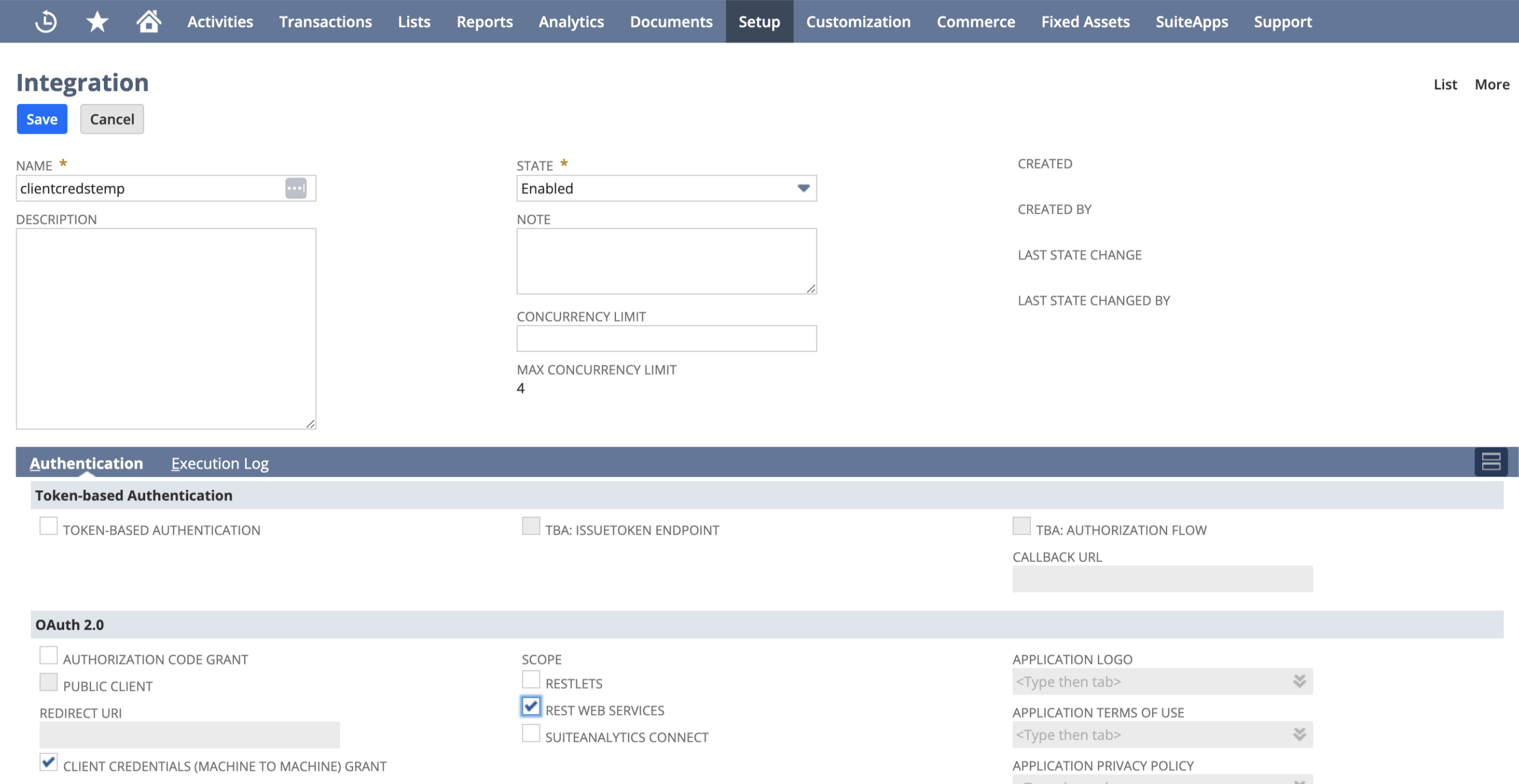
- Check Client Credentials (Machine to Machine) Grant.
- Check REST Web Services.
- Save the integration.
- Copy the values of Client ID (Consumer ID) and Client Secret (Consumer Secret). They will not be visible anymore after you leave the page.
- Generate and load the certificate (RSA Key):
- On your local computer generate the keys (openssl must be installed)
openssl req -x509 -newkey rsa:4096 -keyout key.pem -out cert.pem -nodes -days 730 - In the NetSuite account go to Setup -> Integration -> OAuth 2.0 Client Credentials (M2M) Setup.
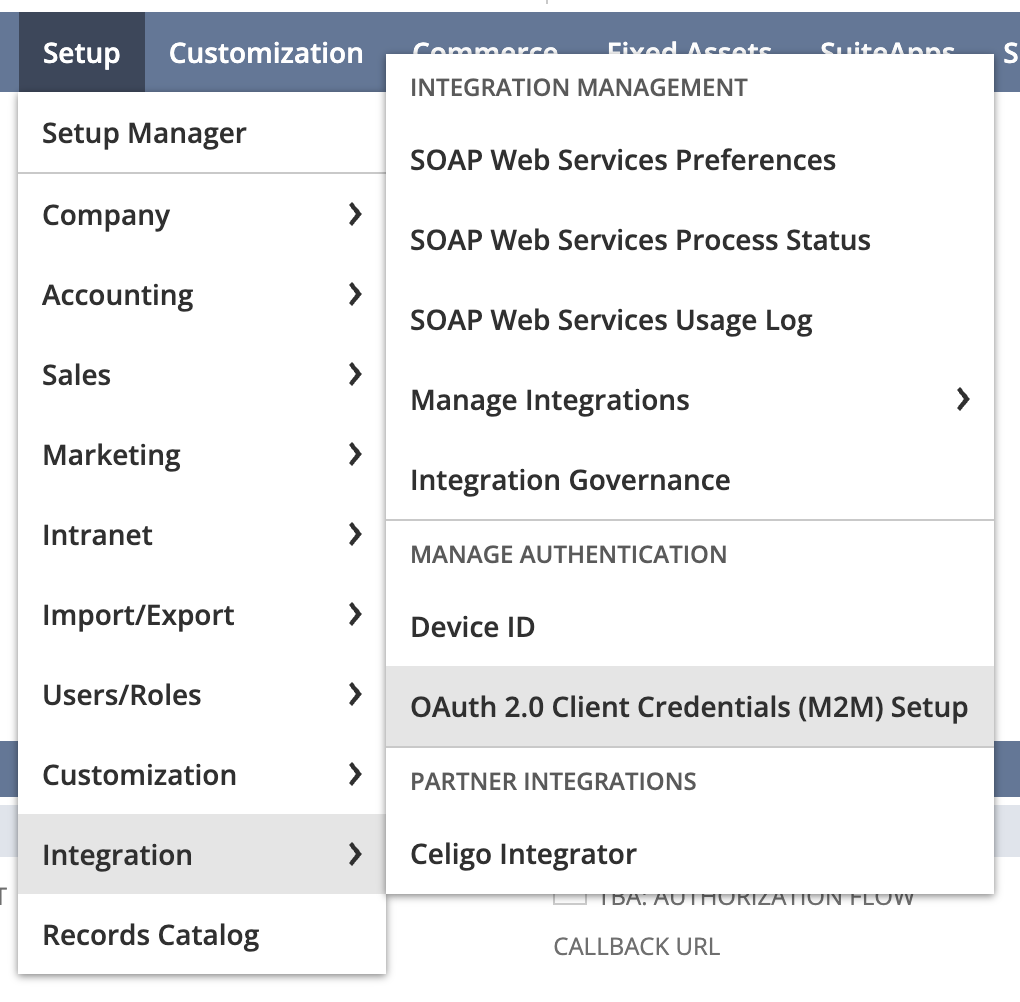
- Click Create New
- Select the entity (user) and the role. They must have the permission
Log in using OAuth 2.0 Access Tokens. - Under Application select the integration you created above.
- Load the public key file (cert.pem).
- Save and write down the Certificate ID.
- On your local computer generate the keys (openssl must be installed)
Component credentials configuration fields:
- Account ID (string, required) - Account ID (E.g. 1234567-sb1 (sandbox) or 1234567). You can find it by going to Setup -> Company -> Company Information. Note that if you are using a sandbox account and an account ID is, e.g.
1234567_SB1, you must input1234567-SB1. - Client ID (string, required) - Client ID of the integration you created above
- Client Secret (string, required) - Client Secret of the integration you created above
- Certificate ID (string, required) - ID of the certificate you created
- Certificate Private Key (string, required) - Private Key of the certificate you created (full content of the key.pem file generated by the openssl command previously). The field must contain the header (
-----BEGIN PRIVATE KEY-----) and the footer (-----END PRIVATE KEY-----)
Triggers
This component has no trigger functions. This means it will not be accessible to select as a first component during the integration flow design.
Actions
Execute SuiteQL Query
This action allows you to interact with NetSuite SuiteQL.
Configuration Fields
- SuiteQL Query - (string, required): Enter your query here. You can also use parameters such as @value1 and @value2.
- Emit Behavior - (dropdown, optional,
Emit individuallyby default): Select the emit behavior:Emit individuallyorEmit original response. - Collect all results - (checkbox, optional): If selected, the component automatically retrieves all query results (up to 100,000 records).
Input Metadata
If Collect all results is unchecked:
- Limit - (string, required): The number of records to retrieve.
- Offset - (string, required): The number of records to skip.
- Additional fields will be available for any parameters used in
SuiteQL Query.
Output Metadata
For Emit Individually mode: Each item populates the entire message.
For Emit original response mode: The original data returned from NetSuite, including all items and technical information.
Limitation
- SuiteQL Limitations and Exceptions
- SuiteQL queries can return a maximum of 100,000 results.
- The component directly replaces parameters with values from the message body, so make sure to properly escape them in the input metadata when needed.
For example, if your query isSELECT * FROM account WHERE fullname = '@name'and the message body (input metadata) is{ "name": "John's account" }, the resulting query will beSELECT * FROM account WHERE fullname = 'John's account'- this will cause an error!
You can escape this parameter using a JSONATA expression in the input metadata, for example:$replace("John's account", "'", "''")- this will result in the querySELECT * FROM account WHERE fullname = 'John''s account', which is valid and will execute without errors.
Make Raw Request
Enables you to run your own custom requests directly through the Netsuite REST API.
Configuration Fields
- Don’t Throw Error on 404 Response - (optional, boolean): This setting configures the handling of 404 HTTP responses as non-errors. By default, it is set to
false.
Input Metadata
- URL - (string, required): The specific path of the resource, which is appended to the base URL
https://${accountId}.suitetalk.api.netsuite.com/services/rest. E.g.record/v1/customer/1234 - Method - (string, required): Determines the HTTP method for the request.
- Request Body - (object, optional): Contains the content for the request.
- Request Headers - (object, optional): Additional headers can be put here.
Output Metadata
- Status Code - (number, required): Indicates the HTTP response status code.
- HTTP Headers - (object, required): Showcases the HTTP headers of the response.
- Response Body - (object, optional): Represents the body of the HTTP response.
Click here to learn more about the elastic.io iPaaS