Understanding Secrets
Introduction
Secrets is a feature which independently keeps access tokens up-to-date so any integration step would get a valid and working access credential to the third party resource. Secrets updates these tokens behind the scene using the token expiration information.
The real power of Secrets becomes evident in case of OAuth2 credentials when token expiration becomes a real problem while more than one integration steps try to refresh the tokens of the same credential. This can create a race-condition and other contention-on-shared-data problems due to concurrent and asynchronous work of steps in different integration flow steps.
Secrets takes over all the functionalities of the Credentials and provides a unified service to manage the credentials and tokens independently. This removes the need to refresh credentials by the components.
Please Note: Secrets runs as a micro-service in the platform cluster, constantly checking the expiration information for all credentials and updating them at last 1 minutes before the expiration.
How it works
There are two entities involved in the work of Secrets feature as a service: the
Authentication Client (auth-client) and the Authentication Secret (auth-secret).
The auth-client takes the responsibility of communication between the Application (platform)
and the Service (3rd party service), while the auth-secret takes the role of the User
(user of the platform) and communicates with the Client in the normal
3-leg OAuth2 authorisation process.
Let us consider the case of Google OAuth2 authentication:
- The
auth-clientwould hold theclient_id,client_secret,auth_uri,token_uriandrefresh_token_urivalues. These values would guarantee connection between the platform and third party service. - The
auth-secretwould hold the actualaccess_token,refresh_token,expires_in,expires_atandscopeof this connection. - There can be more than one
auth-secretfor eachauth-client. - Using
auth-clientandauth-secret, the Secrets feature as a service updates all credentials when necessary, without waiting for the components to initiate the process.
Auth Client Creation
Before you can create your auth-client you must know that:
-
The
auth-clientcan haveworkspace,contractandtenantvisibility levels. For each level you need to have a matching permission. For example only tenant administrator can create a Client withtenantvisibility level. -
They divide into two distinct groups:
oauth2and others:- For
oauth2type you must supplyclient_id,client_secret,auth_uri,token_uriandrefresh_token_urivalues to create the Client. Since some services have their own flavour of OAuth2, this is the right place to give them as well. Check the Creating OAuth2 Clients section for more explanation. - For other types you have relative freedom. However, our system already knows about
noauth(use no authentication),basic(use username/password pair) andapi_key(use header and API Key) types. Contact us if you need something more.
- For
Creating OAuth2 Clients
You can create OAuth2 auth-client using the UI. After creating a auth-client, its visibility level will be workspace. To create a client for the entire contract or tenant, use the API call.
To create via UI you can use the REST API component as
an example to create an OAuth2 auth-client when selecting to add a credentials:
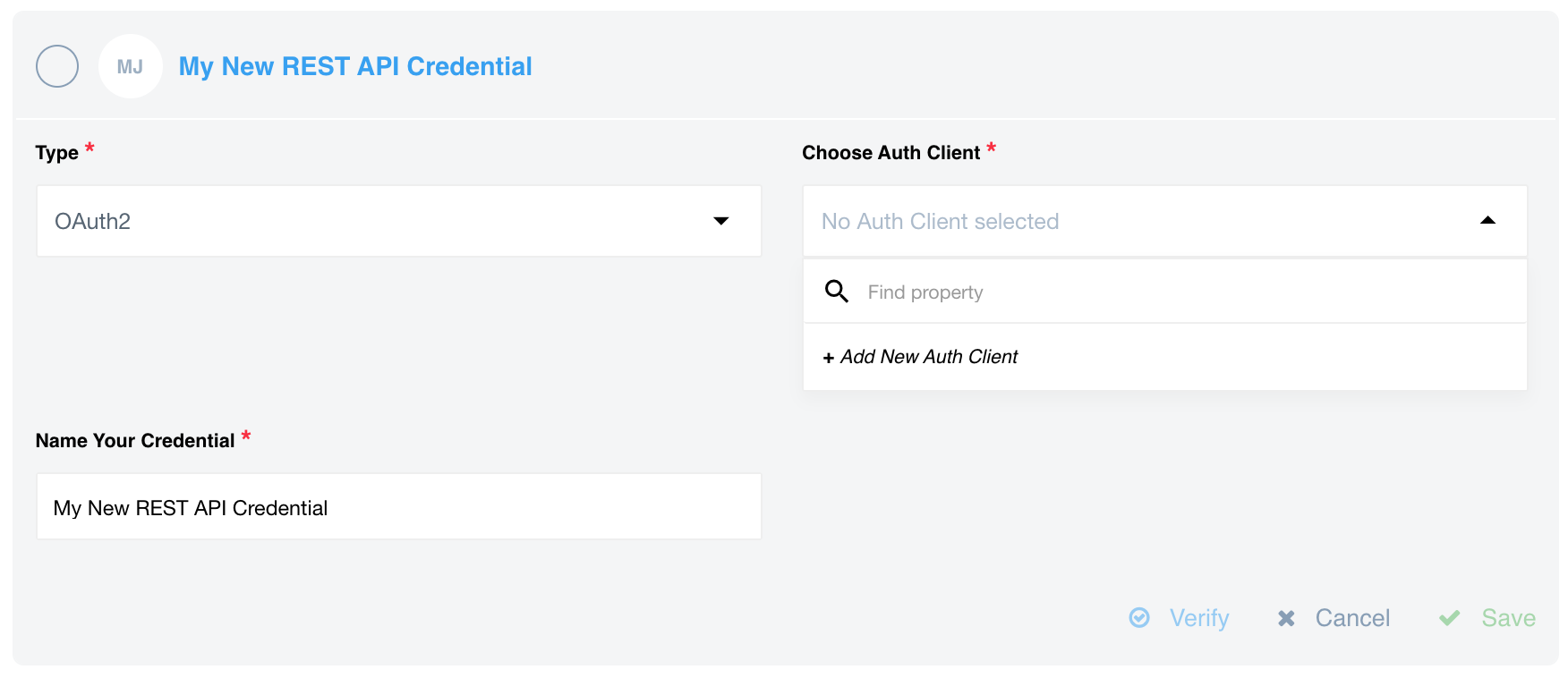
After clicking on + Add New Auth Client a form will show-up to fill-in the details for OAuth2 client:
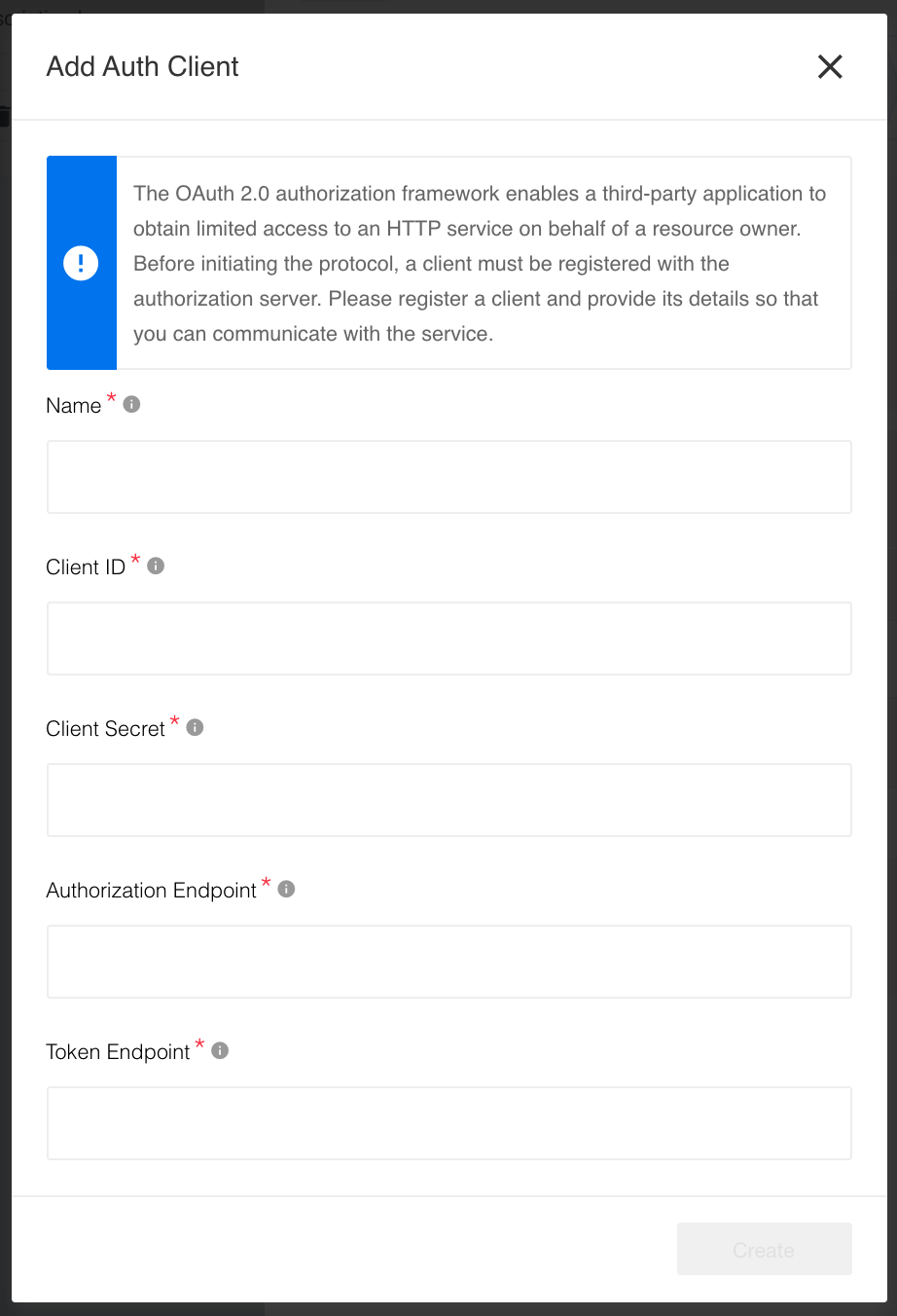
After this step you can create the auth-secret the same way as one would create
a credential.
For more advanced cases we recommend using an API call to create auth-client. We also recommend you to read our API documentation on this topic.
Creating other clients
To create other auth-client types using the Create Auth Client API documentation. However, our platform knows already about the following types:
noauth- to use for no authentication.basic- to use for regularusername/passwordpair.api_key- to use for theheader/API Keypair.
Auth Secret Creation
Before we can proceed with auth-secret creation, couple points needs to be considered:
- Before you can create a secret for any component you must create a client first.
- Your component might have only one defined
auth-clientin the system. It will be auto-selected by default. - In case you have more than one
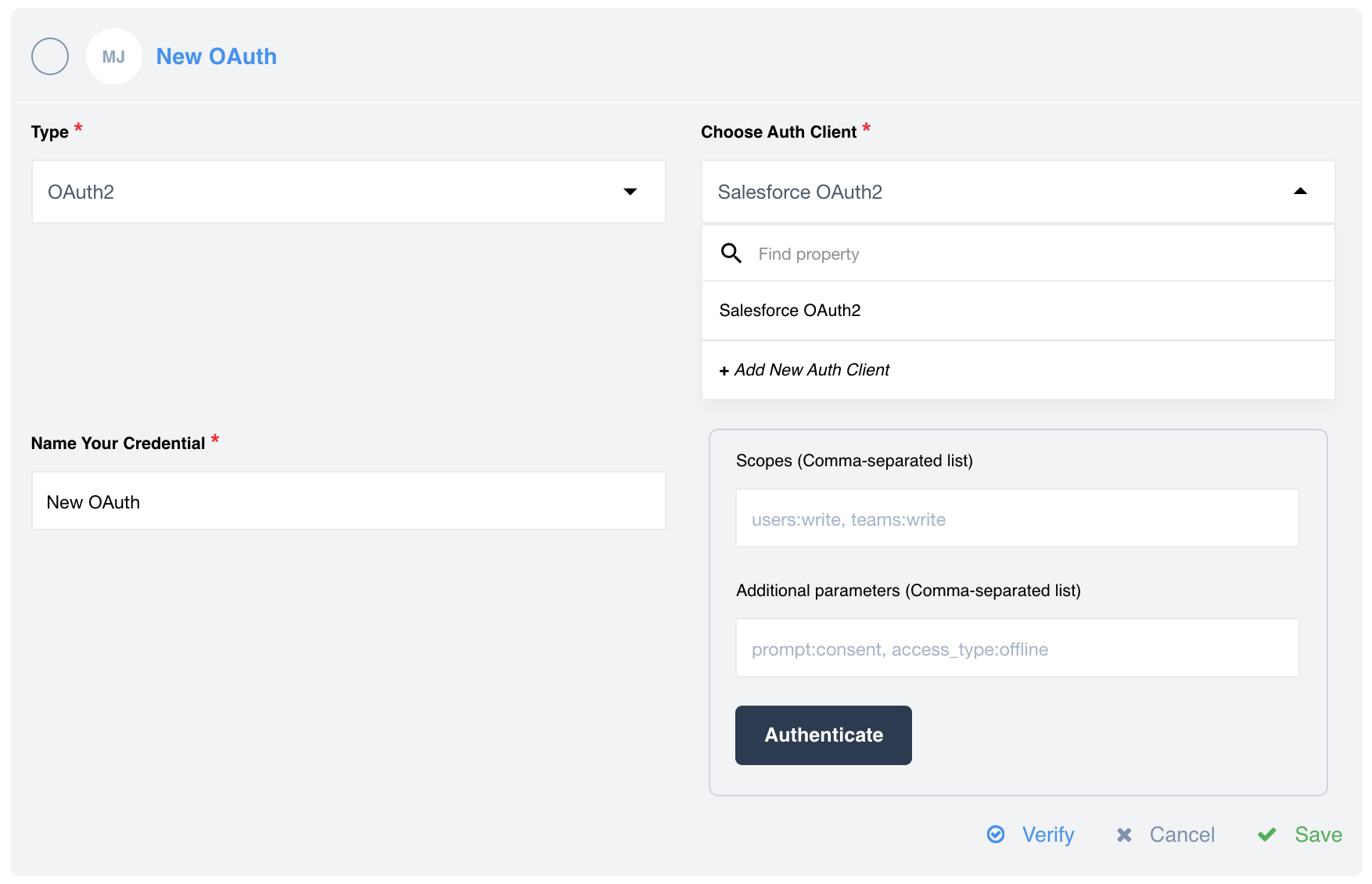
auth-clientdefined in the system, a drop-down window to select a clients will appear. - In case of OAuth2 type authorisation a drop-down with defined OAuth clients will be available. If you have only one OAuth2 client defined, it will be selected by default. Here you have also chance to create a new OAuth client.
- You can create
auth-secreton UI identically as you would create a credential for any component.
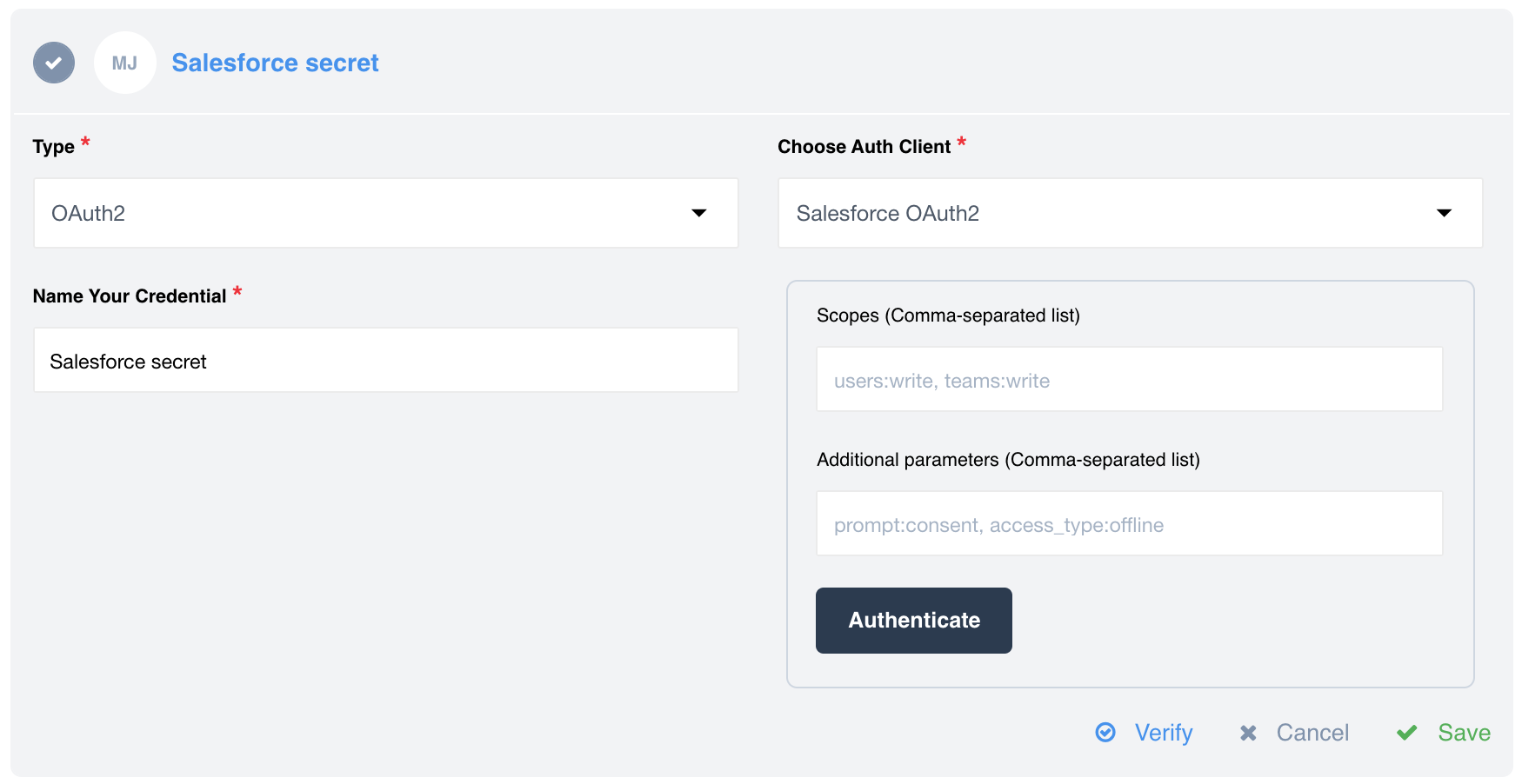
OAuth2 secret creation has more options since the real power of Secrets feature
becomes evident here. For example when we create a OAuth2 credential we can add
scopes and Additional parameters here:
Here is an example when you have only one OAuth2 client. It will be selected as a default client, unless you add a new client:
Auth Secret Creation via API calls
Of course, you can also create an Auth secret using the appropriate API endpoint. We recommend you to familiarize yourself with this feature, which is described in detail in our API documentation. Please note that there are cases where creating secrets will be much easier and more convenient using API calls.
Managing Auth Clients using API call
As already mentioned in advance, you can create a auth-client for a contract only using a API call. This resource allows you to create an auth-client:
Click to expand
{
"data":{
  "type":"auth-client",
  "attributes":{
     "type":"oauth2",
     "name":"Auth client",
     "credentials":{
        "client_id":"{CLIENT_ID}",
        "client_secret":"{CLIENT_SECRET}",
        "refresh_token_uri":"http://example.com",
        "token_expires_in":18000,
        "token_uri":"{TOKEN_URI}",
        "auth_uri":"{AUTH_URI}"
     }
  },
  "relationships":{
     "components":{
        "data":[
           {
              "id":"{COMPONENT_ID}",
              "type":"component"
           }
        ]
     },
     "contract":{
        "data":{
           "id":"{CONTRACT_ID}",
           "type":"contract"
        }
      }
    }
  }
}
Of course, you can create a auth-client for the workspace using a API call. You can select a visibility level for a auth-client in a relationship: workspace, contract or tenant. No relationship means that auth-client visibility level will be global.
CLIENT_ID- this is a unique identification of Application.CLIENT_SECRET- this is also provided by the Application.TOKEN_URI- this is the URL which the Application is going to use to get the User authenticated.AUTH_URI- the is the URL which is going to be used by Application to request theaccess_tokenandrefresh_token.
As an example, you can see how these parameters are defined in the Salesforce component.
Below you can see where to find CONTRACT_ID(1) and COMPONENT_ID(2):

Please check the Create Auth Client API documentation for more. Also note that in addition to the creation itself, you can use API calls for a variety of other tasks. For example, you can lists all auth secrets of the specified workspace or return the specified auth secret from the defined workspace. You can also update or remove the specified auth secret.
Auth Secret Expiration Behavior
The Application (platform) does not manage or control the secret’s expiration. If your CLIENT_SECRET has an expiration date configured in your Service (3rd party service), token refresh attempts will fail with an error once the secret expires.
On the first failed refresh attempt caused by an expired secret, we mark the auth-client with an internal flag indicating that it is no longer in a recoverable state. This behavior is intentional and part of our security design, helping protect against scenarios such as credential brute-force attacks.
Please Note: Once the
auth-clientis marked as irrecoverable, all subsequent token refresh attempts will continue to fail, even if theCLIENT_SECRETis later updated.
How to Prevent Authentication Errors
To avoid entering an irrecoverable state, use one of the following approaches:
1. Recreate the Auth Client
Create a new auth-client and switch to the new credentials.
This guarantees a clean state and avoids any issues related to expired secrets.
2. Rotate the Secret Before Expiration
Update (patch) the CLIENT_SECRET before it expires.
By doing this, you prevent failed refresh attempts, ensuring the client is never marked as irrecoverable and token refresh continues to function normally.