Real-Time Flows
Every step in an integration flow runs as its own container. Keeping thousands of customers’ containers running around the clock, whether or not they have any data to process, would be wasteful — so by default, the platform doesn’t. Understanding that default, and knowing when to override it, is worth knowing before it surprises you.
Why flows sleep
An ordinary flow — what every flow is unless you change it — only runs its containers while there’s work to do. When a trigger receives a message, the platform starts the flow’s containers, processes it through each step, and then, once things go idle, shuts them back down.
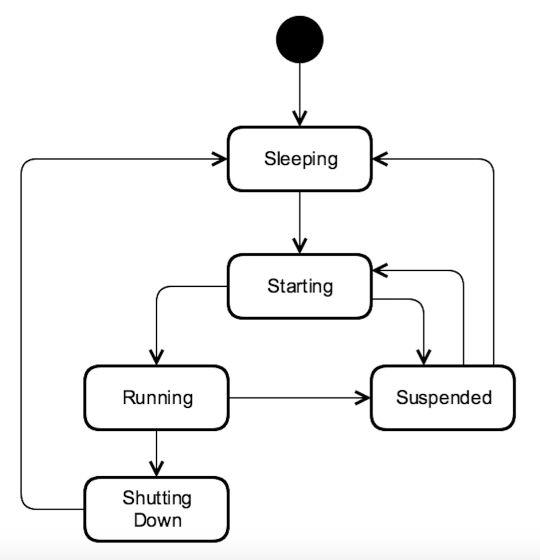
Starting a container back up after it’s been asleep takes a moment — long enough to be irrelevant for background synchronization (nobody notices if a nightly product sync takes an extra second to start), but long enough to matter if a real person is waiting on the other end of that flow.
When ordinary isn’t good enough
If a flow is answering something interactive — a chatbot reply, a live lookup triggered by a website form, anything where a human is watching for a response — that startup delay becomes a real, felt latency. That’s what real-time flows are for: their containers stay in the Running state continuously, so messages are picked up and processed immediately with no startup cost per message.
The trade-off is the mirror image of the savings above: a real-time flow’s containers run (and are billed for running) all the time, whether or not messages are actively flowing through them. There is also a one-time warm-up delay the first time a real-time flow starts, or restarts, while its containers spin up — after that, messages move through without added latency.
Switching a flow to real-time
Any flow can be switched to real-time mode from the Flows page: stop the flow, open its menu, and select Enable real-time. It’s a property of the flow, not something you design differently at build time — the steps and mapping stay exactly the same either way.
One thing worth knowing before you rely on it in production: publishing a new draft of a real-time flow stops the running containers and starts fresh ones, so the flow goes through the warm-up period again on every update.
Related links
- Building real-time flows — full detail on switching flows to real-time and updating them safely
- Integration Flow Overview
- Real-time Flows and component re-deployment
- Managing Flows