Product Updates in 2024 Q2
Product update - v24.17
Released: 2024-04-27
New Features (v24.17)
New Quota for the number of requests to Webhooks per Contract/Workspace (v24.17)
We have implemented new quota types to enhance control over webhook calls per minute:
per_contract_request_webhooks_per_minute_limit: controls calls to webhooks per minute at the contract level.per_workspace_request_webhooks_per_minute_limit: controls calls to webhooks per minute at the workspace level.
These quotas enable fine-grained management of webhook usage, ensuring optimal performance and resource utilization.
The default limit is 120 requests per minute
Please contact our support if your contract needs to change the limit.
Error notification for Quota exceedance
When the quota is exceeded, the following error message will be displayed:
{
  "error": "Request quota exceeded: contract 5b5ed1cf272cf80011ae7b43 (false) | workspace 59d341e9037f7200184a408b (true)",
  "requestId": "9a315b2c476bd2c6f40a8d739d3f348e"
}
Note: Once the requests go above 120 per minute they will be rejected with an error and no messages are queued.
Keep an eye on your quota limits to maintain smooth operations!
New feature-flag for error subscription management (v24.17)
We’ve introduced a new feature-flag subscribe_to_error_by_default, designed to streamline error subscription management within flows. This feature is accessible at both Tenant and Contract levels.
By default, this feature is set to true for all tenants, ensuring seamless error tracking. You can customize this setting using API calls through POST and PATCH methods at the following endpoints:
Review platform compatibility with Kubernetes v1.27 and v1.28. (v24.17)
The update of Kubernetes to version 1.28 is planned for the 27th of April 2024.
New Dashboard metric: Messages in Queues (v24.17)
Introducing a new metric to our Dashboard: Messages in Queues. This metric provides valuable insights into the status of unprocessed messages and offers a detailed list of flows along with their respective message queue counts.
Now, you can easily monitor message queue performance, ensuring efficient message processing across your workflows.

Note: The counter displays the total messages in the queues. To see details please click on the counter.

Run Now Button in Flow Designer Header (v24.17)
The Run Now button is now available in the header of active flows, allowing users to effortlessly initiate the run-now functionality directly from the flow designer interface.

New environment variable: USER_NAME in email template (v24.17)
Added a new environment variable USER_NAME to the email template workspace-invite-new-user. This variable dynamically populates the receiver’s full name (firstName and lastName) in the invitation email.
Now, the email notifications can be personalized with the recipient’s name, creating a more engaging and tailored experience for new users joining your workspace.
Updated UI for Credentials section with checkboxes (v24.17)
Updated UI for the credentials section, implementing a cleaner and more user-friendly design for checkboxes.
Fixed Bugs (v24.17)
- FIXED random plus and fork icons are displayed on the flow-designer page after adding a step in the middle of the flow
- FIXED cases where no new threads if the trigger hasn’t emitted the messages
- FIXED snapshots don’t work for JAVA-based components
Components (v24.17)
Deepl component 1.0.0 (v24.17)
- Initial component release
- ADDED
Make Raw RequestAction - ADDED
Translate DocumentAction - ADDED
Translate TextAction
Monday component 1.0.0 (v24.17)
- Initial component release
- ADDED
Make Raw RequestAction - ADDED
Lookup Objects (plural)Action - ADDED
Lookup Object By IDAction
Notion component 1.1.0 (v24.17)
- ADDED
Archive ObjectAction - ADDED
Lookup Object (at Most One)Action - ADDED
Lookup Objects (plural)Action
ChatGPT component 1.1.0 (v24.17)
- ADDED a field which allows to specify an API call request timeout to the
Send RequestAction - The list of models in the
Send RequestAction is now dynamic
Shopify Admin v2 component 2.4.0 (v24.17)
- ADDED emit empty object if no entities found checkbox to
Lookup Objects (plural)Action
Product update - v24.23
Released: 2024-06-06
New Features (v24.23)
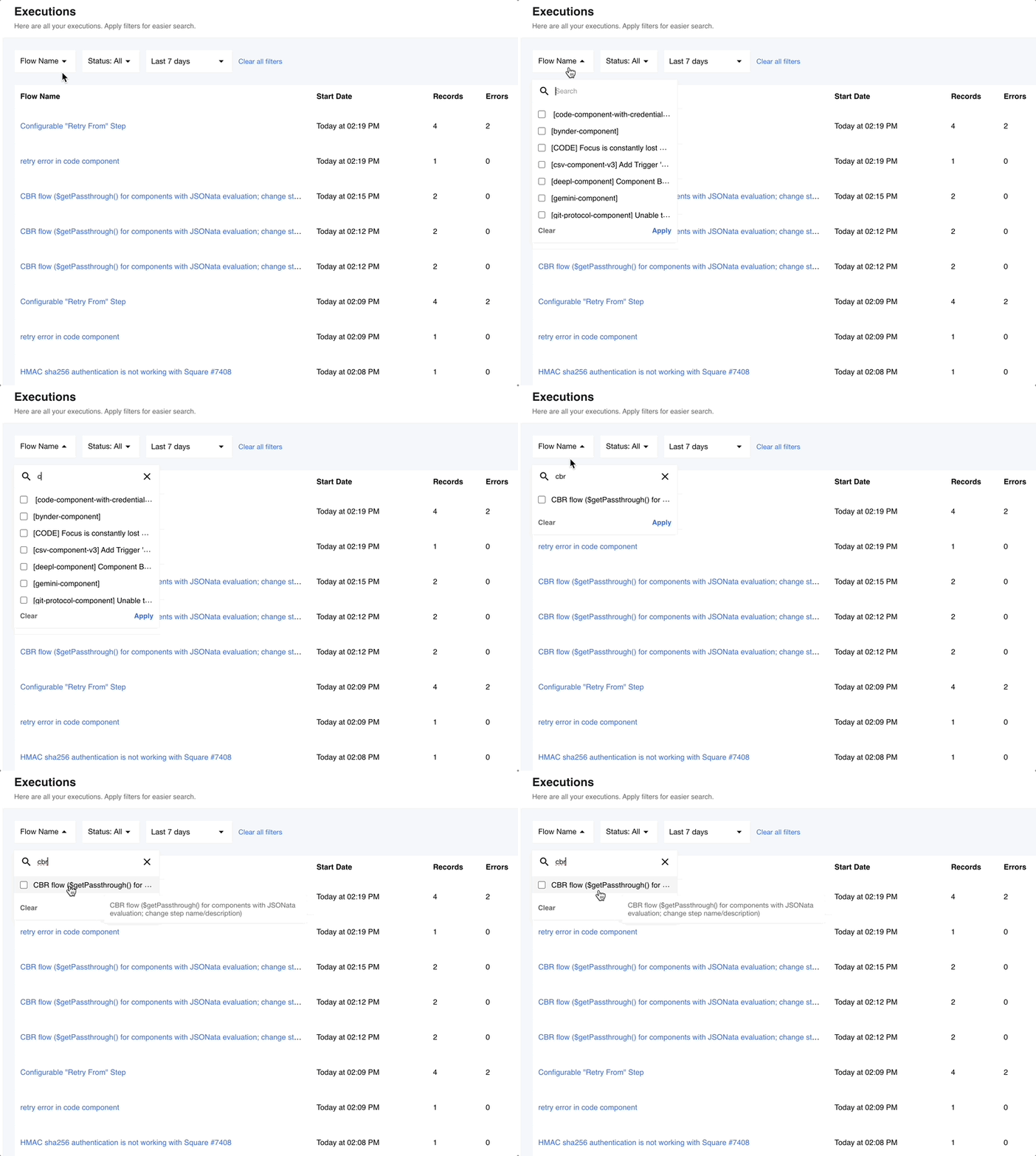
Enhanced flow name visibility in filter dropdowns (v24.23)
Improved the flow name visibility in the filter dropdowns on the Executions, Containers, and Logs pages.
Now, when hovering over flow names in the filter dropdowns, users can view the full flow name if it’s too long. This update facilitates better understanding and navigation within the platform, making it easier for users to identify and select specific flows for their tasks.
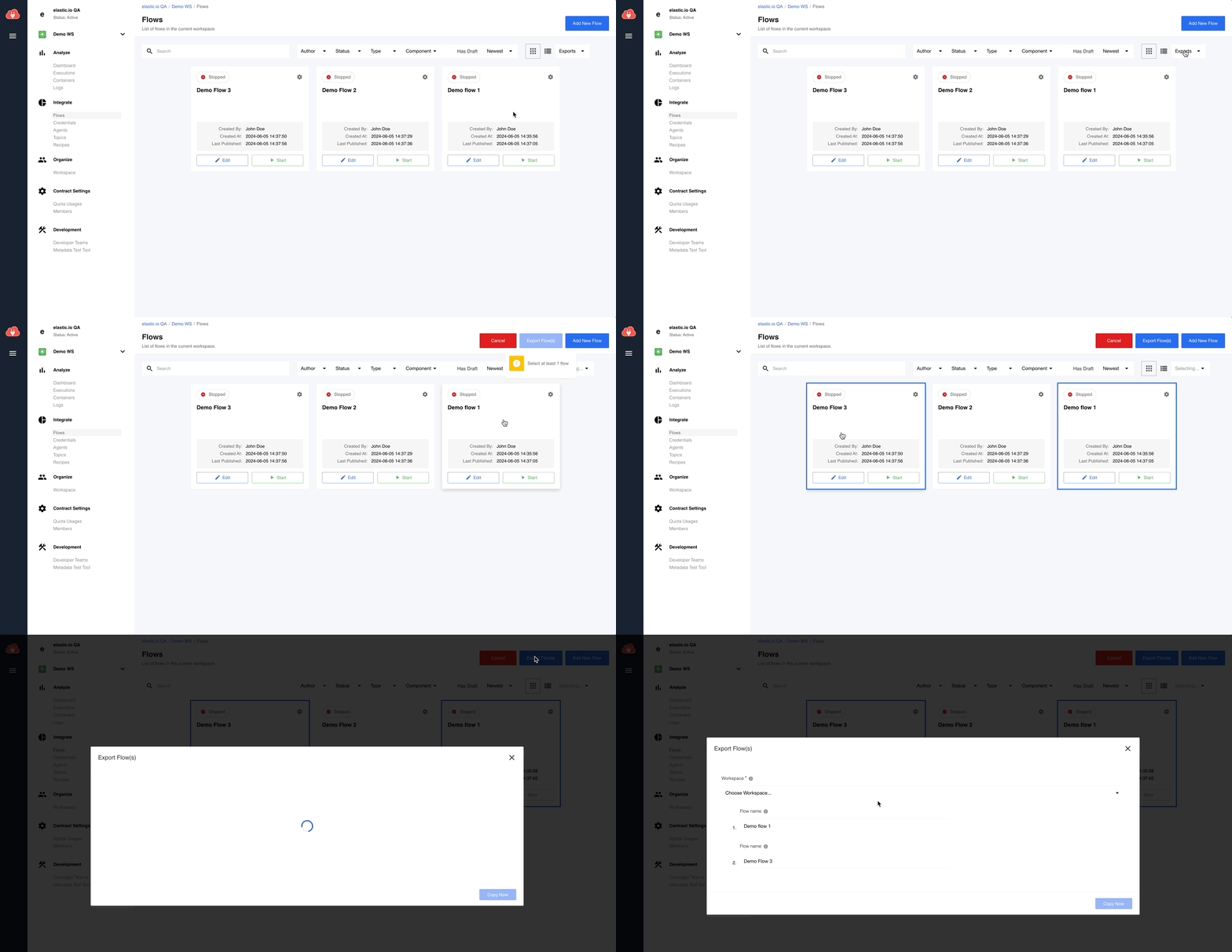
Bulk flow Export feature (v24.23)
Experience increased productivity with the new bulk flow export capability on the platform. The new dropdown menu Exports now offers users two convenient options: Export Flow(s) and Export to a Recipe.
Selecting Export Flow(s), users can choose one or multiple flows and export them simultaneously to any available contract and workspace as flow drafts. This feature empowers users to efficiently manage and export multiple flows with ease, optimizing their workflow and boosting productivity.
Improved data visualization in JSONataView with label field display (v24.23)
Enhanced data representation in the JSONataView viewclass with the introduction of label field display. Users can now easily access and view the contents of the label field within JSONataView, as described in the component.json file. This enhancement allows for clearer data visualization and interpretation within the viewclass, and provides users with enabling better understanding and analysis of the label field content within the JSONataView viewclass.

Unsubscribing from flow errors via API (v24.23)
With the new API endpoint https://api.elastic.io/docs/v2#/flows/delete_flows_subscription, users can now unsubscribe from flow errors across all their flows or specifically within a specific workspace.
This feature empowers integrators to efficiently manage error notifications, providing flexibility and control over error subscriptions for enhanced workflow efficiency.
Default label display for Router component branches (v24.23)
Users can now easily view the Default label associated with a branch of the router component directly on the flow queue page.
This update provides users with quick access to essential information, facilitating better understanding and management of the routing logic within the flow queue.
Updated status code 429 for exceeded Webhook requests limit (v24.23)
When the quota for Webhook requests is exceeded, the Webhook URL now responds with a 429 Too Many Requests status code.
Symbols validation for credentials in the Webhook component (v24.23)
Users interacting with the credential fields of the Webhook component will now go through validation to identify unsupported characters.
In case unsupported characters are detected, an error message displaying Disallowed symbol(s) will prompt users, ensuring data integrity and safeguarding against unauthorized access.
Note:
* Current whitelist for header-name looks like: ABCDEFGHIJKLMNOPQRSTUVWXYZabcdefghijklmnopqrstuvwxyz0123456789-_. More info
* Current whitelist for header-values looks like: ABCDEFGHIJKLMNOPQRSTUVWXYZabcdefghijklmnopqrstuvwxyz0123456789-_.~. More info
Fixed Bugs (v24.23)
- FIXED HMAC sha256 authentication is not working with Some external systems:
- Some external systems may use different headers for passing the HMAC signature. We added a new field Header Name for the Webhook’s credentials with HMAC for customer header value. If not specified - default
x-eio-signaturewill be used.
- Some external systems may use different headers for passing the HMAC signature. We added a new field Header Name for the Webhook’s credentials with HMAC for customer header value. If not specified - default
- FIXED applying of predefined flow type (
OrdinaryorReal-time) on theActivate Recipeaction. - FIXED applying of predefined CRON expression on the
Activate Recipeaction.
Components (v24.23)
Bynder component 1.0.0 (v24.23)
- Initial component release
- ADDED
Make Raw RequestAction
NetSuite REST API Client Credentials component 1.0.0 (v24.23)
- Initial component release
- ADDED
Make Raw RequestAction
Git-Protocol component 1.2.4 (v24.23)
- ADDED option to provide either the
Maester Object IDor theMaester Object URLas input in theCreate CommitAction
Rest API OAuth2 Client Credentials Component 1.2.0 (v24.23)
- ADDED
Maximum response size in bytesconfiguration field toHTTP requestAction
Splitter component 1.5.0 (v24.23)
- REVITALIZED
Re-assembled MessageAction - now all messages are stored in memory within the component and saved to the external storage (Maester) only when needed - ADDED new checkbox
Emit result as arraytoRe-assembled MessageAction - UPDATED Sailor version to
2.7.2 - FIXED vulnerabilities in dependencies
Monday component 1.1.0 (v24.23)
- ADDED
Execute MutationAction
CSV component 3.3.0 (v24.23)
- ADDED
Read CSV file from URLTrigger
Snowflake Component 1.3.1 (v24.23)
- ADDED
Emit Behaviourselect view to theSelectAction
REST API Token AUTH component 1.0.1 (v24.23)
- UPDATED dependencies
- UPDATED Sailor version to
2.7.2
Batch component 2.0.8 (v24.23)
- FIXED error
Could not parse Maester object as it is not a JSON object - UPDATED Sailor version to
2.7.2
Flow Linking component 1.0.3 (v24.23)
- FIXED issue with
Cannot read properties of undefined (reading 'data')inTrigger another flowAction - UPDATED Sailor version to
2.7.2