Product Updates in 2022 Q3
Product update - v22.28
Released: 2022-07-14
Improvements and Updates (v22.28)
Code base optimisation (v22.28)
As part of ongoing codebase optimisation several redundant parameters have been removed from our API - these changes are reflected in our API docs.
PLease visit our API documentation for more information.
HELM3 (v22.28)
We constantly improve different aspects of HELM3 deployments in collaboration with our partners. This section lists updates and improvements included in this release.
Add Ability to Set Per-Service Custom Ingress Annotations (v22.28)
To increase the flexibility of in ingress configurations for different hosts we made a breaking change. We have changed the structure of the model properties tenant.ingressConfig.annotations and helm.Values.global.services.handmaiden.annotations. Please be aware that upgrading to elastic.io Tenants to this latest version requires the small changes described below:
tenant.ingress_config.annotationsformat changed. This parameter must be reset via API call before updating to the latest version. Please use this API call:
  {
     "data": {
         "type": "tenant",
         "attributes": {
             "ingress_config": {}
             }
  }
}
global.services.handmaiden.annotationsHELM variable format changed, please set it to the new format during upgrade
Here you can see the corresponding code for PATCH v2/tenants endpoint:
Click to expand for more details
 {
     "data": {
         "type": "tenant",
         "attributes": {
             "ingress_config": {
                 "annotations": {
                     "app": {
                         "nginx/123": "123",
                         "nginx/456": "456"
                     },
                     "api": {
                         "nginx/123": "123",
                         "nginx/456": "456"
                     },
                     "webhooks": {
                         "nginx/mtls": "true",
                         "nginx/456": "456"
                     },
                     "apidocs": {
                         "nginx/mtls": "true",
                         "nginx/456": "456"
                     }
                 }
             }
         }
     }
 }
Please visit our API documentation for more information.
Add “–push-retry” option to kaniko. (v22.28)
To improve push behaviour we added --push-retry and made this configurable only via gitreceiver (deafult: 3). Please setup using .Values.global.gitReceiver.dockerImageBuildJobPushRetry.
OEM Related (v22.28)
Information in this section is intended for our customers who use the OEM version of the elastic.io platform.
Support new component builder for java components (v22.28)
We are introducing a new сomponent-build-helper version 0.1.0. It also means that the old appbuilder is totally deprecated and is no longer supported. We have added custom dockerfile support for Java components.
Please Note: For now our new component builder supports Java 8 based components only.
Check for vulnerabilities after build using grype (v22.28)
Component vulnerabilities check in the build docker image is done by сomponent-build-helper during component build process. Components-build-helper has build_component_docker command which checks docker image vulnerabilities using grype tool.
For more information please visit our article on Components build configuration requirements.
Fixed bugs (v22.28)
- The status page will now be displayed during maintenance on React pages. The property “location” (“head” or “body”, default: “head”) has been added to
tenant.attributes.customScripts.
PLease visit our API documentation for more information.
Components (v22.28)
Stripe Component 1.0.0 (v22.28)
- ADDED
Make Raw RequestAction
Shopify admin component 1.6.3 (v22.28)
- UPDATED
Lookup Objectsaction, now the methodsearchis used instead oflistfor thecustomerobject type
XERO component 1.1.0 (v22.28)
- ADDED Lookup Objects (plural) Action
- ADDED Lookup Object (at most one) Action
- ADDED Void approved invoices or bills Action
- ADDED Get Updated Objects Polling Trigger
Product update - v22.30
Released: 2022-07-28
Improvements and Updates (v22.30)
Step designer: Credentials part (v22.30)
We have improved the credentials part to provide more unified user experience during the flow design. The look and feel is now more in line with our new user interface approach.

In this new view we moved the Verify, Edit and Delete functions for each credential to a contextual menu which you can open by selecting three dots in the end of each credential record.

Node.js Sailor version 2.6.29 (v22.30)
A new version of the Node.JS Sailor library 2.6.29 is released. For Users who
develop their own components using our SDKs this update enables keep-alive functionality
for the https outgoing connections as well. This functionality reduces the number
of https reconnects in favour of using already open connections.
Component build helper 1.1.0 (v22.30)
A new version of the component-build-helper library 1.1.0 is released. This
library is used by the platform to build components when a new version of an
integration component is deployed. For more information check the
component build configuration requirements
document for supported Java versions and limitations.
Fixed bugs (v22.30)
- Fixed a user interface bug in the recipe activation page when the password was not obfuscated while creating a Basic Authentication credential.
- Fixed a user interface a bug in the recipe activation page when the
Additional parametersfield in the Rest-API-component credential would not render properly.
Components (v22.30)
Slack component 1.0.0 (v22.30)
- ADDED
Make Raw Requestaction - ADDED
Lookup Object (at most one)action - ADDED
Post Messageaction
Xero component 1.2.0 (v22.30)
- ADDED
Upsert Objectaction - FIXED the start time in the
Get Updated Objects Pollingtrigger
Google Spreadsheets component 3.0.0 (v22.30)
- UPDATED authentication mechanism. Component will use Secrets system service to authenticate and refresh tokens.
- ADDED
Create/Upsert/Update Spreadsheet Rowaction - ADDED
Read Spreadsheetaction
Product update - v22.32
Released: 2022-08-11
Improvements and Updates (v22.32)
Continued improvements (v22.32)
As part of ongoing program of improving our code base and in-line with our ISO27001 processes we have recently completed a number of improvements to both address existing vulnerabilities and prevent potential vulnerabilities being released. Instrumental to this approach is the use of regular scans of our code base during back ups.
An high-level overview of our InfoSec standards and processes are available here.
HELM3 (v22.32)
We constantly improve different aspects of HELM3 deployments in collaboration with our partners. This section lists updates and improvements included in this release.
Scalability of services (v22.32)
elastic.io platform runs many services under the hood, such as webhooks, api, frontend, etc.
Most of these services can be replicated, which allows the services to be scaled
horizontally to address the required load and volume. However, some platform
services are inherently not scalable. In this update we removed the possibility
to define scaling within HELM chart configurations for bloodygate and handmaiden
services.
OEM Related (v22.32)
Information in this section is intended for our customers who use the OEM version of the elastic.io platform.
Contract level custom metadata (v22.32)
We introduce a new possibility to add a custom metadata to the contracts. A new
section called custom_data can be used to store non-sensitive string data up-to 1MB in
size. To add, edit and read contract custom metadata you need to have
contracts.contract.edit_custom_data permission (tenantAdmin has this permission
by default) to perform POST, PATCH and GET calls to the /v2/contract API endpoint.
This new feature enables Tenant Owners to better differentiate different types of Contracts they supply to their Clients and Users. For instance, a selection of different Contract types can be defined and automatically created, deployed, and maintained using this metadata as basis. Each contract type can have a wide range of specified features, such as GB RAM quota limits, numbers of users or workspaces, and even connector whitelists.
Fixed bugs (v22.32)
- We corrected the error type for the
PATCHcall to/v2/flows/{FLOW_ID}when an invalid team name or an invalid trigger/action name are defined in the command parameter. Now you will get4xxtype error instead of5xxwhich better reflects the situation.
Components (v22.32)
Shopify component 1.6.4 (v22.32)
- UPDATED error messages in actions
- UPDATED Upsert Object action to match on criteria other than Shopify ID
Snowflake component 1.3.0 (v22.32)
- ADDED ability to read from views
- UPDATED Polling Trigger to allow to Emit Individual Records
Updates to multiple components (v22.32)
Dependencies updated for the following Node.js components where updated:
- SFTP component
1.5.0 - Batch component
2.0.2 - Request-reply component
1.2.4 - Maester component
1.0.3
Product update - v22.34
Released: 2022-08-25
Improvements and Updates (v22.34)
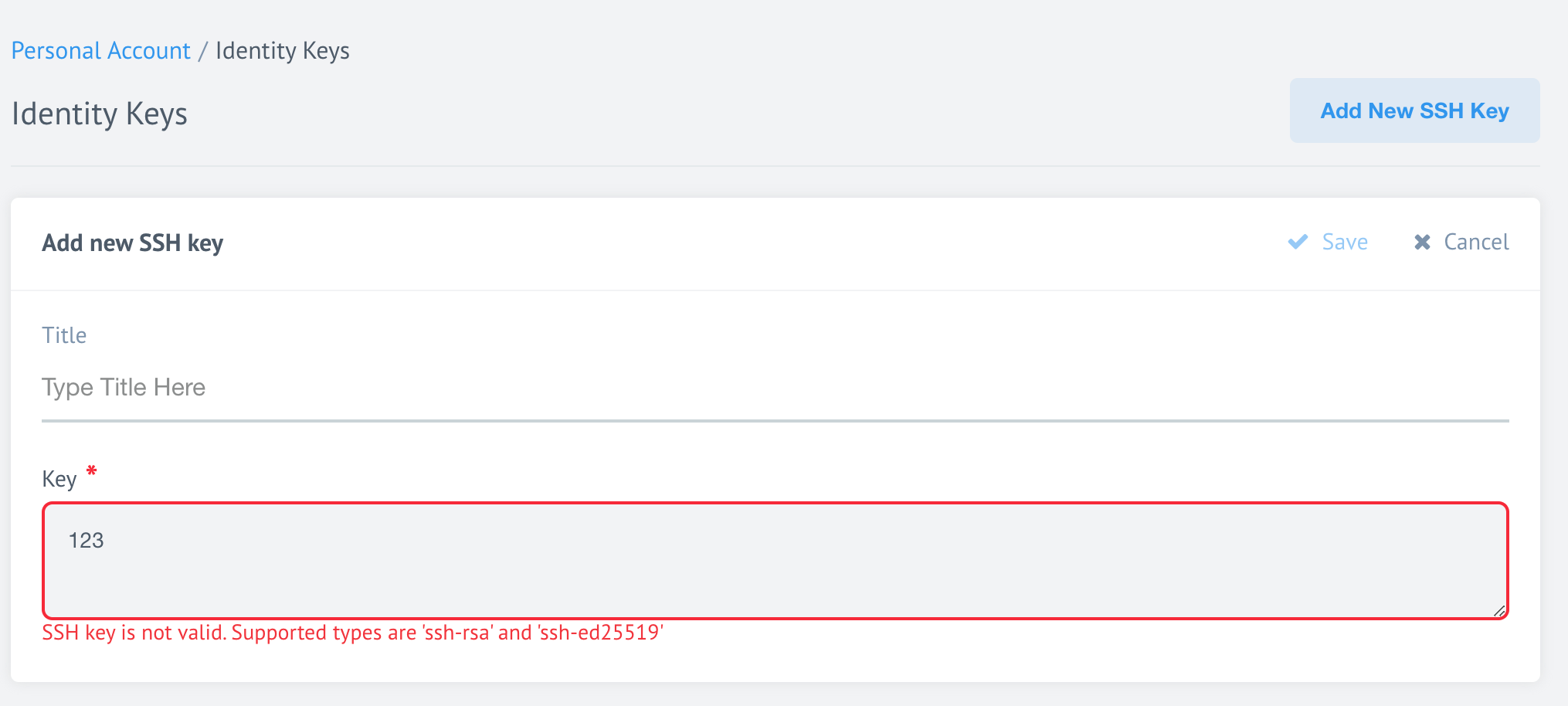
Informative error messaging for invalid SSH key entries (v22.34)
When we introduced support for newest SSH versions
for the user SSH keys used to deploy components, we deprecated the old ssh-dss
types. If users enter an unsupported or incorrect SSH the user interface now
displays an informative error message instead of simply disabling the ‘Save’ button.
Deployment of Externally Build Dockers (v22.34)
This capability will provide an alternative to Git push deployment of user developed components and is of interest to enterprise clients wishing to condense entire integration flows into single custom components and maintain control at the docker level.
At this earliest stages we lay our groundwork by updating the component
commons and api to support components pull from external docker registries.
The following new attributes were added:
docker_registryobject into the HTTPPOSTcall to/v2/teams/attributes.docker_registry.uri- Docker Registry URIattributes.docker_registry.credentials- Docker Registry credentials
docker_repo_nameanddocker_target_tagin thePOSTHTTP call to/v2/components(can be set if its team hasdocker_registryobject)attributes.docker_repo_name- String representing component’s name in docker registry. Available only if team supports docker registryattributes.docker_target_tag- String representing component’s tag in docker registry. Available only if team supports docker registry
Please note, as of this stage these attributes have no functionality attached to them.
HELM3 (v22.34)
We constantly improve different aspects of HELM3 deployments in collaboration with our partners. This section lists updates and improvements included in this release.
Dashboard Runlog retention period (v22.34)
The flow execution statistics presented on the Dashboard Runlog are stored in the platform Mongo Database. This is in contrast to the flow execution threads, shown on the Executions pages, which are stored separately in Clickhouse.
When you access the Dashboard Runlog, the platform queries the MongoDB to get these records. These database calls can delay display of the runlog for users with many active flows. To enable users to manage such circumstances we have added an environment variable which defines the retention period of runlogs in the database.
Previously you could only control the retention period by enforcing the expireAfterSeconds
option in the Database index holding the execution records. In this release we
introduce a new TASK_STAT_START_INDEX_TTL environment variable to the HELM3 charts,
which you can use to set retention suitable for your environment. It is mandatory
that a value is set for TASK_STAT_START_INDEX_TTL and the
default value is set at 432000 seconds (5 days). Which means the platform
will store the Dashboard Runlog records for 5 days in the Database.
Breaking Changes (v22.34)
Setting the TASK_STAT_START_INDEX_TTL environment variable to control the retention
period of the Dashboard Runlog is recommended for the new installations of the platform.
If your platform installation already has the retention period set in the Database prior to your installation of the platform version then your environment variable will not be applied. If you need to change the value you must change the Database index setup prior to the deployment of the current release.
If you need to change the retention period of Dashboard runlogs in the future, remove
the expireAfterSeconds option of the Database index containing the Dashboard Runlog records,
set the value of TASK_STAT_START_INDEX_TTL environment variable and then deploy
the platform version again.
Kubernetes 1.22 (v22.34)
Our platform is now compatible with the Kubernetes version 1.22. Check out the
new features enabled here.
MongoDB Transport Layer Security verification is enforceable (v22.34)
You can now enforce MongoDB TLS verification in all platform services by using newly introduced HELM3 chart configurations:
.Values.global.secrets.mongodbTlsCertificateKey- secret name with the TLS certificate and key. If specified, will be mounted to the services and specified in thetlsCertificateKeyFileconnection option..Values.global.secrets.mongodbTlsCA- secret name with CA certificate to validate MongoDB server certificate on the client side. If specified, will be mounted to the services and specified in thetlsCAFileconnection option.
OEM Related (v22.34)
Information in this section is intended for our customers who use the OEM version of the elastic.io platform.
Embedded credential management for OEM End Users (v22.34)
Here we present further improvements to the recently introduced White-label credential management feature. Now you can use HTML inline frame or iFrame to embed the credentials.
<!DOCTYPE html>
<html lang="en">
<head>
  <meta charset="UTF-8">
  <title>Embedded Credentials Demo</title>
  <style>html, body, iframe { height: 85%; width: 90%; margin: 0;}</style>
</head>
<body>
  <iframe src="https://[eio_platform_domain]/embedded-credentials/[repoId]?workspaceId=[workspaceId]&ssoProviderType=[ssoProviderType]&ssoProviderId=[ssoProviderId]" />
</body>
</html>
The embed URL construction scheme is the same. Refer to the 22.20 release for details.
Pleass Note: End Users must enable pop-ups in their browser settings in order to use the embedded credential management.
Fixed bugs (v22.34)
- Fixed the bug when an HTTP
POSTto/v2/workspaces/:id/secrets/:id/refreshendpoint would return outdatedaccess_tokeninstead of the newly refreshed value.
Components (v22.34)
Qualtrics component 1.0.0 (v22.34)
- ADDED
Get New and Updated Objectspolling trigger - ADDED
Make Raw Requestaction - ADDED
Upsert Objectaction - ADDED
Generate Custom Distribution Linkaction - ADDED
Getting Survey Responsesaction - ADDED
Lookup Object (at most one)action
Google Spreadsheets V2 component 1.0.1 (v22.34)
- IMPROVED the component behavior in case of
429status code. Now it will retry the messages with an exponential backoff. - IMPROVED the component behavior in case of
5xxerrors. The messages will be retried with an exponential backoff as well.
SFTP component 1.5.1 (v22.34)
- UPDATED component the
component-commons-libraryto the version3.0.1
SugarCRM component 1.1.6 (v22.34)
- ADDED
email1andemail2fields for metadata of Contacts module in theUpsert Action - UPDATED
elasticio-sailor-nodejstov2.6.29
Shopware V6 component 1.0.0 (v22.34)
- ADDED
Make Raw RequestAction
Request-Reply component 1.2.5 (v22.34)
- UPDATED the
maester-clientlibrary version to4.0.2 - UPDATED the
component-commons-libraryto the version3.0.1
Zoho Subscription component 2.0.0 (v22.34)
- UPGRADED authentication mechanism to
OAuth 2.0and migrated to the Secrets service - UPDATED the sailor library to version
2.6.29 - UPDATED build time dependencies
Product update - v22.36
Released: 2022-09-08
Improvements and Updates (v22.36)
Credentials: New design & improved responsiveness (v22.36)
We continue to update our User Interface to improve ease of use and reduce UI lag. This time it is the UI surrounding Credentials that is updated. When you navigate to Integrate > Credentials you will notice larger icons and a more coherent design.

When you select a component from the Component Overview page, you will see the redesigned Component Credential view. The Salesforce component is shown here as an example:

In this view you can select the kebab menu (3 vertical dots) at the right of each credential to Verify, Edit, or Delete the Credentials. Alternatively, you can select the + icon to the right of the search field if you want to create a new Credential.

Here is how each credential page looks when you Edit it:

Retrieve new sample button (v22.36)
While developing new integration flows it is often necessary to retrieve new sample data after each flow step is created. This was previously possible by navigating Back. In this release we have added a new button Retrieve new sample from component that allows you to create new sample data without navigating away from your work.

Long lines in Code component (v22.36)
We improved the user interface of the Node.js Code component configuration field. Now you can use long lines of code witout spaces and the interface will wrap it for you.

HELM3 (v22.36)
We constantly improve different aspects of HELM3 deployments in collaboration with our partners. This section lists updates and improvements included in this release.
OEM Related (v22.36)
Information in this section is intended for our customers who use the OEM version of the elastic.io platform.
Registration page improvement (v22.36)
If your tenant is using the registration page and the email_verification parameter
is enabled (set to true) then only the email address field will be displayed.

When an User enters their E-mail address and presses Register, an Email verification link is sent to the mail address. Through this link Users can then enter their password:

Fixed bugs (v22.36)
- We have made our platform more robust by ensuring that User metadata which defines views of each workspace is backed up and recreated even if the data has been deleted from its primary location (RabbitMQ).
Components (v22.36)
Maester component 1.0.5 (v22.36)
- UPDATED the
maester-clientlibrary version to4.0.3
Batch component 2.0.4 and 2.0.5 (v22.36)
- UPDATED the
batchinglibrary version to2.0.3
Request-reply component 1.2.6 (v22.36)
- UPDATED the
maester-clientlibrary version to4.0.3 - UPDATED the
component-commonslibrary version to3.0.2
SFTP component 1.5.2 (v22.36)
- UPDATED the
component-commonslibrary version to3.0.2
Email component 1.2.1 and 1.2.2 (v22.36)
- UPDATED the
Sailorlibrary version to2.6.29 - UPDATED the
component-commonslibrary version to3.0.2 - FIXED the vulnerabilities in dependencies
- REPUBLISHED the component using
components-build-helperversion2.0.0
CSV component 3.1.5 (v22.36)
- UPDATED the
Sailorlibrary version to2.6.29 - UPDATED the
component-commonslibrary version to3.0.2 - FIXED the vulnerabilities in dependencies
rest-api-ntlm-auth component 1.0.0 (v22.36)
- ADDED
Make Raw Requestaction
Salesforce component v2 2.4.0 (v22.36)
- ADDED new
Get New and Updated Objects Pollingtrigger, old one set to deprecated - UPDATED the
Sailorlibrary version to2.6.29 - UPDATED the
component-commonslibrary version to3.0.2 - FIXED the vulnerabilities in dependencies
IPaas Core component 1.5.0 (v22.36)
- ADDED the
Calculate Flow Dependenciesaction - ADDED the
Validate Deployabilityaction - ADDED ability to fetch more that 100 objects (in total) for the
Lookup Objects (plural) action - ADDED checkbox
Retrieve only base fieldsforLookup Objects (plural) action - UPDATED the
Sailorlibrary version to2.6.29
Product update - v22.38
Released: 2022-09-22
Improvements (v22.38)
Credentials Page: Search by component name (v22.38)
In our quest to improve every aspect of our User Interface, we added a search function to the Credentials page. When you navigate to Integrate - Credentials you can now Search by component name to find the credential card you need instead of scrolling to find it.

WebHook Step: Send sample request (v22.38)
When you configure a webhook component step in your integration flow, you can either Send sample request or Add sample manually. When you select Send sample request a WebHook address is provided which you can use to send your example sample.
We also highlight that this address to be used only one-time to send a representative sample which you can use to configure subsequent steps in your integration flow.

REST-API-V2 component POST and PUT body type (v22.38)
To improve the user experience and prevent an accidental JSON data structure pasting
into the Body field while in an Integrator mode, we changed the User Interface
behaviour to default into JSONata mode when an application/json content type is
selected for the POST and PUT HTTP calls.
This change avoids possible errors when users forget to change the input field settings deom Integrator to JSONata mode.

Run-time environment variables (v22.38)
Components exchange information with various platform services using run-time environment variables during execution of each step of an integration flow.
We are constantly working to standardise and add new environment variables to streamline the information exchange. The following environment variables were added to the run-time:
-
WEBHOOK_URI- This environment variable will be available to each step in the flow which exchanges data with the webhook service, eg. WebHook or Flow-linking. This environment variable from the Tenant attributeswebhooks_domainor from the HELM3 environment variableWEBHOOKS_BASE_URIif the Tenant record is missing. -
ELASTICIO_CONTRACT_ID- To help with troubleshooting of errors in multi-contract cases this environment variable will be available during the run-time of every execution including:- Verify credentials
- Select model
- Dynamic metadata
- Generated samples and flow execution
Updates (v22.38)
Node.js Sailor version 2.7.0 (v22.38)
A new version of Node.JS Sailor library 2.7.0 is released. This update is
preparatory groundwork for the message persistence feature.
Java Sailor version 3.4.0 (v22.38)
A new version of Java Sailor library 3.4.0 is released. This update is
preparatory groundwork for the message persistence feature.
HELM3 (v22.38)
We constantly improve different aspects of HELM3 deployments in collaboration with our partners. This section lists updates and improvements included in this release.
Iron-bank service Scalability (v22.38)
Iron-bank service collects statistics from the running integration flows. The
service is now running as Kubernetes DeamonSet together with
the cadvisor. This reduces the load on the system significantly and increases
the scalability of Iron Bank.
Externally Build Docker Components (v22.38)
Information in this section is intended for our customers who intend to extend the automatic component delivery to include custom developed components.
API changes (v22.38)
Added new endpoint to PATCH /v2/teams to add docker registry to a team. Check
the API documentation for the details.
Components Pusher changes (v22.38)
HELM3 configuration changes (v22.38)
To extend the automatic component delivery to include custom developed components, we
modified the componentsConfiguration section of HELM3 charts in the following way:
componentsConfiguration:
  developmentTeam: teamName
  components:
    componentName:
      # Image tag for pulling into the internal docker registry. Required, can be "latest"
      targetTag: latest
      # Image name by which to pull repo from registry. Optional, `team_name/repo_name` by default
      dockerRepoName: "orgName/repoName"
      # Team where create RepoBuild. Optional. Will override root `developmentTeam` on the `components` level
      developmentTeam: teamName
      # Access for the component in the platform context. Optional, `global` by default
      access: team
Please Note: These are breaking changes and you should carefully revise your setup if you intend to use this feature.
developmentTeam- unchangedcomponentName- unchangedregistry,url,repoandtaggot changed intodockerRepoName,developmentTeam,targetTagandaccess. Please review these changes carefully.
Along with these changes the following new required variables were introduced:
DOCKER_REGISTRIES_ENCRYPTION_KEYused to encrypt credentials for docker registriesCOMPONENTS_PUSHER_AUTH_USERNAMEused to authenticate to components-pusher serverCOMPONENTS_PUSHER_AUTH_PASSWORDused to authenticate to components-pusher server
The components-pusher expects to find these variables to deploy the component docker images into your default team.
The new approach expects to also find a new optional TEAM_DOCKER_REGISTRY environment
variable in case of custom developed components. It is defined in the following way:
TEAM_DOCKER_REGISTRY:
   uri: "https://index.docker.io/v1/"
   credentials:
       username: ""
       password: ""
For the uri system expects string containg the address of docker registry.
The credentials object can have the following properties:
authFile- path of the authentication fileregistryToken- bearer token for accessing the source registryusernameandpassword
If none of the above are used - components-pusher will try to access the registry
anonymously.
Behavior Changes (v22.38)
The components-pusher is not longer a cronjob but a fully integrated service of
the platform. It runs in Kubernetes cluster in a single instance (replicas non-configurable).
The service runs following way:
- Regularly checks for new builds for repositories with
dockerTargetTagfields in therepodocuments. - When new builds of repository are detected they are copied into internal docker registry.
- The frequency of checks is configurable with the
.Values.componentsPusher.processLoopIntervalparameter of thecomponent-pusherservice. The frequency of checks is set in millisecond(ms). The default is 86400000 ms (1 day). - The
component-pusheruses the newly added internal endpoint (/copy/:component_id?version=:version) to pull of the specified component and version from docker registry. Uses basic authentication withCOMPONENTS_PUSHER_AUTH_USERNAMEandCOMPONENTS_PUSHER_AUTH_PASSWORDvalues defined in the HELM3 charts.
Gendry changes (v22.38)
createTeamtask now creates/updates default team with docker registry data from theTEAM_DOCKER_REGISTRYenvironment variable- New
createDefaultRepostask creates/updates components listed incomponentsConfiguration. Teams, in which these repositories are created, require to have docker registry data associated with them. If default team used - docker registry data will be taken fromTEAM_DOCKER_REGISTRYvariable. If any other team used - it needs to be patched with correct docker registry data using API endpointPATCH/v2/teams.
Fixed bugs (v22.38)
- Fixed the User Interface bug where the execution logs could not be copied.
- Fixed unexpected behavior of the Time Picker when filtering in the Threads and Execution pages.
- Addressed the limitation when credentials fields (
oauthand additional fields,baseUrl, etc ) could not be retrieved in theOAuthFieldView. Now all fields can be accessed directly from thecfgobject.
Components (v22.38)
Microsoft Dynamics CRM V2 component 1.0.0 (v22.38)
Introducing new component for Microsoft Dynamics CRM.
- ADDED
Make Raw Requestaction
Marketo component 2.2.5 (v22.38)
- FIXED the bug when non required field would show as required and block configuration of the step.
Shopware 6 component 1.1.0 (v22.38)
- ADDED new authentication method using
CLIENT_IDandCLIENT_SECRETcredentials - ADDED
Lookup Object (at most one)action - ADDED
Lookup Objects (plural)action - ADDED
Upsert Objectaction - ADDED
Delete Object By IDaction - ADDED
Get New and Updated Objects Pollingtrigger
HJSON component 1.0.3 (v22.38)
- UPDATED the
Sailorlibrary version to2.6.29 - UPDATED the
component-commonslibrary version to3.0.2 - FIXED the vulnerabilities in dependencies
Zendesk component 1.0.2 (v22.38)
- UPDATED the
Sailorlibrary version to2.6.29 - UPDATED the
component-commonslibrary version to3.0.2 - FIXED the vulnerabilities in dependencies
VTEX component 1.4.3 (v22.38)
- FIXED output metadata for the
Lookup Object (at Most 1)action for Object Type - Orders - FIXED incorrect behavior of the
Allow ID to be omittedoption in theLookup Object (at Most 1)action - UPDATED the
Sailorlibrary version to2.6.29
Shopify component 1.6.5 (v22.38)
- ADDED retry on
429error (respecting theRetry-Afterheader)
Hubspot component 1.5.3 (v22.38)
- FIXED the
Verifycredentials