Product Updates in 2023 Q3
Product update - v23.27
Released: 2023-07-03
New Features (v23.27)
Transfer modal windows to the new styles: (v23.27)
We transferred three sections of Flow Designer from Ember to React:
- Components section
- Versions
- Functions
“Containers” Page: Renamed all columns related to the statuses to one name (v23.27)
To avoid any confusion for our users we have applied one name “Status” for all columns that related to the statuses of containers.
Fixed Bugs (v23.27)
-
FIXED The wrong separation between
My WorkspacesandOther contract workspacesat theView All Workspacespage for Tenant Admin and Contract Owner. -
FIXED
502 Bad Gatewayresponse while authentication for OAuth2.
Components (v23.27)
Request-reply component 1.3.0 (v23.27)
- ADDED
Response Status Codevalidation - UPDATED README
- FIXED vulnerabilities and unused libraries in dependencies
Salesforce Component 2.7.0 (v23.27)
- ADDED support for files attachment by providing a URL in the body for all actions where it is used
Simple-trigger component 1.2.0 (v23.27)
- ADDED
Start TimeandEnd Timeconfiguration fields to limit the polling range
NetSuite component 3.1.0 (v23.27)
- ADDED
Lookup Objects by Custom FieldAction - ADDED
Add ObjectAction - ADDED
Update ObjectAction
Product update - v23.27.1
Released: 2023-07-18
Fixed Bugs (v23.27.1)
- FIXED the reason why a platform didn’t start ordinary flows for a long period.
- ADDED
redeliveredflag on RabbitMQ message in cloud-handler for errors from redelivered messages
Product update - v23.31
Released: 2023-08-01
New Features (v23.31)
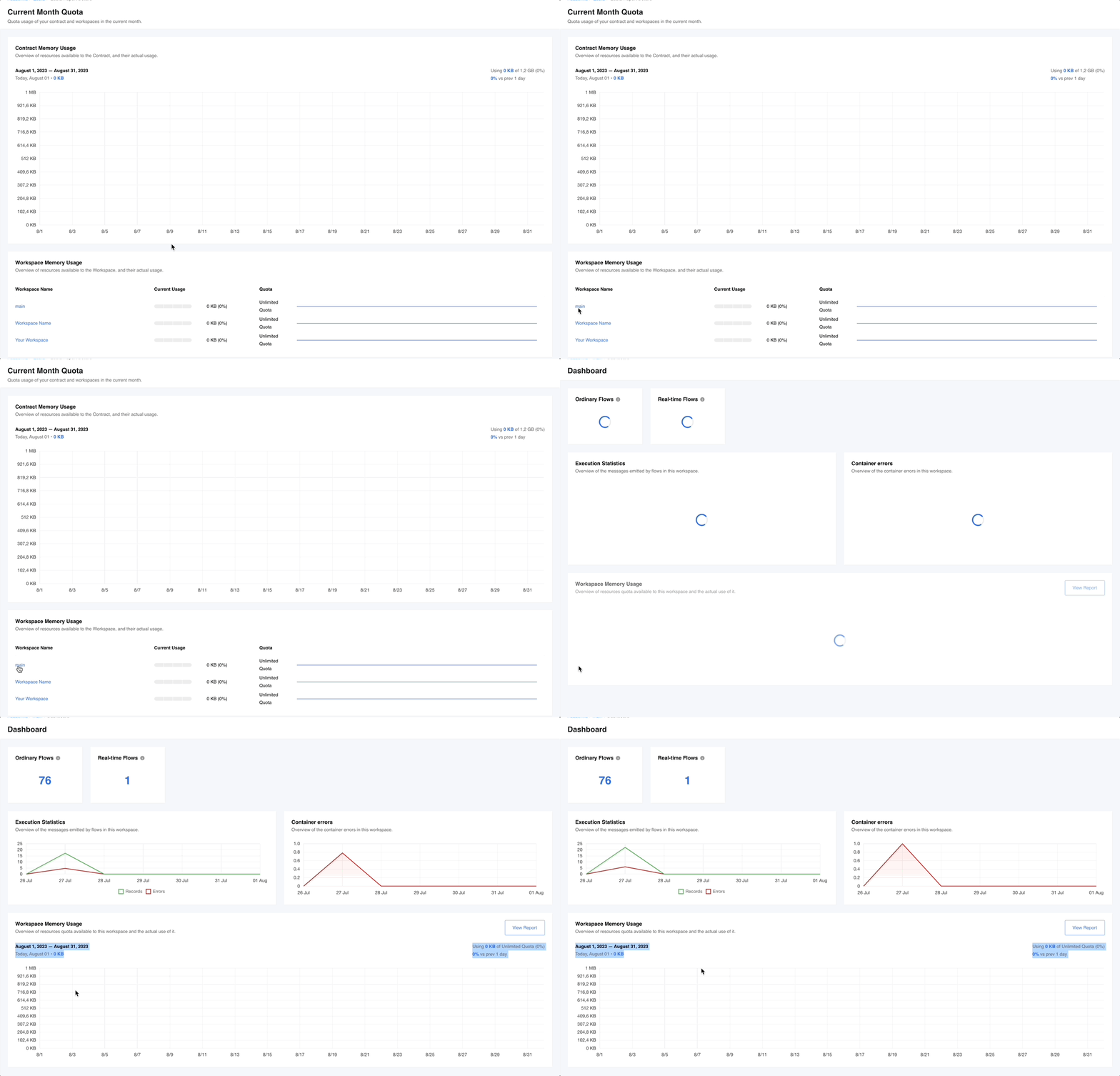
Dashboard Redesign: (v23.31)
The Dashboard is now enhanced to provide a more useful and intuitive selection of information regarding integration flows, executions, and errors. Specifically:
- Added Ordinary Flows counter - click on the counter to open
Flowspage with filtered ordinary flows - Added Real-time Flows counter - click on the counter to open
Flowspage with filtered real-time flows - Redesigned the current Execution Statistics graph - each day on the graph is clickable and leads users to the corresponding page
- Added new graph for Container errors - each day on the graph is clickable and leads users to the corresponding page
- Transferred the Workspace Quota Usage graph from the Quota page
Quota Usage (v23.31)
Clicking the workspace name in the Workspace Memory Usage list on the Current Month Quota page will now redirect the user to the corresponding workspace’s Dashboard.
Transfer modal windows to the new styles: (v23.31)
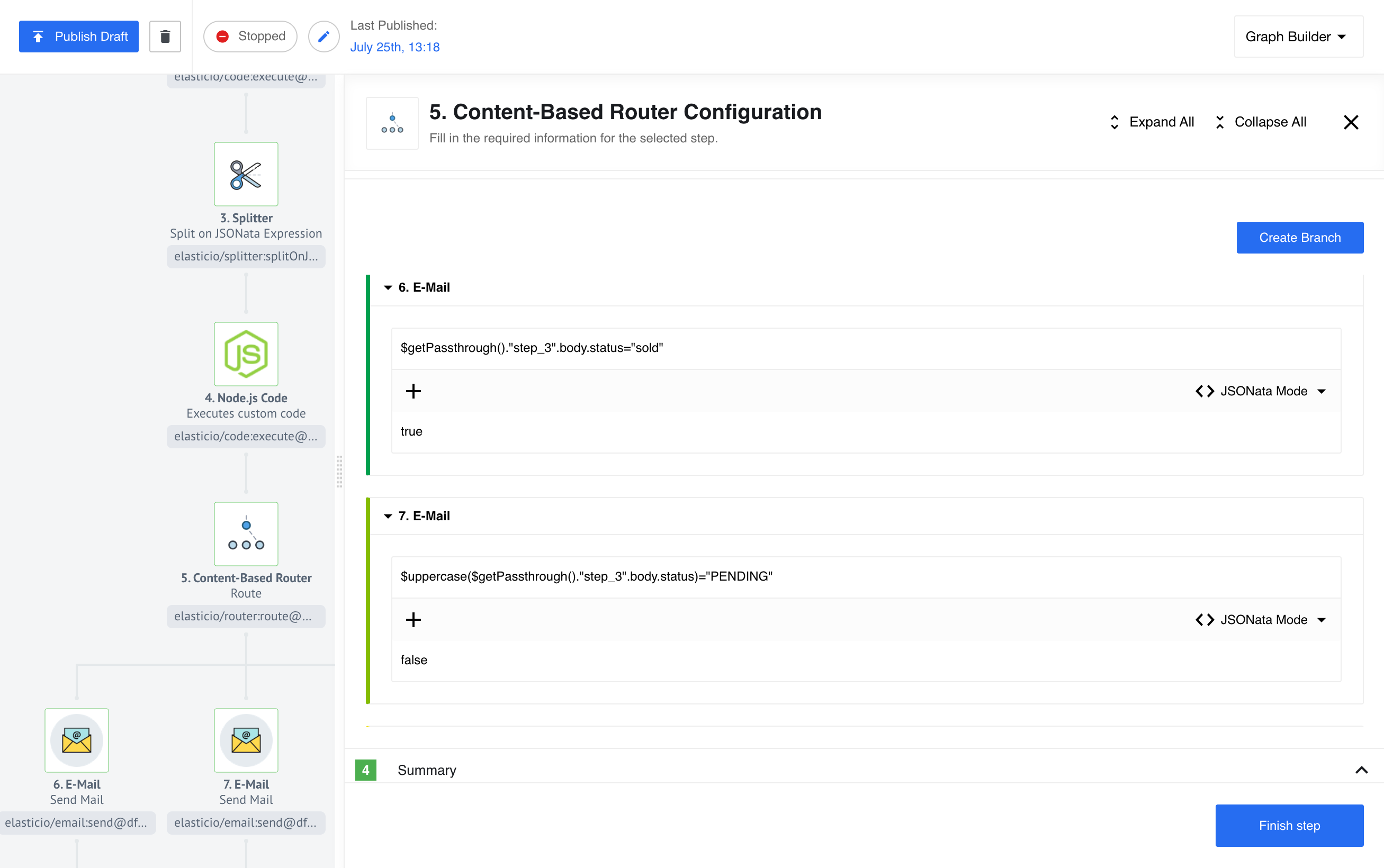
- Flow Designer UI changes: Configuration screens for the Content-Based Router are changed to React and now Users can map values from previous steps for evaluation.
New version of Sailor-JVM 4.0.1 (v23.31)
In a new Sailor version we have replaced jakarta.json with org.eclipse.parsson.
OEM Related (v23.31)
Removed LOOKOUT_PROCESS_DATA env var (v23.31)
LOOKOUT_PROCESS_DATA was introduced to disable Runlog for the dashboard. After redesigning the Dashboard page, this env var does not do anything on the frontend, since runlog is not on the new dashboard.
We’ve removed this env var from the frontend completely, and removed it from lookout by making it run as if this env var is set to “false”.
Change elasticsearch index config: (v23.31)
The search function is now more user-friendly as it now accepts partial matches (e.g. “test.123” log line previously would match only if a user searched for exact “test.123”, but now both “test” and “123” will match the logline).
Also, we’ve fixed the bug where irrelevant search results appeared due to incorrect configuration of Elasticsearch.
How to apply new changes to the mapping:
-
Check if the custom mapping template is already installed Send
GET http://{ELASTICSEARCH_IP}:9200/_template/exec-custom-mapping -
If
exec-custom-mappingtemplate already exists If this template includes some additional configuration and mapping - you should include it in the request body as well and then sendPUTrequest -
If
exec-custom-mappingtemplate does not exist Simply sendPUTrequest
The request for adding or updating the template
PUT http://:9200/_template/exec-custom-mapping
{
    "order": 0,
    "index_patterns": [
        "exec_*"
    ],
    "mappings": {
        "properties": {
            "msg": {
                "analyzer": "simple",
                "type": "text"
            }
        }
    }
}
After the mapping template is updated, Graylog indices need to be updated as well. The best way is to just wait until they are rotated by Graylog itself (with the default config it should be 15 days). To check that the oldest index has correct mapping - send
GET http://:9200/exec_602(instead ofexec_602put the oldest index from exec index set in Graylog) and find a mapping for msg filed - it should have type and analyzer from the updated custom mapping template.
Fixed Bugs (v23.31)
- REMOVED the buttons
Create Branch,Create Default BranchandContinuein the view flow mode for Content-Based Router.
Components (v23.31)
Freshworks component 1.0.0 (v23.31)
- Initial component release
- ADDED
Make Raw Requestaction - ADDED
Upsert Objectaction - ADDED
Lookup Object (at most one)action - ADDED
Lookup Objects (plural)action - ADDED
Delete Object by IDaction
Outlook component 2.0.0 (v23.31)
- BREAKING CHANGE Reworked authentication mechanism - implemented Secrets feature
- ADDED new action -
Send Mail
Batch component 2.0.7 (v23.31)
- ADDED more informative logs
- FIXED vulnerabilities
- ADDED
batching-libraryfunctionality implemented as an internal client - UPDATED to Node version 18
- ADDED unit tests
IPaas Core component 1.5.2 (v23.31)
- FIXED credential verification
MongoDB component 1.5.12 (v23.31)
- ADDED ability to use
ObjectIdin following actions:Lookup By Unique CriteriaUpdate ManyUpsert By Unique Criteria
- ADDED unit tests
Google Spreadsheets component v2 1.0.3 (v23.31)
- UPDATED Sailor version to
2.7.1 - FIXED issue when a component doesn’t read
Number of retriesandMax number of calls per secondfrom credentials configuration
Dun-and-bradstreet component 1.0.6 (v23.31)
- UPDATED Sailor to
4.0.1
JDBC component 2.5.7 (v23.31)
- UPDATED Sailor to
4.0.1
Petstore-java component 1.0.7 (v23.31)
- FIXED component fails with old Sailor
- UPDATED Sailor to
4.0.1
Product update - v23.39
Released: 2023-09-28
New Features (v23.39)
Open Credentials, Configuration, Mapping and Sample sections on the full screen (v23.39)
We have added an expand window feature (square symbol) at the end of each indicated section to allow the user to open the required section to the full screen.

Included descriptor for GET flow by id (v23.39)
GET v2/flows/:id now accept query parameter include with values flow-containers, descriptor.
Flow triggerer improvements (v23.39)
- IMPROVED
queues-readerservice - REDUCED load to MongoDB
Remove deprecated exec pages from the subscription to error emails (v23.39)
Now once the customer subscribes to flows error the link in the letter will redirect to the corresponding thread for component errors and the corresponding container for container errors.
Use separate node pool for one-time-execs (v23.39)
To speed up the time response during step configuration we added a separate node pool for one-time executions.
-
Create new envar KUBERNETES_ONETIME_EXEC_LABEL_VALUE: ‘one-time’ Run one-time executions on separate node pool
-
The default node pool for one time exec is ordinary. To change it - create a separate node pool with kubernetes labels: elasticio-role:
<lablel>
Change the deployment-handler env var KUBERNETES_ONETIME_EXEC_LABEL_VALUE to <label>
Health-check service for flow steps (v23.39)
Introduced significant enhancements, including improved step queue state retrieval from RabbitMQ, flow verification and Sailor versions mechanism checks, error notifications from the exporter API and health-check endpoint.
Other improvements (v23.39)
- CHANGED API response metadata for requests to
/v2/tenants/:tenantId/certificates. API DOCS have been updated.
Fixed Bugs (v23.39)
- UPGRADED HAProxy and Redis-cluster Helm charts to fix
CVE-2023-2650vulnerability. - ADDED
Workspace is lockedpage to Dashboard - FIXED bug when unsynced
taskErrorRecordsCountandtaskStatErrorwould lead to the removal of alltaskStatErrors- ADDED the mechanism for syncing
taskErrorRecordsCountandtaskStatErrorwhen the unsynchronization occurs
- ADDED the mechanism for syncing
- FIXED bug where the deleted credentials prevent stopping flow by the
Flow State Handler
Components (v23.39)
Facebook component 1.0.0 (v23.39)
- Initial component release
- ADDED
Make Raw RequestAction
Gmail component 1.0.0 (v23.39)
- Initial component release
- ADDED
Make Raw RequestAction - ADDED
Send EmailAction - ADDED
Search emailsAction - ADDED
Get Email by IDAction - ADDED
Delete Email By IDAction - ADDED
Get New EmailsTrigger
ChannelEngine component 1.0.0 (v23.39)
- Initial component release
- ADDED
Make Raw RequestAction - ADDED
Make API callAction
Freshworks component 1.1.0 (v23.39)
- ADDED
Get New and Updated Objects PollingTrigger
Outlook component 2.1.0 (v23.39)
- ADDED checkbox
Get AttachmenttoPoll for New MailTrigger - ADDED metadata field
AttachmentstoSend MailAction