Product Updates in 2021 Q4
Product update - v21.41
Released: 2021-10-18
Features (v21.41)
Retry from Step (v21.41)
Up to this point, when an error occurred in the thread, you could exit the message and then initiate a retry at the step where the error occurred. With the platform release version a feature with which you can select any previous step in the flow and start retrying from that moment. For more information please read this article.

-
Selects “Retry From” step from dropdown. You can select the current step and all previous steps.
-
You can edit message to be inputted.
-
You can click retry and flow starts from that point.
-
You can not retry from trigger-step.
Please Note:
- To retry your flow must be active
- If passthrought is disabled in a step, you will not be able to retry from previous steps.
Informing about deprecated or not latest version (v21.41)
With the platform release version we introduce a new feature that will inform you if your productive flows are using deprecated(Exclamation Icon) or not latest versions of components(Cycle Icon).

In case there is a deprecated component in your flow, you will need to replace the old component with new one or use another trigger/action instead of deprecated one. If you just need to update your components to the latest version, you can use the Update all components feature:

The API call also provides information about deprecated and outdated components.
Improvements and Updates (v21.41)
The release contains number of improvements under the hood which are not obvious for the users. Our team worked hard to:
- Improve the look and feel of Try Metadata Tool
- Improved the alerting of fluentd to investigate the occasional overload cases
Reduce list of component version (v21.41)
Previously, on the Versions tab of the component configuration, you could select any previously released version of the component. We decided to limit the selectable options in the UI to the latest and last 2 published versions. Of course, all versions remain selectable via the API. However, we discourage you to use older version of the components to ensure better performance of your flows.

-
If you had a old version selected it remains visible
-
When you switch from old version it will disappear
Fixed Bugs (v21.41)
- Addressed the timeout issue with the buggy OAuth servers when the delays would cause token refresh loop and freeze the secrets management service.
Components (v21.41)
JDBC Component 2.5.0 (v21.41)
- ADDED new Select Action
- DEPRECATED old Select Action
Snowflake Component 1.1.0 and 1.1.1 (v21.41)
- ADDED Upsert row by primary key action
- ADDED Execute stored procedure action
- FIXED metadata bug in Execute stored procedure action
Hubspot Component 1.0.0 and 1.1.0 (v21.41)
- ADDED Make Raw Request Action
- ADDED Get New and Updated Objects action
Zendesk Component 1.0.0 (v21.41)
- ADDED the following actions:
- Add new actions:
- Lookup Object By Id
- Lookup Objects
- Make Raw Request
- Upsert Object By Id
- Add Attachment to Ticket
- ADDED the following trigger:
- Subscribe To Ticket Audits
SOAP Component 1.2.6 (v21.41)
- UPDATED Call Action: add an option to emit a platform message instead of throwing an exception in case of a SOAP fault
- UPDATED the java sailor version to
3.3.6
ZOHO CRM Component 1.0.0 (v21.41)
- ADDED Raw request action
Product update - v21.43
Released: 2021-10-28
Improvements and Updates (v21.43)
The release is rather an intermediate release containing multiple behind the scene improvements to the platform installation procedures. These changes and updates are more relevant to our OEM and on-prem customers.
HELM3 (v21.43)
We are in middle of constantly improving various aspects of HELM3 deployments in collaborations with our partners. These are updates and improvements done in this round.
Delete outdated attachments job (v21.43)
Before introduction of Maester service in the platform the attachments were stored
using the same service as the platform storage slugs (PSS). To remove these attachments
a cron job called remove-outdated-attachments would run and clean these attachments.
With an introduction of Maester and our recent deprecation of the
PSS service in favour of the Master
for all object type storage, we are removing the remove-outdated-attachments
cron job from the HELM3 charts as of platform version.
Fixed Bugs (v21.43)
- Fixed the bug when the newly invited contract member with a permission
contracts.workspace.listAll(Admin or Owner roles) would land on a page with a Locked Workspace message in case when he/she was invited into the contract only. Now the user would be offered to create a new workspace instead. - Addressed the issue when by pressing the Update All Components button would not create a new draft and still display the old one. Now the existing draft is replaced with a new draft containing the updated component versions.
- Fixed the bug in UI when searching and choosing a user roles to invite, an HTML code was displayed instead of the role name. Now the role name displays correctly.
Components (v21.43)
MongoDB component 1.5.7 (v21.43)
- UPDATED the node.js sailor version to
2.6.26 - UPDATED
Aggregateaction: addallowDiskUseoption - UPDATED
Lookup Pluralaction: add ability to lookup objects by fields with an ObjectID type
Snowflake Component 1.2.0 (v21.43)
- ADDED Get rows polling trigger
Magento2 Component 1.6.5 (v21.43)
- FIXED Get New and Updated Objects Polling trigger metadata bug
Product update - v21.45
Released: 2021-11-11
Features (v21.45)
Quota for flow number (v21.45)
With platform version introduces a quota for flow numbers. This particular quota can limit number of flows per Workspace, Contract or the whole Tenant.
Please Note There will be a roll-out stage for this quota. All existing customers will not be affected as of this moment.
The following rules would apply when the quota is applied to your Workspace:
- At the moment quota would be applied to only Production workspaces.
- You can have as many flows as you wish in the Developer (limited) workspaces.
- You will not be able to add a new flow to the Production workspace if you would exceed the quota for flow count.
The following rules would apply when the quota is applied to your Contract:
- Only the combined number of flows in the Production workspaces would count towards this quota.
- If you wish to upgrade the Developer workspace to Production the number of flows in your Developer workspace would be counted towards your Contract’s quota limit. If it exceeds the workspace will not be upgraded to Production unless you reduce the combined number of flows in all your Production workspaces to accommodate the flows from your Developer workspace.
- If you wish to downgrade your Production workspace to Developer workspace - the quota on flow numbers will be removed.
- When you wish to export your flows from the Developer workspace to a new flows in the Production workspace it will count towards your quota limit. Otherwise your action will be blocked if you exceed your limit.
- If you wish to create a flow from a recipe in your Production workspace this will count towards the quota limit. Your flow creation via the recipe activation will be blocked if it exceeds the set limit.
OEM Related (v21.45)
News in this section are for our customers who use OEM version of the elastic.io platform.
Flow Quotas (v21.45)
With an introduction of flow quota system it is possible to control the combined number of flows in the Production Workspaces throughout the entire Tenant. It would be then the responsibility of the tenant administration to divide the quota within the Contracts and Workspaces accordingly to avoid one Contract affecting others by using excessive amount of resources.
Please Note To apply quota for number of flows you would need a special administrative access credentials like service account or a dedicated quota management account.
Components (v21.45)
Hubspot Component 1.2.0 (v21.45)
- ADDED Lookup Object (at most one)
- ADDED Upsert
ZOHO CRM Component 1.1.0 (v21.45)
- ADDED Get New and Updated Objects trigger
- ADDED Upsert action
- ADDED Lookup object (at most one)
- ADDED Lookup Set Of Objects By Unique Criteria action
GIT Protocol Component 1.0.0 (v21.45)
- ADDED Create Commit action
Product update - v21.47
Released: 2021-11-25
Features (v21.47)
Announcement: New design for Flows page (v21.47)
We would like to inform you all about the impending roll-out of the new Flows page during our next 21.49 release (9th of December 2021). Our OEM customers will receive the detailed explanation of changes in advance.
The platform user interface has gone through changes in the last year. Some pages like the Executions and Logs use the new unified design. We have still some way to go for a complete transition into the new unified look.
Our team has been working hard to transition the Flows page as well. We are ready to show you what is coming during our next release in two weeks:
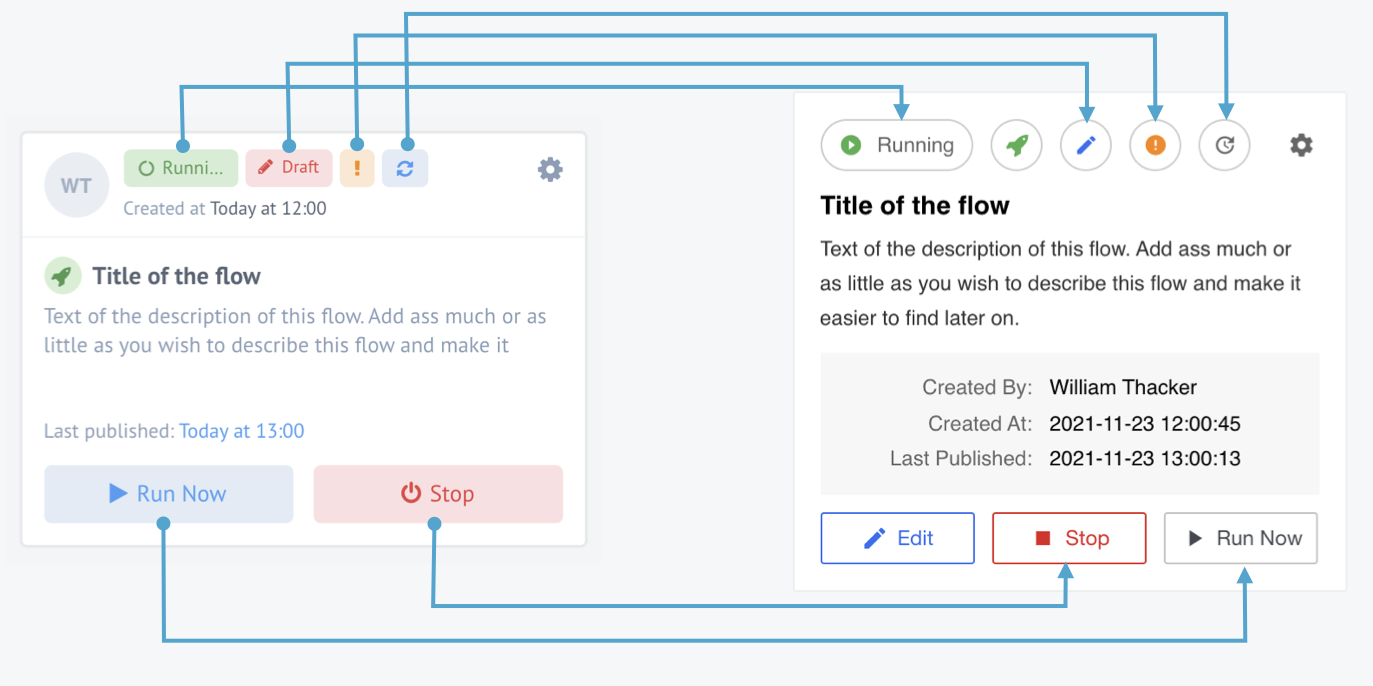
Picture shows the flow card changes.
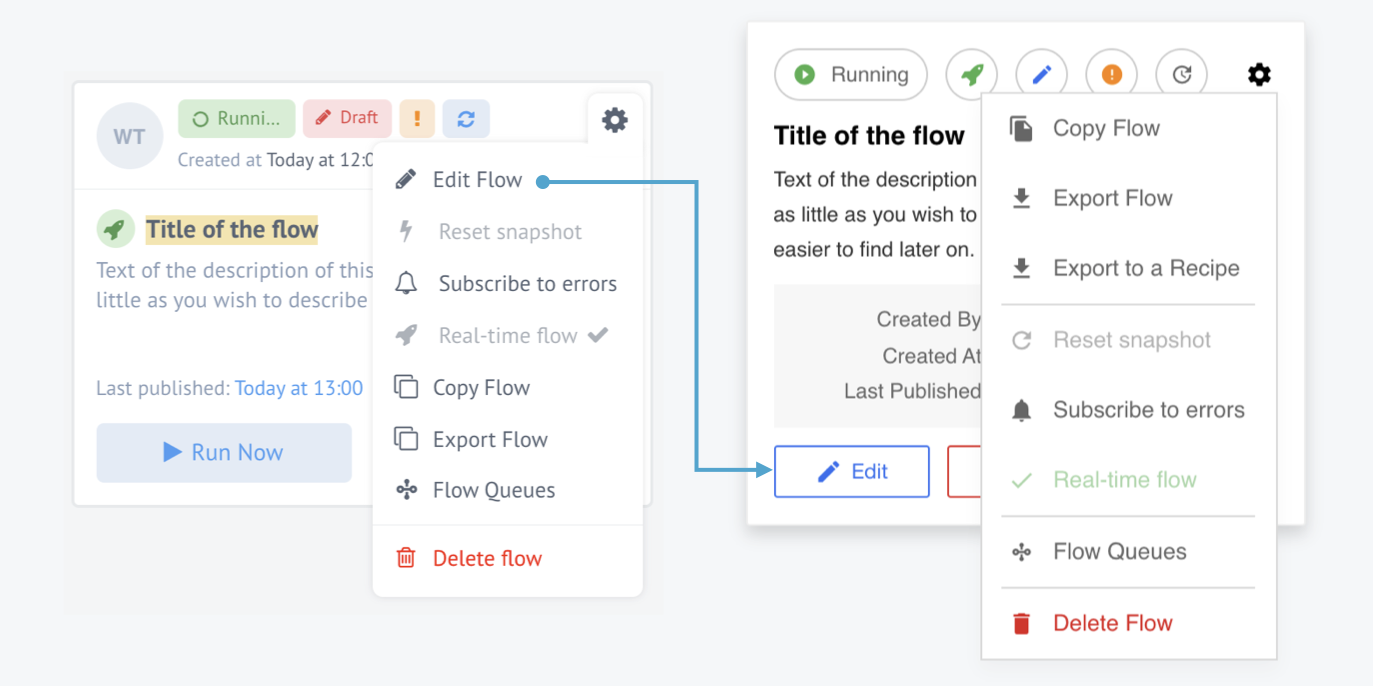
Picture shows the flow card menu changes.
Improvements and Updates (v21.47)
The release release contains behind the scene improvements to the platform backend, more relevant to our OEM and on-prem customers.
- Introducing support for Elasticsearch API version 7.
- Adding
SCRAM-SHA-256authentication for MongoDB. - Commons: update mongoose to
5.13.13version. - API: update mongoose to
5.13.13version.
HELM3 (v21.47)
We constantly improve different aspects of HELM3 deployments in collaborations with our partners. This section lists updates and improvements done in this round.
Quota service health-check problem (v21.47)
During the 21.45 deployment of flow quota feature the sync process was failing the health-check and the Kubernetes was constantly killing it. Our investigation showed that the sync process must be done in batches. For this purpose we introduce the following new parameters.
Api: (v21.47)
SyncMaster QUOTA_SYNC_BATCH_SIZE is equals 20 by default
Quota service: (v21.47)
Added MAX_BATCH_SIZE environment variable (50 by default)
Helm: (v21.47)
Values.secrets.platform.config.QUOTA_MAX_BATCH_SIZE- Optional. Use to override default value of maximum batch size limit in the/resources/{resource}/applyendpoint.Values.secrets.platform.config.API_QUOTA_SYNC_BATCH_SIZE- Optional. Use to override default value of batch size for the Quota synchronisation.
OEM Related (v21.47)
News in this section are for our customers who use OEM version of the elastic.io platform.
Custom login and logout redirects (v21.47)
With we introduce a possibility to configure custom login and
logout redirect URL for our OEM customers. You can use this with OIDC or SAML
providers to streamline and unify customer management in your entire ecosystem.
To setup redirects you need to update (PATCH) your tenant record and add the required
parameters following this example:
"login_redirect_sso_provider":{
         "type": "openid",
         "id": ""
     },
"logout_redirect_url": "https://sso.example.com/logout"
Our API documentation contains the instruction on how to update tenant record.
Along with this addition we introduce a new API endpoint for deleting the OIDC provider record: DELETE /v2/tenants/{TENANT_ID}/openid/providers/{OPEN_ID_PROVIDER_ID}
Fixed Bugs (v21.47)
- Fixed the mapping user interface bug when the first character of a dot in the value in the array fields would disappear.
Components (v21.47)
Hubspot Component 1.3.0 (v21.47)
- ADDED Create Association action
- ADDED Delete Association action
- ADDED Lookup Set Of Objects By Unique Criteria action
- ADDED Lookup Objects action
- ADDED Delete Objects action
- ADDED Webhook trigger
ZOHO CRM Component 1.2.0 (v21.47)
- ADDED Lookup Objects action
- ADDED Delete Object action
Rest API OAuth2 Client Credentials Component 1.0.0 (v21.47)
- ADDED HTTP request action
Product update - v21.49
Released: 2021-12-09
Features (v21.49)
New design for Flows page (v21.49)
As we announced in the release 21.47, we are ready to present you a new even more understandable and intuitive design for Flows page. We are trying to unify our platform design. The first improvements are more convenient filtering and an easier way to edit a flow. Now you just need to click on “Edit” button and you are automatically redirect to the Flow Designer page with already created draft (Note: if a draft for a flow already exists, it will not be overwritten). We added the “Stop” button for the flow in suspended state. So you have the option to resume the flow and keep the messages in queues, or stop the flow and clear the queues. Here you can see what changes have been made:
Picture shows the flow card changes.
We also improved flow card menu:
Picture shows the flow card menu changes.
For more informations on flow management please visit our documentation page.
New step configuring panel design (v21.49)
We decided to make some flow step configuring panel design changes. Now the step configuration menu is fixed under the flow panel, and it will also be tied to the specific step that you are editing. This will be especially useful in the case of “wide” flows, where you will always see exactly the step that you are configuring.
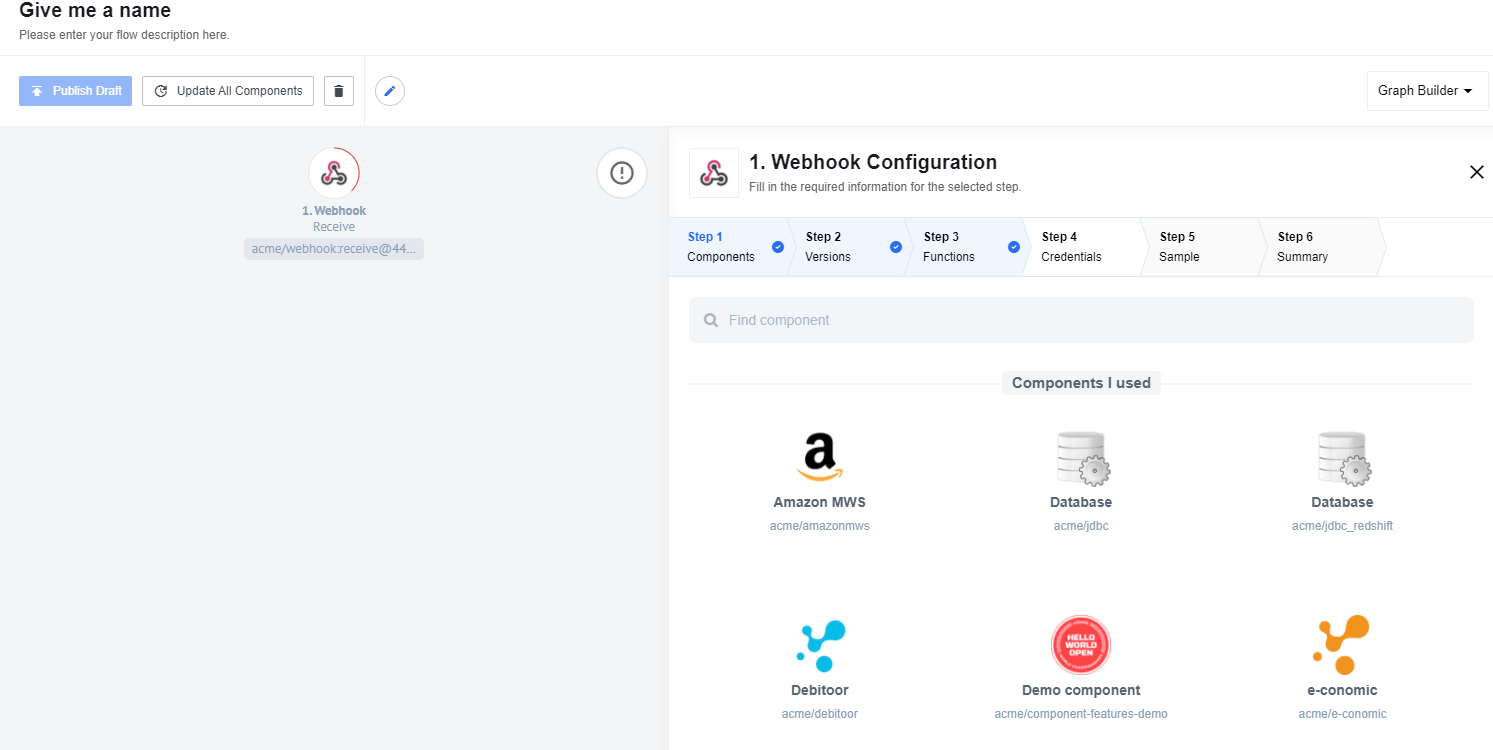
Improvements and Updates (v21.49)
UI performance on the flow designer page (v21.49)
In order to speed up the work of the flow draft page, we decided to improve a caching system. We added if-none-match by default header to the API proxy mechanism to improve responses caching on the client-side.
For more informations on
if-none-matchheader visit this page
HELM3 (v21.49)
We constantly improve different aspects of HELM3 deployments in collaborations with our partners. This section lists updates and improvements done in this round.
Tag api-docs with platform version (v21.49)
We removed global.apiDocsImage from the helm values and set platform version for api-docs image.
From now you don’t need to specify manually api-docs image commit hash in k8s-clusters. When you deploy any platform version you can be sure that api-docs corresponds to a given platform release.
Components (v21.49)
Git-protocol Component 1.0.1 (v21.49)
- UPDATED ‘Public SSH Key’ and ‘Passphrase’ fields type to PasswordFieldView
- UPDATED Reduced the size of component icon file
Zoho Crm Component 1.3.0 (v21.49)
- ADDED Added support for Attachments in:
- Lookup Object (at most one) action
- Lookup objects (plural) action
- Upsert request action
- UPDATED Reduced the size of component icon file
Splitter Component 1.4.0 (v21.49)
- UPDATED Re-assembled message action
- UPDATED Sailor version to 2.6.26
Salesforce v2 Component 2.2.1 (v21.49)
- FIXED output metadata for Get New and Updated Objects Polling trigger and Lookup Objects action
Shopify Component 1.4.4 (v21.49)
- FIXED output metadata for Lookup Objects action
Sailor update for following components (sailor-nodejs up to 2.6.26 and sailor-jvm up to 3.3.6). Some of them have reduced the file size of the component icon: (v21.49)
- JDBC Component
- Simple-trigger Component
- SFTP Component
- Google Spreadsheets Component
- Jsonata Component
- Configuration Component
- Pub-sub Component
- Filter Component
- AWS-S3 Component
- Marketo Component
- Lookup Table Component
- Mapper Component
- REST API Component
- MongoDB Component
- Shopify Component
- PostgreSQL Component
- Maester Component
- Open API Component
- ID Linking Component
- Snowflake Component
- Petstore-nodejs Component
- Google BigQuery
- Delta Detection Component
- Microsoft OneDrive
- SugarCRM Component
- ZIP/UnZIP Component
- Batch Component
- Router Component
- Code Component
- Email Component
- Webhook Component
Product update - v21.51
Released: 2021-12-23
As you may have noticed from the latest releases, we are working on the design improvements. Now our team is working on new view for the step configuration panel. We will announce your more information in the next releases.
We are also working on API documentation improvements.
Improvements and Updates (v21.51)
Store Flows page selected layout information (v21.51)
Previously, when you chose a convenient flows page view - Grid or List - the choice was not saved.

Now we save information about your choice in your browser and the view that is convenient for you will remain even after you log out of your account.
Fixed Bugs (v21.51)
- Now after deleting the contract, workspace and flow are released from quota usage
- Fix URL in the invitation letter to developer team.
- Fix problem with configuration SAML providers for custom login and logout redirect. For details please see this article.
- Fixed UX issue with datepicker at execution page