Product Updates in 2024 Q3
Product update - v24.27
Released: 2024-07-04
New Features (v24.27)
Hide empty executions on Execution page (v24.27)
Improved filtering functionality on the Execution page with the addition of a checkbox option to hide executions without messages. Users can now easily toggle this feature next to the filters, effectively removing empty executions from view. This enhancement optimizes the display of relevant execution data, enabling users to focus on executions with messages and enhancing the overall usability of the Execution page for efficient flow monitoring and analysis.

Handling unprocessed expiration errors from Kubernetes (v24.27)
Enhanced capabilities with the addition of handling for unprocessed expiration errors from Kubernetes. A dedicated metric that tracks and logs restarts associated with unprocessed expiration errors, providing valuable insights into system stability and performance.
Addressing UI freezing during large Sample loads (v24.27)
The replacement of the old library with a new, more efficient one has significantly enhanced UI memory usage, resulting in a smoother experience when working with extensive sample datasets. This upgrade aims to provide users with a more responsive interface, eliminating freezes and ensuring a seamless workflow when handling large sample loads.
Fixed Bugs (v24.27)
- FIXED the error message
TypeError: Cannot read properties of undefined (reading 'filter')on theFlowspage, even when no flows are present. - FIXED snapshots are not being read properly within a single container.
- A new version of Sailor
io.elastic:sailor-jvm:4.0.2has been released.
- A new version of Sailor
Components (v24.27)
Square component 1.0.0 (v24.27)
- Initial component release
- ADDED
Make Raw RequestAction - ADDED
WebhookTrigger
Microsoft Dynamics for Finance and Operations component 1.0.0 (v24.27)
- Initial component release
- ADDED
Make Raw RequestAction
Kafka component 1.1.0 (v24.27)
- ADDED new authentication mechanism:
SASL/OAUTHBEARER
Flow Linking component 1.1.0 (v24.27)
- ADDED
Lookup by idcheckbox toTrigger another flowAction - ADDED
Retry errorscheckbox toTrigger another flowAction - FIXED
Socket Hang Upissue
AMQP component 1.4.3 (v24.27)
- UPGRADED
Consumetrigger now locate the logs and messages in the last flow execution - UPGRADED Sailor to
v2.7.2 - UPGRADED amqplib to
v0.10.4
Bynder Component 1.1.0 (v24.27)
- ADDED
Lookup Object By IDAction
Monday component 1.2.0 (v24.27)
- ADDED
WebhookTrigger
SFTP component 1.7.1 (v24.27)
- UPGRADED Sailor to
v2.7.2 - UPGRADED
component-commons-librarytov3.2.0
Product update - v24.36
Released: 2024-09-04
New Features (v24.36)
Increased character limit for invitation emails (v24.36)
By increasing the allowable number of subdomain characters from 10 to 50, users now have greater flexibility when sending invites, accommodating longer and more diverse subdomain configurations. This enhancement simplifies the process of inviting new users and ensures that workspace invitations can accurately reflect the unique subdomains of each recipient, enhancing communication and user engagement within the workspace.
Transform UI for Profile Information page to React (v24.36)
This update enhances the performance and responsiveness of the user profile display, offering a more intuitive and efficient way to manage and view profile details. The transition to React not only modernizes the user interface but also lays the foundation for future enhancements and optimizations, providing users with a more seamless and enjoyable profile management experience.
Transform UI for Execution (single execution) page to React (v24.36)
This update brings the benefits of React’s component-based architecture to the interface, enhancing responsiveness and interactivity for users.
Page titles displayed in the browser history (v24.36)
The navigation within app.elastic.io now displays page titles in the browser history for all React-powered pages. By incorporating descriptive titles for each page, users can easily track their browsing history and identify specific pages at a glance.
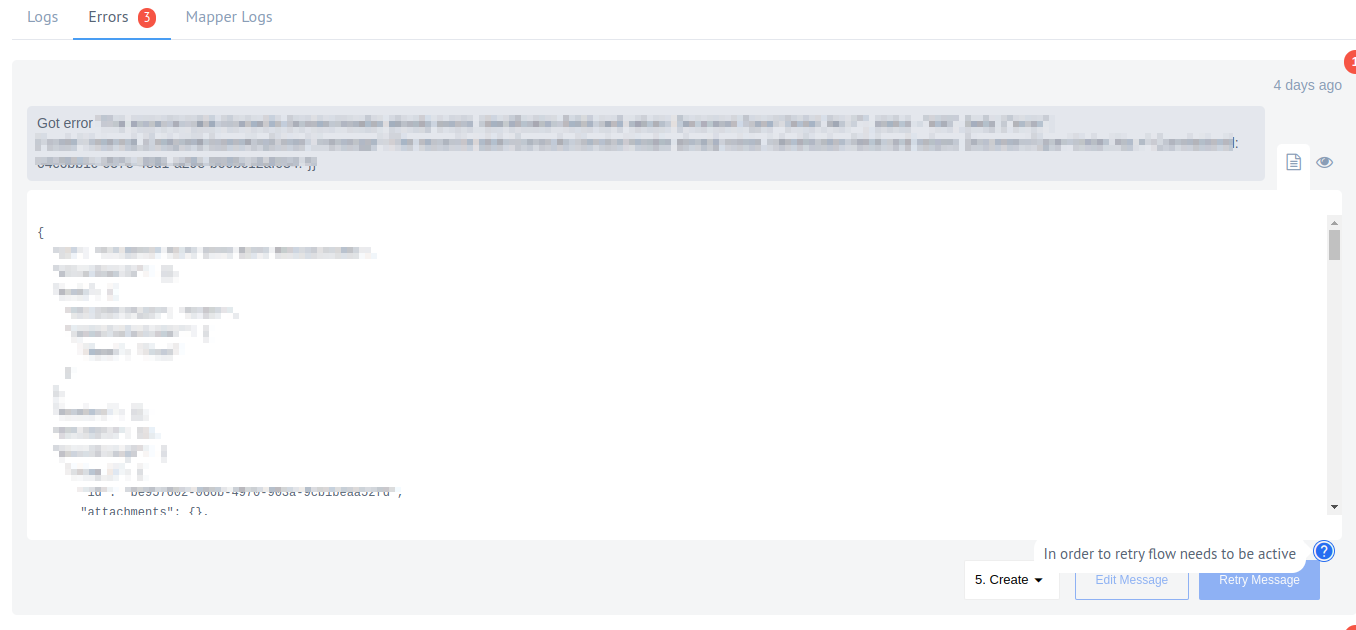
Retry Message button for the stopped flow (v24.36)
This enhancement not only allows users to retry errors seamlessly but also provides a clear hint stating that the flow needs to be active for the retry function to work. By offering this convenient feature, users can easily manage and troubleshoot errors, promoting a more user-friendly and efficient workflow within the platform.
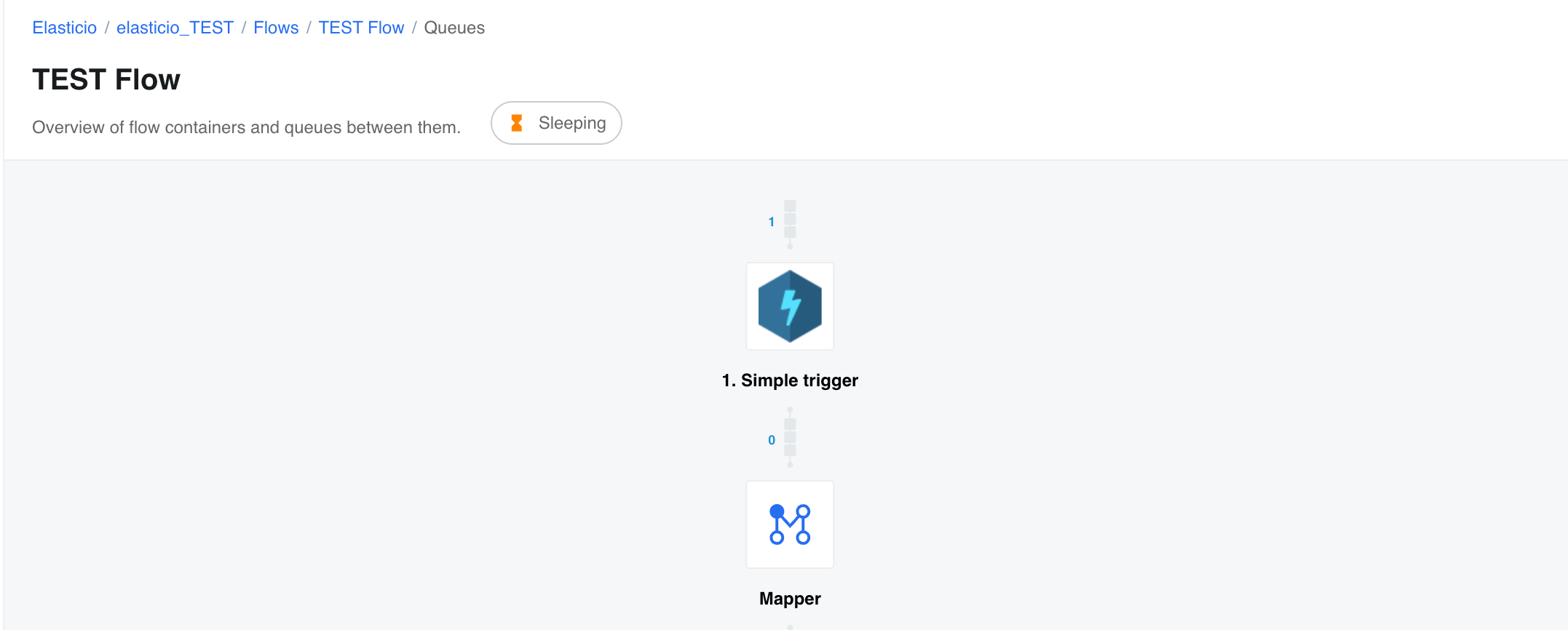
Displaying the flow status on the “Flow Queues” Page (v24.36)
Enhance user visibility and control over flow operations by showcasing the live status of containers on the “Flow Queues” page. With this enhancement, users can now monitor the actual status of flows in real-time, empowering them with valuable insights into ongoing processes.
Disabled CRON Tab for ‘Flow Linking’ Trigger (v24.36)
Since this trigger is initiated by another flow, displaying the CRON tab becomes irrelevant and can cause confusion. By removing this tab, users benefit from a more intuitive and streamlined interface, ensuring that flow configuration remains clear and concise.
Note: This feature requires to use Flow Linking component v1.1.1.
Displaying transparent API Error explanations in popups on Recipes page (v24.36)
This enhancement ensures that users receive more precise and informative explanations of errors directly on the UI, enabling them to quickly identify and address issues.
Fixed Bugs (v24.36)
- UPGRADED outdated libraries for
sailor-jvm - FIXED the buttons stop working when the Google authentication window is closed for all sensitive actions.
- FIXED broken retry feature with lightweight messages.
- FIXED issue where focus is constantly lost when a flow keeps emitting errors.
- FIXED issue where workspace name doesn’t change in breadcrumbs when switching between workspaces.
- FIXED
TypeError: Invalid Version:when replacing the same component with a new one that uses a sailor version with^.- Note:
- Unable to validate sailor version on the
component-pusherside as this service doesn’t have access to thepackage.jsonfile. - Gitreceiver will throw an error about an invalid semantic version if you try to use the sailor version with
^. - Admiral-related services won’t fail anymore. Instead, Kubernetes will attempt to start the component pod but will fail with the log
putOutToSea.catchand the errorInvalid Version.
- Unable to validate sailor version on the
- Note:
Components (v24.36)
Microsoft Dynamics Business Central On Prem Component 1.0.0 (v24.36)
- Initial component release
- ADDED
Make Raw RequestAction - ADDED
Upsert ObjectAction - ADDED
Lookup Objects (plural)Action - ADDED
Lookup Object By IDAction - ADDED
Delete Object By IDAction - ADDED
Get New and Updated Objects PollingTrigger
Git-Protocol component 1.2.5 (v24.36)
- UPGRADED
nodegitto0.28.0-alpha.11
NetSuite component 3.2.0 (v24.36)
- ADDED
Get Item AvailabilityAction
HubSpot component 1.6.1 (v24.36)
- ADDED
Max Amount of Polling Pagestext field for theGet New and Updated ObjectsTrigger - UPGRADED
component-commons-libraryversion to3.2.0 - UPGRADED Sailor version to
2.7.2 - UPGRADED Node engine to
20.11.0 - FIXED vulnerabilities in dependencies
SFTP component 1.7.3 (v24.36)
- FIXED the issue when a SFTP connection drops in realtime flows
Odoo component 1.1.0 (v24.36)
- ADDED
Get New and Updated Objects PollingTrigger
Bynder Component 1.4.0 (v24.36)
- ADDED
Lookup Objects (plural)Action - ADDED
Delete Object By IDAction - ADDED
Get New and Updated Objects PollingTrigger
JDBC Component 2.5.9 (v24.36)
- UPGRADED Sailor version to
4.0.3
Flow Linking component 1.1.1 (v24.36)
- ADDED service
flow-linkingtocomponent.json
WhatsApp Component 1.1.0 (v24.36)
- ADDED
WebhookTrigger - UPGRADED
component-commons-libraryversion to3.2.0 - UPGRADED Sailor version to
2.7.2
Salesforce Component 2.8.4 (v24.36)
- FIXED error
The Replay ID validation failed when the Subscribe to PubSubtrigger doesn’t emit messages for more than three days - UPGRADED
component-commons-libraryversion to3.2.0 - UPGRADED Sailor version to
2.7.2
Shopify Admin v2 component 2.5.0 (v24.36)
- ADDED
Upsert ObjectAction