Product Updates in 2022 Q4
Product update - v22.40
Released: 2022-10-06
Improvements (v22.40)
Developer Teams: New design & improved functionality (v22.40)
We continue to update our User Interface to improve ease of use. This time it is the UI surrounding Developer Teams that is updated. When you navigate to Development > Developer Teams you will notice new uniform design:

Along with the new design we added a functionality to delete the developer team using the User Interface. Previously this functionality was only available via an API call.
Please Note: You can only delete a Developer Team when it contains no respoitories. The platform will give an error if you attempt to delete it when there is even one repository.
Updates (v22.40)
Java Sailor version 3.5.0 (v22.40)
A new version of Java Sailor library 3.5.0 is released. This update adds
support for Java 17.
HELM3 (v22.40)
We constantly improve different aspects of HELM3 deployments in collaboration with our partners. This section lists updates and improvements included in this release.
Helm chart: Cron job resources defined (v22.40)
Platform has number of cron jobs performing different functions. With this release we added kubernetes resource definition for:
- gendry
- wiper conrjobs
- git-receiver cronjobs
- maester cronjobs
- lookout cornjobs
OEM Related (v22.40)
Information in this section is intended for our customers who use the OEM version of the elastic.io platform.
Force pull/push for externally built docker components (v22.40)
In this update of our automatic component delivery
feature we introduce a new API endpoint to force pull of a component version from external
docker registry: POST /v2/components/:component_id/docker-pull/:version. This
endpoint forces pull of a component version from external docker registry. The
component must belong to one of the user’s team which supports the docker registry.
Executions details loading and Clickhouse (v22.40)
To streamline the proper data replication between Clickhouse cluster and reduce internal efforts to constantly update the Clickhouse-mongo dictionaries with every update of Clickhouse version we performed the following changes:
- The User Interface (
frontend) will load flow and user names directly from the MongoDB, instead of thebranservice. - Removed the Clickhouse-mongo dictionaries and all related resources. Our OEM customers can delete mongo dictionary from clickhouse instances and mongodb proxy from HA-Proxy.
Please Note: as a regular user of the platform you don’t need to do anything. You will not notice any difference. This change is for customer who run a version of of the platform on their premises.
Components (v22.40)
Shopware 6 component 1.1.1 (v22.40)
- FIXED sample retrieving in some actions
- IMPROVED Error handling in
Get New and Updated Objects PollingTrigger
Microsoft Dynamics CRM v2 component 1.1.0 (v22.40)
- ADDED
Get New and Updated ObjectsPolling Trigger - ADDED
Lookup Objects (plural)Action - ADDED
Lookup Object (at most one)Action - ADDED
Delete Object By IDAction - ADDED
Extract Raw System MetadataAction
REST API v2 component 2.0.14 (v22.40)
- UPDATED to use
sailor-nodejsversion2.6.29
Microsoft Dynamics CRM (v22.40)
- COMPONENT HAS BEEN DEPRECATED
Updates to multiple components (v22.40)
- UPDATED the sailor library to version
2.6.29 - FIXED the vulnerabilities in dependencies
- ADDED new headers
User-Agentandx-request-id
For the following components:
- Utility component
1.5.2 - Docuware component
1.1.2 - AWS S3 component
1.5.2 - Microsoft OneDrive component
1.0.6 - XERO component
1.2.1 - PayPal component
1.3.2 - Zoho CRM component
1.3.5
Product update - v22.42
Released: 2022-10-20
Improvements (v22.42)
Developer Team Pages: New design & improved functionality (v22.42)
We continue to update our User Interface to improve ease of use. This time it is the UI of every Developer Team that is updated. When you navigate to Development > Developer Teams > your team you will notice new uniform design:
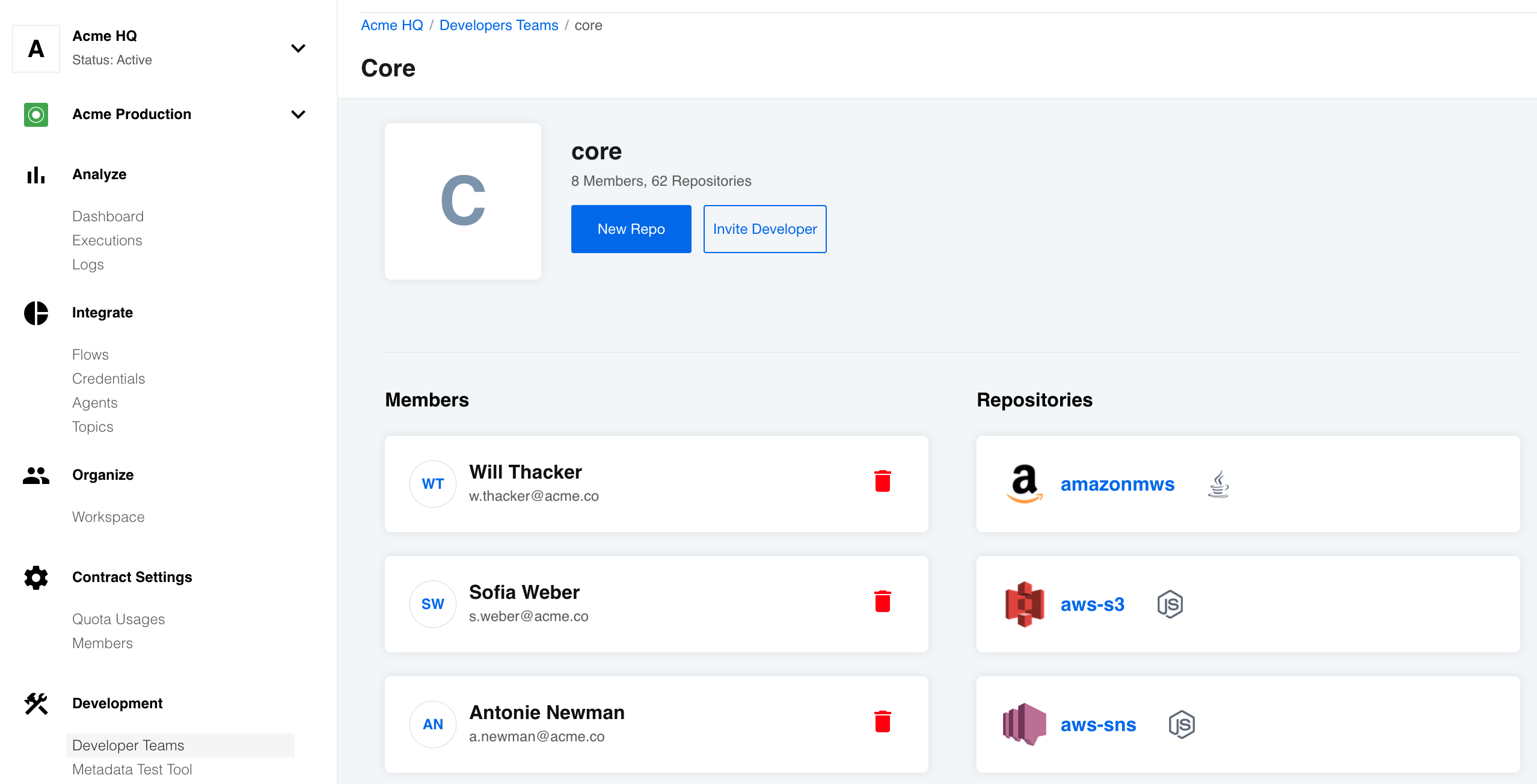
Along with the new design we added a functionality to delete member of the developer team using the User Interface. Previously this functionality was only available via an API call.
Please Note: You can delete all members from a Developer Team. This will not delete the repositories, however, you will not see the developer team in your list of developer teams. Your membership to any existing developer team can be restored by the tenant Administration (
tenantAdminrole holder).
Swagger based API documentation (v22.42)
We change the way our platform API documentation is rendered. From now on it will be presented using OpenAPI Swagger specifications. The address to the API documentation is the same: https://api.elastic.io/docs/v2.
Updates (v22.42)
NodeJs Sailor version 2.7.1 (v22.42)
A new version of NodeJs Sailor library 2.7.1 is released. When you use this
version of library in your NodeJs components, it will use maester-client v4
instead of object-storage-client.
JSONata version 1.8.6 supported (v22.42)
We upgraded the jsonata-moment library (1.1.5) to support JSONata version 1.8.6.
This core dependency is used in our User Interface and the components to evaluate JSONata
expressions.
OEM Related (v22.42)
Information in this section is intended for our customers who use the OEM version of the elastic.io platform.
White-labeling API docs (v22.42)
With new implementation of the Swagger based API documentation, we introduce a new configuration for the tenant records which you can use to change the look and content of the API documentation for each tenant in your environment:
"api_docs_config": {
  "top_bar_background_color": "red",
  "custom_css_url": "http://host.com/custom.css",
  "theme": "outline",
  "hidden_tags": ["vpn agents", "sshkeys"]
}
top_bar_background_color- set the value of this parameter to any CSS color to change the top bar panel’s background colourcustom_css_url- set the value to an URL for custom CSS file to be included in the API documentationtheme- Name of the known Swagger theme to use for rendering (allowed values are:classic,feeling-blue,flattop,material,monokai,muted,newspaper,outline)hidden_tags- Array of tags to hide in the API documentation. In this context the tags are sections in the API documentation like VPN Agents or SSH-keys.
Components (v22.42)
HJSON component 1.0.4 (v22.42)
- UPDATED to use
sailor-nodejsversion2.7.0 - FIXED errors when receiving attachment from the Maester
Akeneo component 1.0.0 (v22.42)
- ADDED
Make Raw RequestAction - ADDED
Lookup Object By IDAction - ADDED
Lookup Objects (plural)Action - ADDED
Delete Object By IDAction - ADDED
Upsert ObjectAction - ADDED
Get New and Updated Objects PollingTrigger
Splitter component 1.4.2 (v22.42)
- UPDATED to use
sailor-nodejsversion2.7.0 - FIXED the vulnerabilities in dependencies
- FIXED message processing
- IMPROVED the Maximum Delay timer in Re-assembled message action by reducing it to 20 sec
Salesforce-v2 component 2.4.1 (v22.42)
- FIXED loop bug in the
Get Updated Objects Pollingtrigger - UPDATED to use
sailor-nodejsversion2.7.0
Product update - v22.44
Released: 2022-11-03
Features (v22.44)
COMING SOON - Improved Recipes and Embedding (v22.44)
In this release we make available a number of new API features that will soon enable an upgrade of our Recipes functionality and embedding credential addition steps in 3rd party platforms.
These new features will be limited to Tenant users and will enable:
- More scalable ways to create integration Recipes
- More automation of recipe deployment
- Simple updates of recipes and deployment of changes to flows deployed from that recipe
- Addition of credentials to deployed flows
Together these features will make it much easier for our clients to offer and automatically deploy integration solutions without their clients leaving their platform, App or website. Interested to learn more or you would like a demonstration? Contact our sales department.
Improvements (v22.44)
Component repositories: New design & improved functionality (v22.44)
In this release we update the UI of the Component repository pages. When you navigate to Developer Teams on the side menu and then select a Component repository you will notice the new design.

From each component repository page you can navigate to the environment variables page where you can add new, change, or delete the existing environment variables for the component:

HELM3 (v22.44)
We constantly improve different aspects of HELM3 deployments in collaboration with our partners. This section lists updates and improvements included in this release.
RabbitMQ HAProxy in kubernetes cluster (v22.44)
The HAProxy for RabbitMQ cluster will now run as a separate service in the platform kubernetes cluster instead of as a single virtual machine. This enables high-availability and scalability by running the service in a replica set.
To run the HAProxy for the RabbitMQ cluster, change the following parameters in the HELM3 charts:
- Update all HELM3 variables pointing to HAProxy VM to
haproxy-service.platform.svc.cluster.local. - Introduce a new HELM3 configuration file
haproxy.yamlwith the following content:haproxy: rabbitmqNodeIps: rabbitmq: "10.28.0.4" rabbitmq-2: "10.28.0.65"Where
rabbitmqandrabbitmq-2parameters must match the RabbitMQ cluster VM names and values to their VM IP addresses.
Please Note: You must first deploy the HAProxy chart before the platform version deployment.
Fixed bugs (v22.44)
- Fixed the user interface bug when flow status changes were not reflected on the flows page.
- Addressed the problem when removing the user from the workspace or contract would take more than 4 minutes. Now the process takes less than a second.
- Fixed the bug when API would return
5xxerror when you use a space in the repository name while creating a component repository. Now the UI will disable the save button and show en error messageRepository name contains invalid characters. Letters, digits, - and _ are allowed only - Addressed the bug when identity keys page (SSH Keys) would not load when a key was previously saved without a title. The title is now a required field.
- You must provide an SSH Key title to save the key.
- The system will also attempt to use the user title if present in the SSH Key body.
Components (v22.44)
Simple-trigger component 1.1.7 (v22.44)
- UPDATED the
Sailorlibrary version to2.7.1
WebHook component 1.2.12 (v22.44)
- UPDATED the
Sailorlibrary version to2.7.1
Splitter component 1.4.3 (v22.44)
- UPDATED the
Sailorlibrary version to2.7.1
Email component 1.2.3 (v22.44)
- UPDATED the
Sailorlibrary version to2.7.1
JSONata Transformation component 1.0.12 (v22.44)
- UPDATED the
Sailorlibrary version to2.7.1 - UPDATED the
component-commonslibrary version to3.1.2to support JSONata1.8.6version
Product update - v22.46
Released: 2022-11-17
Improvements (v22.46)
Mapper can now map objects in hierarchies (v22.46)
The mapper User Interface (UI) now supports the mapping of objects, including their sub-structures.

You can map object sub-structures like before by clicking on the arrow right beside the component icon. You can also click on the name of the component to map the entire object. This is also true for objects inside the objects. Click on the object name to include it in the mapping.
Updates (v22.46)
Component builder helper 2.0.1 (v22.46)
We released the new version of the component builder helper, 2.0.1. It can now
process custom Dockerfiles.
OEM Related (v22.46)
Information in this section is intended for our customers who use the OEM version of the elastic.io platform.
Quota management API (v22.46)
The API documentation now includes all endpoints for the quota management in your installation.
Please Note: You need quota management or service user credentials to use these endpoints in your installation.
Fixed bugs (v22.46)
- FIXED bug, where the step configuration data were copied between branches during the switching.
- FIXED bug, where you could not set additional fields in the
HTTPAuthViewcredentials object. - FIXED bug, where the UI would fail during the GraphQL component credential creation.
Components (v22.46)
Hubspot component 1.5.6 (v22.46)
- FIXED output metadata for
Upsertaction
Lookup Table component 1.1.7 (v22.46)
- UPDATED the Node.js
Sailorlibrary version to2.7.0 - ADDED async to a process action
- FIXED the bug when input values were not stringified before being processed.
Salesforce component v2 2.4.2 (v22.46)
- IMPROVED error handling in the
Lookup Objectsaction
JDBC component 2.5.6 (v22.46)
- UPDATED the Java
Sailorlibrary version to3.5.0 - UPDATED limitations description about the custom timezone behavior
Microsoft dynamics business central component 1.1.0 (v22.46)
- ADDED
Get New and Updated Objects Pollingtrigger - ADDED
Lookup Objects (plural)action - ADDED
Lookup Object (at most one)action - ADDED
Upsert Objectaction - ADDED
Delete Objectaction
Amazon SQS component 1.0.0 (v22.46)
- ADDED
Delete Messageaction - ADDED
Receive Messageaction - ADDED
Send Messageaction
Product update - v22.48
Released: 2022-12-01
OEM Feature (v22.48)
Information in this section is intended for our customers who use the OEM version of the elastic.io platform.
White-labeled recipe management (v22.48)
In this release we introduce the recipe management feature for creating and deploying the integration solutions at scale. You can now embed the entire solution in your platform, App or website. Your clients can now access and deploy flows without leaving your platform or site - they simply select an integration that you list and enter their credentials.
Please note that you will need to trigger the necessary API calls to the platform so that the User, workspace, etc. are created and so that the flow is deployed.
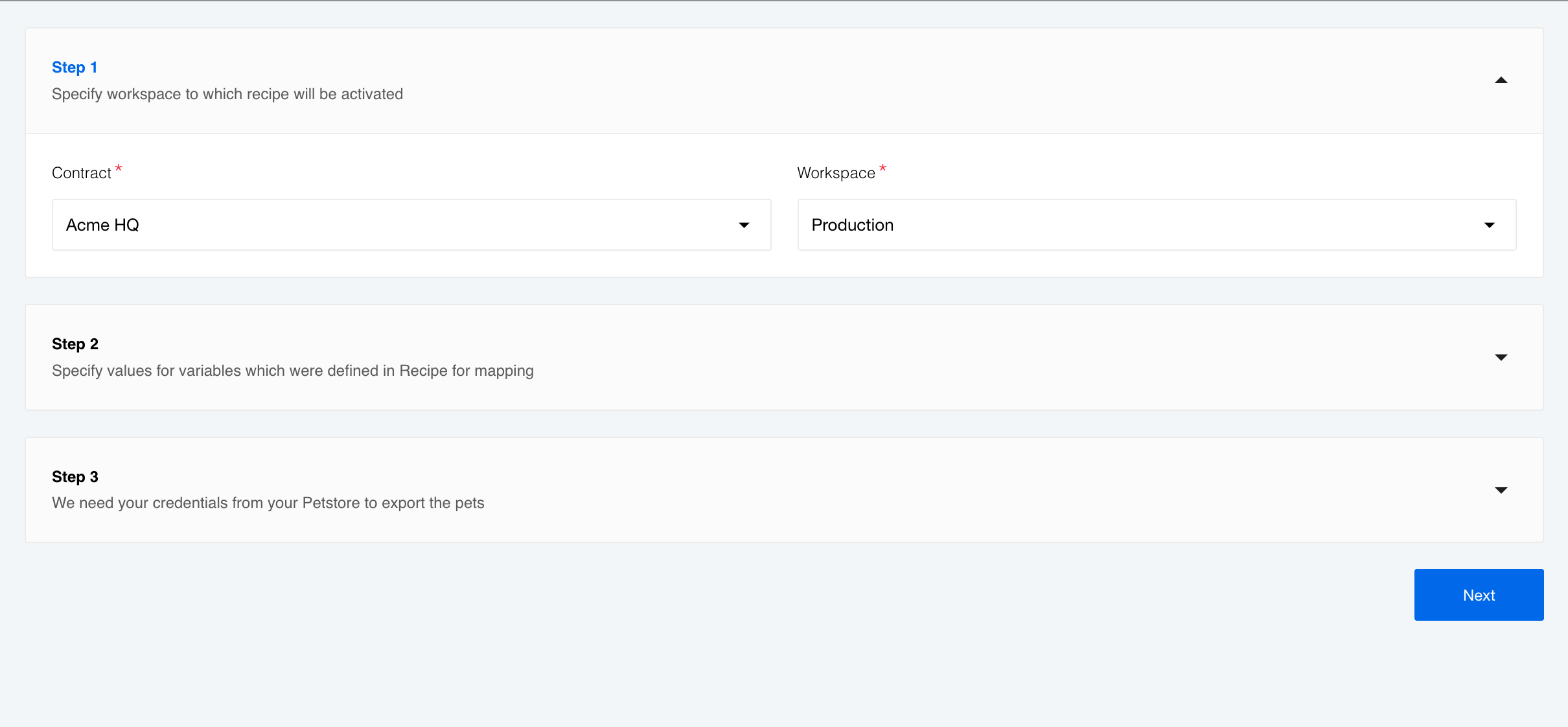
You can see an embedded form for recipe activation on a screenshot above. The following instruction show how to create a similar page for your case.
Please Note: You must have
tenantAdminrole to succeed.
Initial setup (v22.48)
The whole idea of recipe activation form embedding is to make the process as easy as possible for your user. You take over the entire process of user creation and registration and manage it behind the scene. Your user gets one URL to a form to fill-in the necessary fields and activate the integration solution.
Here are the steps:
- Create a user - (
taenantAdminAPI call). - Add the newly created user as a contract member - (
tenantAdminAPI call). - Add the same user as a workspace member - (
tenantAdminAPI call). - Revise user to allow necessary access required to activate a recipe.
- Create a onetime token for the user - (API call). Not ready for the
tenantAdminrole holder. Contact support for help. We expect to deliver this option by the next release. - Generate the access URL for your user.
- Create and host embed page.
- Confirmation for successful activation.
Generate access URL (v22.48)
The access URL to a form must have the following format:
https://[platform_domain]/embedded-recipe?recipeId=[recipeId]&oneTimeToken=[oneTimeToken]&contractId=[contractId]
platform_domain(required). Your platform domain.recipeId(required). Recipe ID which you want the user to activate.oneTimeToken(required). Onetime token you generated earlier (step 5) to authenticate your user in the platform.contractId(optional). Contract ID in which the user will activate the recipe. If you omit this parameter then the platform will use the first available contract where user is registered.
Embed page (v22.48)
You can create an embed page following the example:
<!DOCTYPE html>
<html lang="en">
<head>
  <meta charset="UTF-8">
  <title>Embedded Credentials Demo</title>
  <style>html, body, iframe { height: 85%; width: 90%; margin: 0;}</style>
</head>
<body>
  <iframe src="https://[platform_domain]/embedded-recipe?recipeId=[recipeId]&oneTimeToken=[oneTimeToken]&contractId=[contractId]" />
</body>
</html>
Here we use the generated URL in iframe. You can shape and style your page
according to your needs.
Successful activation (v22.48)
When a user successfully activates a recipe, the platform sends a message with a Recipe Deployment ID to the parent window.
{
    "action": "eio:embedded-recipe:activate-success",
    "data": {
        "recipeDeploymentId": "RECIPE_DEPLOYMENT_ID"
    }
}
Recipe deployment API (v22.48)
To manage recipes in scale and enable easy management we introduced the recipe deployment new endpoints to our API. Along with this change, we updated related API endpoints for consistency.
Recipe deployment permissions (v22.48)
To manage recipe deployments for each tenant, we introduced GLOBAL.RECIPE_DEPLOYMENT.GET,
GLOBAL.RECIPE_DEPLOYMENT.SYNC and GLOBAL.RECIPE_DEPLOYMENT.DELETE permissions.
Please Note: The
PATCHandDELETEcalls to edit or delete the flows will now return409Conflict (Can not delete flow, because it has recipe deployment relation) when the flow is part of a recipe deployment. You must first sever the connection between them. Check theGLOBAL.RECIPE_DEPLOYMENT.DELETEsection to learn how.
GLOBAL.RECIPE_DEPLOYMENT.GET (v22.48)
With this permission you can retrieve the recipe deployments using the
?include=recipe-deployments parameter in the GET /v2/recipes HTTP call.
The answer will include the connected RecipeDeployment in a response.
The standard user can fetch only recipe deployments:
- That are deployed into a workspace where they are member,
- All recipe deployments in their tenant if they have
GLOBAL.RECIPE_DEPLOYMENT.GETpermission in theTENANTscope, - All recipe deployments in the installation if they have
GLOBAL.RECIPE_DEPLOYMENT.GETpermission in theGLOBALscope.
GLOBAL.RECIPE_DEPLOYMENT.SYNC (v22.48)
This permission allows to stop the flows connected to a certain recipe, update it
to the latest version of the recipe and start it again. By default the tenantAdmin
role has this permission.
With this permission you can make POST HTTP request to /v2/recipe-deployments/:id/sync
to stop the flow, update and restart it.
The standard user can sync recipe deployments:
- That are deployed into the workspace where they are member and the flow edit permission is granted,
- All recipe deployments in their tenant if they have
GLOBAL.RECIPE_DEPLOYMENT.SYNCpermission in theTENANTscope, - All recipe deployments in the installation if they have
GLOBAL.RECIPE_DEPLOYMENT.SYNCpermission in theGLOBALscope.
GLOBAL.RECIPE_DEPLOYMENT.DELETE (v22.48)
This permission allows to delete the recipe deployment but not the flows created from it. It effectively cuts the connection between recipe deployment and the flow.
With this permission you can make an HTTP DELETE call to the /v2/recipe-deployments/:id
endpoint to delete the recipe deployment only.
The standard user can delete the recipe deployment:
- That are deployed into the workspace where they are member and the flow edit permission is granted,
- All recipe deployments in their tenant if they have
GLOBAL.RECIPE_DEPLOYMENT.DELETEpermission in theTENANTscope, - All recipe deployments in the installation if they have
GLOBAL.RECIPE_DEPLOYMENT.DELETEpermission in theGLOBALscope.
Components (v22.48)
Plytix component 1.0.0 and 1.1.0 (v22.48)
- ADDED
Get New and Updated Objects Pollingtrigger - ADDED
Lookup Object (at most one)action - ADDED
Lookup Objects (plural)action - ADDED
Upsert Objectaction - ADDED
Delete Objectaction - ADDED
Make Raw Requestaction - ADDED
Link or Unbind objectaction
Bigcommerce component 3.0.0 (v22.48)
- REMOVED
Create a Paymentaction. Note this is a breaking change
Batch component 2.0.6 (v22.48)
- UPDATED the
Sailorlibrary version to2.7.1 - FIXED the vulnerabilities in dependencies
ZohoCRM component 1.3.6 (v22.48)
- FIXED bug in the verify credentials process
Id-linking component 1.2.0 (v22.48)
- ADDED
Delete Objectaction - UPDATED the
Sailorlibrary version to2.7.1
ZIP component 1.2.0 (v22.48)
- ADDED Maester support
Product update - v22.50
Released: 2022-12-15
Features (v22.50)
Updated Recipe Concept & Views (v22.50)
In this release we introduce a new dedicated page for recipe management accessible through the new Recipes menu item available under the Integrate section. Recipes enable Users to develop an integration once and then deploy that recipe multiple times for any of their clients or end-users. These recipes can contain single or collections of flows, from which end users can select the flows they need.
All recipes available to a User are now listed in the Recipes page. The format and style is deliberately similar to the Flows page so it is familiar to Users.
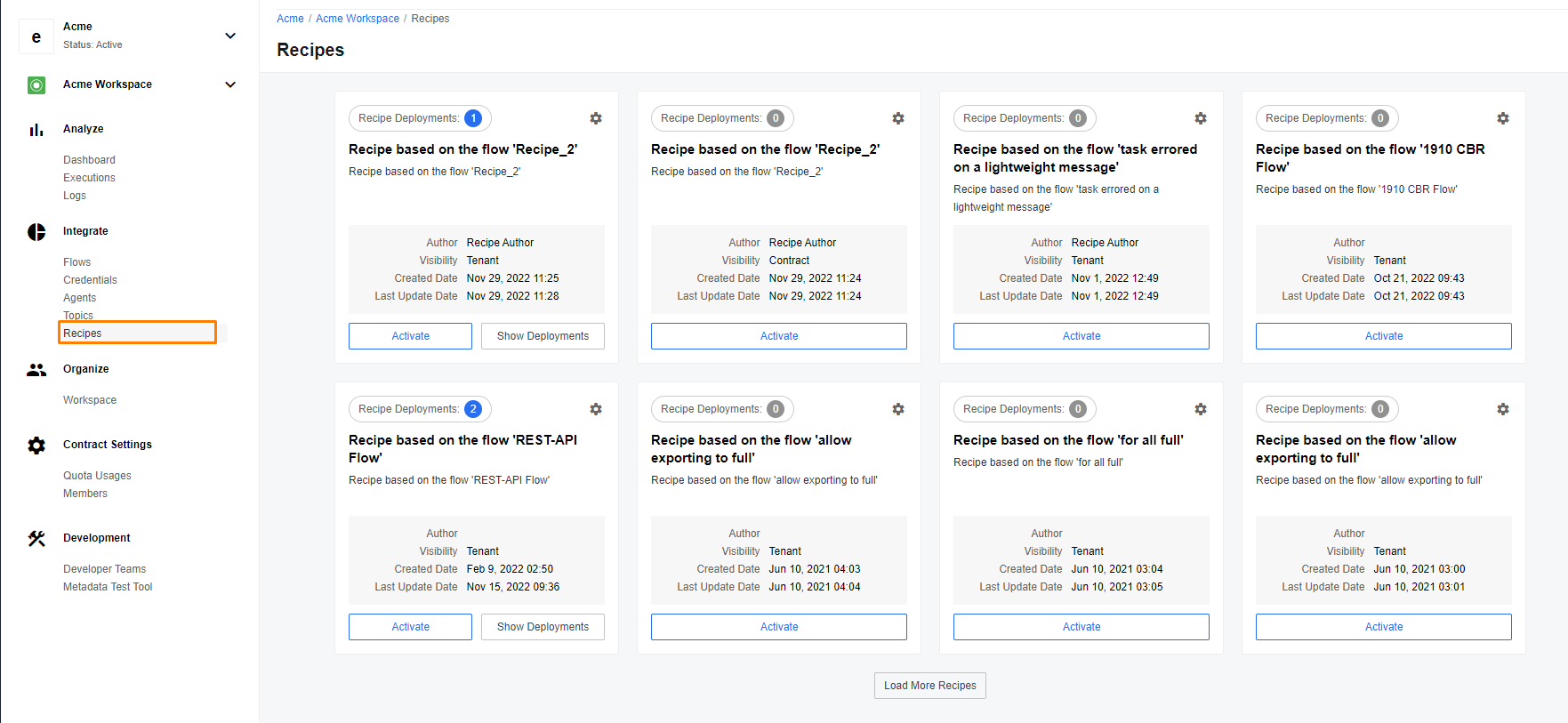
We display the number of deployments of these recipes on each Recipe Card. Each deployment can include more than one integration flows and these we display when you click Show Deployments on the Recipe Card.
You can deploy running integration flows from any listed Recipe by hitting the Activate button.
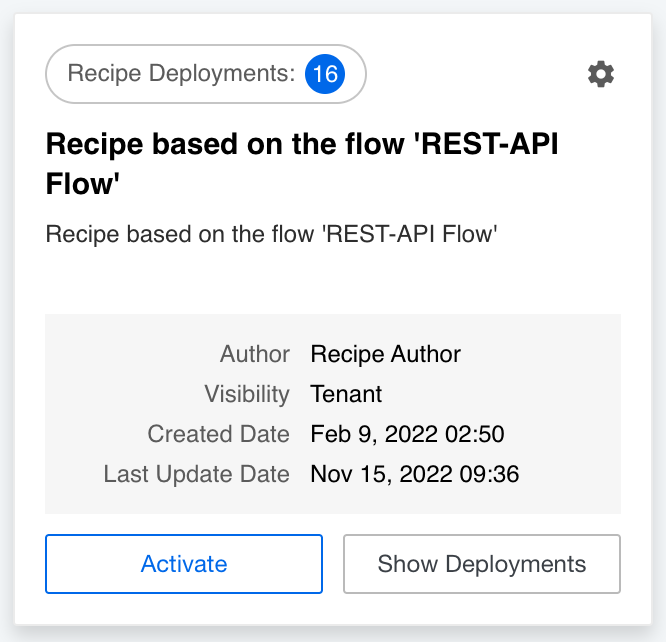
Please note: you can delete the recipe deployment by selecting the cog menu on the recipe card. However, you can only delete recipe deployments with
workspacevisibility and only when you haveAdminrole in the workspace. You can not delete public recipes (those withTenantorGlobalvisibility).
Click on a recipe title on the card to open a dedicated recipe section which includes Recipe and Deployments pages accessible through the tabs on the top. The Recipe page contains information about the recipe. From here you can press Activate to create a flow based on this recipe.
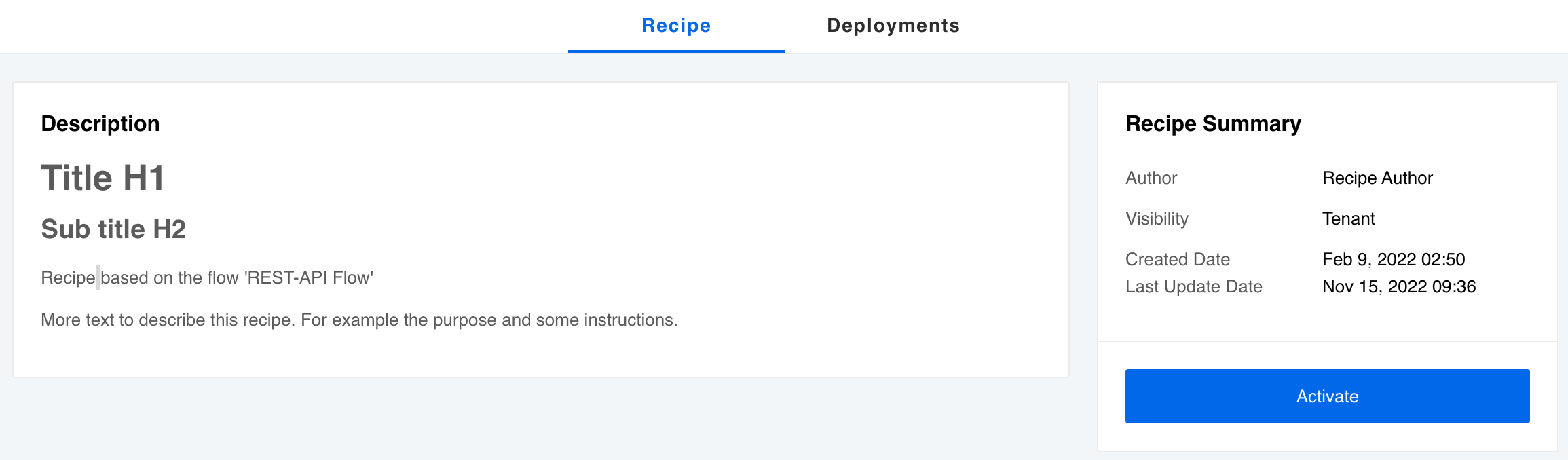
Please Note: we changed the access URL of an individual recipe page. Now it contains the contract ID and has the following form:
{base_url}/c/{contract_id}/w/{workspace_id}/recipes/{recipe_id}
If you have used this recipe before to create a flow, the Deployments page will list them all.
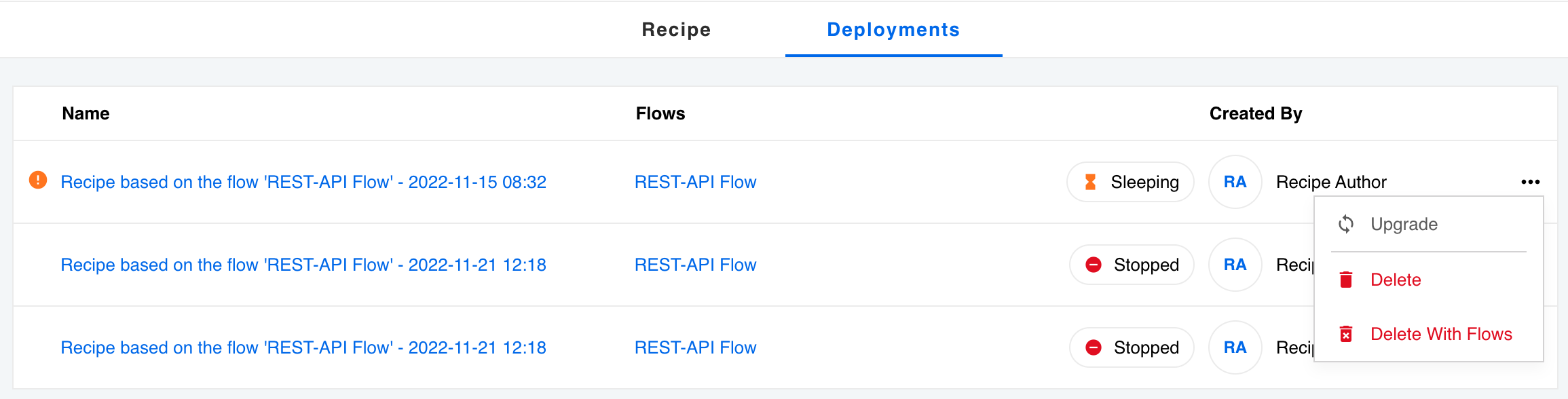
From here you can:
- Open the flows if you have the required workspace access.
- Upgrade the flow using a new recipe version if available.
- Delete the recipe deployment - severing the connection between flow and recipe.
- Delete With Flows - deleting the recipe deployment with the associated flows (one recipe deployment can contain more than one flow).
Improvements (v22.50)
New flow designer graph UI (v22.50)
We continue to improve our flow designer Page. Now when you create or change a flow you will notice a new, more uniform, design with components of the flow displayed inside squares instead of circles.
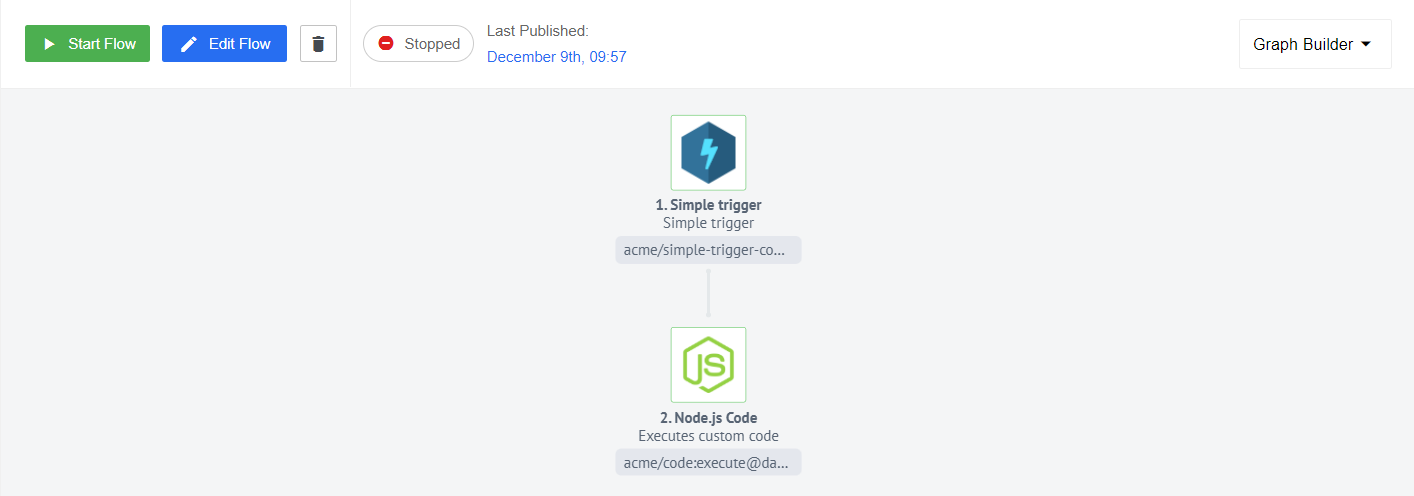
We have also updated designer page graph - now it uses react portal.
Components (v22.50)
Plytix component 1.2.0 (v22.50)
- ADDED
Product Bulkaction
Shopify Admin component 1.6.6 (v22.50)
- UPDATED the
Sailorlibrary version to2.7.1
MongoDB component 1.5.10 (v22.50)
- UPDATED the
Sailorlibrary version to2.7.1
IPaas Core component 1.5.1 (v22.50)
- UPDATED the
Sailorlibrary version to2.7.1
Amazon Selling Partner component 1.0.0 and 1.1.0 (v22.50)
- ADDED
Execute operationAction - ADDED
Make Raw RequestAction
CSV component 3.1.6 (v22.50)
- UPDATED the
Sailorlibrary version to2.7.1
AWS SQS component 1.1.0 (v22.50)
- ADDED
Receive Messages Long Pollingtrigger
Shopware 6 component 1.1.2 (v22.50)
- FIXED schema to support both namings e.g.
product_flatandProduct - UPDATED Limited number of (infinitely in general) nesting depth of ‘parent’ and ‘children’ objects for Products metadata to 1
- UPDATED the
Sailorlibrary version to2.7.1
Product update - v22.52
Released: 2022-12-29
Features (v22.52)
Additing tenant roles (v22.52)
We have changed the name of permission tenants.tenant.edit_roles to global.tenant.edit_roles.
Now PATCH /v2/tenants/:tenantId/roles allows to create a new role with permissions in a tenant scope. We have also updated API endpoint PATCH /v2/tenants/{tenant_id}/members/{user_id} which allows granting any role from the tenant’s scope to any user. The permission tenants.user.generate_one_time_token can be granted to any user inside the tenant.
Abbility to read recipies by SERVICE_ACCOUNT (v22.52)
Our goal is to make easy-to-use recipes. In a recent release 22.48, we have already begun some improvements in this direction. Now we are introducing a new permissionGLOBAL.RECIPE.GET to view all recipes based on the permission’s scope and provide the new permission to SERVICE_ACCOUNT with the Global level. This is the first step in the development of a new feature, in which the new role of the superuser will allow you to review and approve recipes, as well as to change their level up to tenant or global if necessary.
Please Note: All updates related to the API are detailed here.
OEM Related (v22.52)
Scalable Redis Cluster (v22.52)
We are working on the Redis Cluster improvements. We made Redis Cluster scalable according to the load increases. Please follow the instruction below to deploy the cluster:
- Deploy the secrets chart first.
- Deploy bitnami/redis-cluster chart. Ask support for the config.
- Wait until all 3 instances of redis-cluster are up and running.
- Make a regular deployment.
New secrets config variable:
REDIS_CLUSTER_PASSWORD - the password of redis cluster instances.
Fixed bugs (v22.52)
- FIXED bug, where additional fields can’t be saved in faceless credentials.
- FIXED bug, where the step number was duplicated. Now you can change the name of the step, but the step number will remain displayed.
- FIXED bug with red Router branch indicator. Now if you have unconfigured Router branch its panel has a red border:

Components (v22.52)
NetSuite component 3.0.0 (v22.52)
- Breaking change - User credentials authentication mechanism has been removed. As it is no more supported by Netsuite SOAP API
- UPDATED API version to
2022.1 - UPDATED the
Sailorlibrary version to3.4.0 - ADDED
requireddependencies to component.json fields - ADDED Circle.ci job to build and push images to Docker Hub
SAP ByDesign component 2.1.4 (v22.52)
- UPDATED the
Sailorlibrary version to3.4.0
Google Cloud Storage component 1.0.0 (v22.52)
- ADDED
Make Raw RequestAction - ADDED
Upload fileAction - ADDED
Download fileAction - ADDED
Delete fileAction
Router component 1.0.1 (v22.52)
- UPDATED jsonata-moment library to 1.1.5 in order to support Jsonata 1.8.6
- UPDATED the
Sailorlibrary version to2.7.1