Product Updates in 2021 Q3
Product update - v21.27
Released: 2021-07-08
Improvements and Updates (v21.27)
Node.js Sailor 2.6.26 (v21.27)
We released a new Node.js Sailor 2.6.26 which improves the communication and
speed with queueing system. In particular with new sailor we:
- Return to consume-based approach in communication with RabbitMQ.
- Improve the re-connections to RabbitMQ.
Here is the NPM package release link.
Executions page slow loading (v21.27)
With the release we improved the loading speeds of the execution threads. In this scope the following improvements were done:
- Optimised the internal communications between the UI and back-end services.
- The revised and improved the threads list (execution page) and individual threads pages.
- The default time intervals for listing the threads is now 7 days instead of previous 30 days.
We also added a new environment variable to the system (BRAN_RETENTION_MONTHS_MESSAGES)
This variable defines the number of months to store the data for Executions page.
The default value is 1 (1 month).
HELM3 (v21.27)
We are in middle of constantly improving various aspects of HELM3 deployments in collaborations with our partners. These are updates and improvements done in this round.
Redis deployment is optional (v21.27)
To support external Redis service we made the service as optional and the HELM3 charts were changed accordingly. To use en external Redis service follow these steps:
- Set the
values.global.services.maesterRedis.enabledandvalues.global.services.cache.enabledvalues asfalse. This means both Redis services will not be deployed during the deployment. - Add values for the following parameters to use external Redis:
values.global.config.CACHE_REDIS_URI:redis://uri-to-external.redis,- and
values.global.config.MAESTER_REDIS_URI:redis://uri-to-external.redis.
Charts Security Audit (v21.27)
An audit of HELM3 charts were performed to remove any sensitive data like keys, password and credentials from main charts. All sensitive data were migrated into the secrets.
In scope of this audit a new environment variable FRONTEND_SESSION_SECRET was added.
Configure it in Values.global.config.FRONTEND_SESSION_SECRET. It is required value,
without it the platform deployment would not work.
OEM Related (v21.27)
News in this section are for our customers who use OEM version of the elastic.io platform.
Internal IP address for internal communication (v21.27)
With version we changed a logic of internal service communications.
All internal calls to the API would use internal API address from now on. For that
reason the parameter API_URI environment variable value will be computed by Kubernetes
API service URL and not hard-coded. Here are the details of this approach:
- Do not use external IP addresses for communication between internal services. Use
API_URIeverywhere. The tenant record parameter responsible for this isdata/attributes.api_domain. - Deprecate the use of
EXTERNAL_API_URIparameter. - Use
api.elastic.iodefault in the platform UI when displaying the API address if not set in tenant.
Control Number of Contract Users (v21.27)
You can now control number of users in any contract in your tenant. This new
feature works through the platform quota service and has a unique API endpoint
/v2/quotas/per_contract_user_count_limit/TENANT_ID.CONTRACT_ID.
Note: The default value of this quota is
-1, which means unlimited.
As with all types of quotas you need global.quota_limits.edit permission to
apply any values.
When the quota is set for a contract the following rules apply:
- You can not invite a new member to your contract when quota is exhausted. The invitation will not be created.
- You can not add a user via an API call when the quota is exhausted.
- You can not redeem previously sent invitation to the contract when the quota is exhausted in the meantime.
- If the support user functionality is enabled in your tenant then adding support user to your workspace is not counted towards your contract quota.
Quota Release and Apply Process (v21.27)
We extended the /sidedoor/quotatxns/sync endpoint used to sync the quotas during
the release process. This endpoint must be called once to sync the correct numbers
of users in contracts and workspaces with the quotatxns data base.
You must add an extra parameter that represents resource type to sync. Available
types are user and workspace. For example:
/sidedoor/quotatxns/sync/user,/sidedoor/quotatxns/sync/workspace.
For this release you must call the following command to properly sync user data:
curl -u 'username@password' -X POST API/sidedoor/quotatxns/sync/user
You need to use have AccessManager.ACTIONS.GLOBAL.QUOTATXN.SYNC permission to
work with these endpoints.
There is a known issue with sync, it might return 504 if your DB contains large
number of contracts. The sync operations can take anywhere from 30 to 60 seconds
causing a timeout on HTTP proxy. However, the sync operation will continue in
background to a successful completion.
Bran and Clickhouse Optimisation (v21.27)
If you are running ClickHouse in replica set continue reading.
On this round of optimisation we optimised the bran service by creating new
tables and views in ClickHouse. To apply you must run the following command
for each replica after the installation of version:
docker run \
-e LOG_LEVEL=info \
-e AMQP_URI= \
-e MONGO_URI= \
-e BRAN_CLICKHOUSE_URI="http://localhost:8123/bran" \
--rm --network=host elasticio/bran:21.27 npm run start:migrate
Don’t forget to change the BRAN_CLICKHOUSE_URI to your replica URL.
Fixed Bugs (v21.27)
- Addressed the failed to fetch
step_idand related problems from amqp routing key in case when an old node.js sailor (earlier than2.3.0) library is used in the component. - Fixed the problem of hard-coded session secret. A new required environment variable
FRONTEND_SESSION_SECRETis introduced.
Components (v21.27)
REST API component (v21.27)
- FIXED OAuth2 authentication strategy limitation:
refresh_tokenproperty is now optional for Access Token Response (also optional in OAuth2 standard).
Delta Detection Component (v21.27)
- REFACTORED to
maester-clientlibrary based onobject-storage-clientlibrary. - UPDATED to sailor version
2.6.24.
Product update - v21.31
Released: 2021-08-07
Features (v21.31)
Regenerate your REST API Key (v21.31)
The introduced a new opportunity to regenerate your personal API key you use to authenticate your calls with the platform REST API.
You have two options, either using a new Generate new API Key button in
your profile page or using a
HTTP POST to the new API endpoint /v2/users/me/generate-api-key. In both cases
the platform will generate a new API Key and store it in the Database
Please Note Generating a new API key will replace the existing API key. If a new API key is generated, then API calls made with the old API key will fail.
Two-factor Authentication (v21.31)
We introduce two-factor (2FA) login authentication to provide an additional layer of security. We use Google Authenticator for the 2FA. If the feature is enabled in the tenant then you can enable it for your account following the instructions in the profile page.
Component Whitelisting (v21.31)
With the platform version we introduce a new feature called Component Whitelisting. In verbatim this means we can enable or disable certain integration components in each contract based on the list of components - the Component Whitelist. If the component whitelist is enabled in the tenant the following rules would apply in each contract:
- You have access to all components available in your tenant while working in the developer (limited) workspaces.
- You can only build integration flows using the available components (whitelisted components) in your production workspaces. Not included components would not show in your production workspaces while building an integration flow.
- You can not export an integration flow from the developer workspace to production workspace if the flow contains a component not included in the whitelist.
- You can not create a recipe with a contract level access when the recipe uses a component not included in the whitelisted components for the contract.
- The developer workspace will not be converted to a production workspace in case when at least one step of one flow in your developer workspace uses not whitelisted component.
- All native components from your contract with
teamaccess level would still be available in your production workspaces.
Remove pending Contract invites (v21.31)
With platform we added support for deleting pending invitations to contracts using UI and API.
Now you can delete the user invitation by visiting Members section of the Contract Settings, scrolling down to find the list of Pending Members and clicking to delete. Check the following documentation page for more details.
You can also delete the invitation using the API call.
HELM3 (v21.31)
We are in middle of constantly improving various aspects of HELM3 deployments in collaborations with our partners. These are updates and improvements done in this round.
Kubernetes Namespaces (v21.31)
With release we remove Kubernetes namespace hard-coding from our charts to integrate the platform into more Enterprise friendly infrastructures.
IMPORTANT To deploy the platform version on top of your existing cluster you would need to re-create the entire kubernetes cluster. We recommend to announce maintenance run since the platform would be down for 10-15 minutes.
Here are the steps necessary for a successful platform deployment:
- Delete existing namespaces OR uninstall helm release (IMPORTANT: this step will delete the cluster).
- Create following namespaces in kubernetes cluster (the
nameandlabels.nameshould be equal to values provided in thevalues.global.namespacesof HELM3 charts):apiVersion: v1 kind: Namespace metadata: labels: name: <monitoring_namespace_name_from_values> name: <monitoring_namespace_name_from_values> --- apiVersion: v1 kind: Namespace metadata: labels: name: <platform_namespace_name_from_values> name: <platform_namespace_name_from_values> --- apiVersion: v1 kind: Namespace metadata: labels: name: <tasks_namespace_name_from_values> name: <tasks_namespace_name_from_values>The labels are important to platform’s network functionality.
- Install the helm release.
AWS Network Load Balancer support (v21.31)
Platform version includes the support of the AWS Network Load
Balancer for ingress LoadBalancer. Here are the details of this change:
- We introduce a new storage type (for the AWS cloud provider)
aws-efs-csi-driver. This means the AWS EFS storage type is supported in case when Amazon EFS CSI driver is installed on the EKS cluster. You can see more details in the Amazon EFS CSI driver configuration documentation. Here is an example configuration for your guidance:storage: slugsSubPath: “slugs” stewardSubPath: “steward” storageClassName: “platform-storage-slugs” persistentVolumeClaimName: “platform-storage-slugs-volume-claim” type: “aws-efs-csi-driver” config: name: “platform-storage-slugs-volume” path: “/pss” size: “20Gi” gid: 1502 fileSystemId: fs-03f24358 # AWS EFS file system ID - We added the parameter for the AWS Network Load Balancer (NLB). Use
global.cloudProvider: AWSin your configuration to enable this (HELM3 values). - We added also support for the Secured docker registry. To enable the following configuration must be provided in the HELM3 chart:
global.services.dockerRegistry.secured: true
global.services.dockerRegistry.tlsSecretName: "docker-registry-tls"
global.services.certificates.dockerRegistry.name: "docker-registry-tls"
global.services.certificates.dockerRegistry.key: "<<base64 encoded key>>"
global.services.certificates.dockerRegistry.crt: "<<base64 encoded certificate>>"
Please Note:
- Certificate CN should match domain name specified in the
global.services.dockerRegistry.loadBalancerIp, - The docker registry load balancer does not support external load balancer type yet. Created domain must be bound to the private ip address.
Two-factor Authentication Enabling (v21.31)
For 2FA we use Google Authenticator mechanism. To enable the 2FA on the tenant you must perform the following steps:
- Set a new parameter called
USER_TOTP_CRYPTO_PASSWORDin the platform secrets part of the HELM3 charts. You must generate it in advance (likepwgen -s 32 -n 1 -B). If this value is not set all the following steps will fail. - Set the new tenant level parameter (switch)
attributes.feature_flags.enabled_totptotrueusing aPATCHto/v2/tenants/{TENANT_ID}record (admin access). - When user enabled the 2FA and fails to login for some reason you can
POSTto a new API endpoint/v2/users/:id/disable-totpto clear 2FA setup and enable user to login again using only username and password (admin access).
Support HTTPS for docker registry URI (v21.31)
With this release we added HTTPS for external docker registry URI.
OEM Related (v21.31)
News in this section are for our customers who use OEM version of the elastic.io platform.
ClickHouse replication instructions (v21.31)
To facilitate installation of ClickHouse and the required dependencies to run in the High Availability mode we added the following documentation pages:
Enabling Component Whitelisting (v21.31)
The newly introduced Component Whitelisting feature
includes changes and parameters only accessible to the tenant administration. Before
you can use the component whitelisting you must enable a dedicated tenant level
parameter (switch) attributes.feature_flags.contract_component_whitelist. Set
it to true using a PATCH to /v2/tenants/{TENANT_ID} record (admin access).
When the tenant level switch is enabled, the system will start the migration and add IDs of all contracts to the components records in cases when the component is used in integration flows of production workspaces. Any subsequent new contracts would only have access to all components in the developer workspaces.
Flow network isolation (v21.31)
With this release we investigated and implemented integration flow complete network isolation. The traffic is now restricted to/from step pods. Only allowed connection to services required for the runtime.
Fixed Bugs (v21.31)
- Addressed the problem when it was not possible to join the Contract via invitation letter in case login with OIDC (Login using Google credentials)
- Fixed UI bug
Invalid '0' value in the required fields with type 'number'. - Addressed and standardised Maester’s Redis. Sometimes it used to leave incomplete object keys and Maester would not regard this as problem.
Components (v21.31)
Splitter component 1.2.1 (v21.31)
- ADDED support of maester storage in
Re-assembled messageaction (maester-client library 3.3.0)
CSV component 3.0.0 (v21.31)
We released a new version of the component which is not backwards compatible. Users are encouraged to investigate the CSV component documentation to learn about the new component.
The component will not be deployed on top of the old component repository, you can
keep using the old component. At some stage we will deprecate the old one. The new
component is available as csv-v3 component in your components list.
- ADDED new following actions:
Read CSV attachmentCreate CSV From Message StreamCreate CSV From JSON Array
- DELETED the following functions:
Read CSV attachmenttriggerWrite CSV attachmentWrite CSV attachment from JSON ArrayWrite CSV attachment from JSON ObjectRead CSV file from URL
id-linking-component 1.0.1 (v21.31)
- UPDATED to sailor version
2.6.26 - UPDATED to Maester client library version
3.0.0
Delta Detection Component 2.0.1 (v21.31)
- UPDATED to Maester-client version
3.3.0
Google PubSub component 1.7.3 (v21.31)
- FIXED the bug with not-awaited emits and endless cycle
Maester component 1.0.0 (v21.31)
We introduce new component for working with platform native object storage called Maester.
- ADDED the following actions:
Delete ObjectLookup Object (at most one)Lookup ObjectsUpsert Object
Utility Component 1.3.0 (v21.31)
- ADDED new action:
Delay - UPDATED the sailor version to
2.6.26and build type todocker
Product update - v21.33
Released: 2021-08-19
New Release Schedule (v21.33)
With the platform version we are changing the schedule of release notes to every 2 weeks instead of every 4 weeks to synchronise with the release of HELM3 charts. Our commitment to deliver release to our OEM customers every 4 weeks remains unchanged.
Improvements and Updates (v21.33)
Platform software version (v21.33)
Starting from the version you can clearly identify the platform software version in the UI and in the header of every authorised API call response.
Please note This is an optional, configurable setup and your tenant administration might choose not to show this information in your case.
On the UI the platform version is shown along with the bottom links of privacy policy, terms of service and Imprint.
The authorised API call response would contain the platform version in the header
x-ipaas-platform-version parameter.
HELM3 (v21.33)
We are in middle of constantly improving various aspects of HELM3 deployments in collaborations with our partners. These are updates and improvements done in this round.
Platform version parameter (v21.33)
With introduction of platform software version option
we added a new configuration parameter Values.global.displayPlatformVersion in
the HELM3 charts with a default value true (to show on the UI).
PSS deprecation and backward compatibility (v21.33)
With the deprecation of Platform Storage Slugs service we introduce a parameter which you can used to ensure backward compatibility in cases when you wish to keep the attachments longer in your installation.
A standard procedure is to save the attachment for the period of integration flow
execution process. This is determined with a parameter STEWARD_ATTACHMENTS_LIFETIME_DAYS
which we recommend to set 1 or 2 days. If your system setup has longer periods set
for attachments then you must set the PSS_BACKWARD_COMPATIBILITY parameter in the
values.yaml of the HELM3 chart to true so your system can use the old attachments
created before the deployment of platform version.
Please Note We recommend keeping the
PSS_BACKWARD_COMPATIBILITYparametertruefor the period indicated in yourSTEWARD_ATTACHMENTS_LIFETIME_DAYSparameter and setting it tofalseafter the indicated period of over.
OEM Related (v21.33)
News in this section are for our customers who use OEM version of the elastic.io platform.
Deprecation of Platform Storage Slugs (v21.33)
From the platform release we are deprecating the Platform Storage Slugs (PSS) service and transferring all attachment and objects storage capabilities to our Maester service. This deprecation would not be felt by the regular users of the platform. All existing endpoints to submit and retrieve attachments will not change. The following change will take affect in the back-end of the platform:
- The
buildType: dockerwill be the only supported build process. We will enforce it even if it is not explicitly set in thecomponent.jsonof your component. This will prevent saving the components code as slugs (the old method). - Steward service, responsible for working with attachments, will work with the Maester as back-end instead of the PSS.
Please Note Deprecation of PSS service is applicable/relevant for existing on-prem installations of the platform. All new installations from the version are not affected.
Improvements for AKS support (v21.33)
With release we extended and improved the AKS (Azure k8s) support. In particular:
- Support for internal load-balancer in AKS run system. To enable set the
Values.global.cloudProviderto"AZURE". - Support for log collection in
criandjsonformats for cases withcontainereddeployments.
Components (v21.33)
Maester component 1.0.1 (v21.33)
- ADDED new nice logo!
- FIXED bug with Lookup Object action error handling
Salesforce component 2.1.0 (v21.33)
- ADDED new action:
Raw Request - ADDED new action:
Upsert Object - DEPRECATED old
Upsert Objectaction - UPDATED
Get New and Updated Objects Pollingtrigger:- Default size of pages to be fetched changed from
1000to10000 - Restriction
maxFetch should be maximum 10000 objectsis removed
- Default size of pages to be fetched changed from
REST-API component v2 2.0.10 (v21.33)
- FIXED bug with response charset
utf-16le
Exact Online Component 1.1.1 (v21.33)
- FIXED tests preventing the deployment
- UPDATED the nodejs sailor version to
2.6.26
Build fixed for following components: (v21.33)
- Amazon MWS Component
- NetSuite Component
- Dun-and-bradstreet Component
- JDBC Component
- Bazaarvoice Component
Product update - v21.35
Released: 2021-09-02
Improvements and Updates (v21.35)
Deprecated components (v21.35)
Starting from the release you can not choose the deprecated components to build your integration flows. The following rules will apply:
- The platform will not show the deprecated components in the designer when adding a new step.
- For the existing flow steps where deprecated components are used, the platform will show these components until you choose another component instead. After this the deprecated component would be hidden.
- The platform will not show the deprecated component in the credentials section unless you still have credentials associated with them.
Improvements for input fields (v21.35)
While mapping the values the platform UI used to hide the buttons below the input fields for switching between mapping modes (integrator/JSONata) and the mapping preview. You could see these buttons only when you move you mouse over the input fields.
With release the mapping modes and previous buttons show permanently.

HELM3 (v21.35)
We are in middle of constantly improving various aspects of HELM3 deployments in collaborations with our partners. These are updates and improvements done in this round.
Support for AKS logs and metrics (v21.35)
To support metrics collection in case when the containered runtime is used
(for example AKS) in your cluster, we introduce a new global.containerRuntime
parameter to HELM3 charts (global values.yaml). It can have two values
docker (default) or containerd.
With the platform version we added an improved logs and metrics collection
for AKS (Azure Kubernetes Service) based clusters. To enable it set the parameter
global.containerRuntime to containerd instead of the default docker.
PSS deprecation finalisation (v21.35)
In the last release we reported about PSS deprecation. With the current we complete the process by making the PSS dependence optional.
- For the existing installation the PSS service will become read-only. Meaning you can read the stored files only, not write. For this purpose you must keep
.Values.global.services.pss.enabledastruein the HELM3 configuration. - All new platform installations will not have the PSS service.
- In cases when you use
s3for the docker registry and the PSS is disabled (the default), the associatedpv/pvcwill not be created.
Redis Sentinel support (v21.35)
With we introduce support for Redis Sentinel as en external redis
for the Maester and other internal caching solutions. To use it, ensure related .Values.global.config.*_REDIS_URI
value is not set and the new values for connecting to Sentinel are correctly set.
Here are the newly introduced HELM3 values and their descriptions:
.Values.global.config.CACHE_REDIS_SENTINELS- Configuration for our caching solution based on Redis. List of sentinels to connect to. Format: array of objects withhostandportvalues..Values.global.config.CACHE_REDIS_SENTINEL_NAME- Configuration for internal caching solution based on Redis. Identifies a group of Redis instances composed of a master and one or more slaves..Values.global.config.CACHE_REDIS_SENTINEL_PASSWORD- Configuration for internal caching solution based on Redis. Password to authenticate with Sentinel..Values.global.config.MAESTER_REDIS_SENTINELS- Maester’s Redis configuration. List of sentinels to connect to. Format: array of objects withhostandportvalues..Values.global.config.MAESTER_REDIS_SENTINEL_NAME- Maester’s Redis configuration. Identifies a group of Redis instances composed of a master and one or more slaves..Values.global.config.MAESTER_REDIS_SENTINEL_PASSWORD- Maester’s Redis configuration. Password to authenticate with Sentinel.
OEM Related (v21.35)
News in this section are for our customers who use OEM version of the elastic.io platform.
Optional VPN and old Agents (v21.35)
If the platform services bloody-gate and knight-of-the-bloody-gate are
not deployed the agents section, as well as possibility to select Agent while
creating credentials will not show on UI. The platform will not accept
calls to /v2/agents/vpn API endpoint as well.
Fixed Bugs (v21.35)
- Addressed the problem when it was not possible to export the flow to recipe in the same workspace if flow contained components with a Team visibility.
Components (v21.35)
No new development were made for components in the release .
Product update - v21.37
Released: 2021-09-16
Features (v21.37)
Update components in all flow steps (v21.37)
We introduce a new feature to help update the components in all steps of your integration flow in one go. A new button Update All Components will appear in the flow designer if your flow has steps which run on older version of the component.
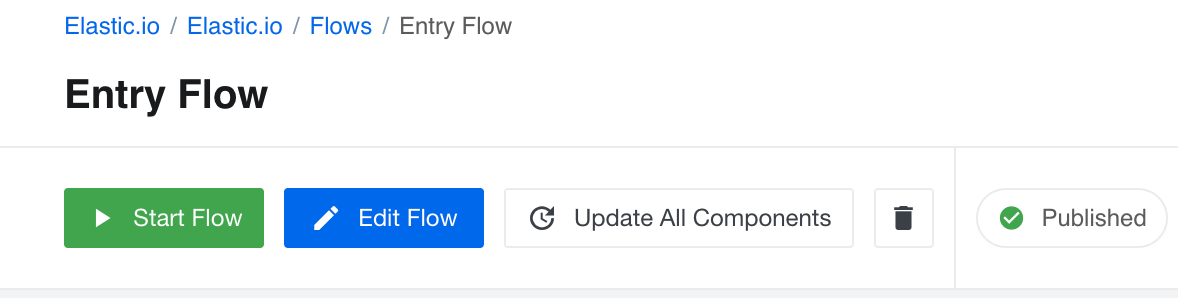
The following rules apply with this new feature:
- The Update All Components button will appear in case when the flow draft has one or more steps using an older version of the component.
- By clicking on this button the platform will upgrade all steps to use the latest available component version - not the
latestalias. - If your flow has a step running an outdated component version, by clicking on the Update All Components button the system will create a new draft of this flow with an updated latest component version - not set the
latestalias. You can review your flow and publish it essentially upgrading all steps.
For more information go read the article on this topic.
Try metadata tool (v21.37)
With the platform version we decided to reveal one of our internal tools our team uses to render the component metadata structures to see how they would look on the platform UI. You can experiment and refine the metadata structure before committing it to your custom component code. We hope this tool will be as useful for you as for our component developer team.
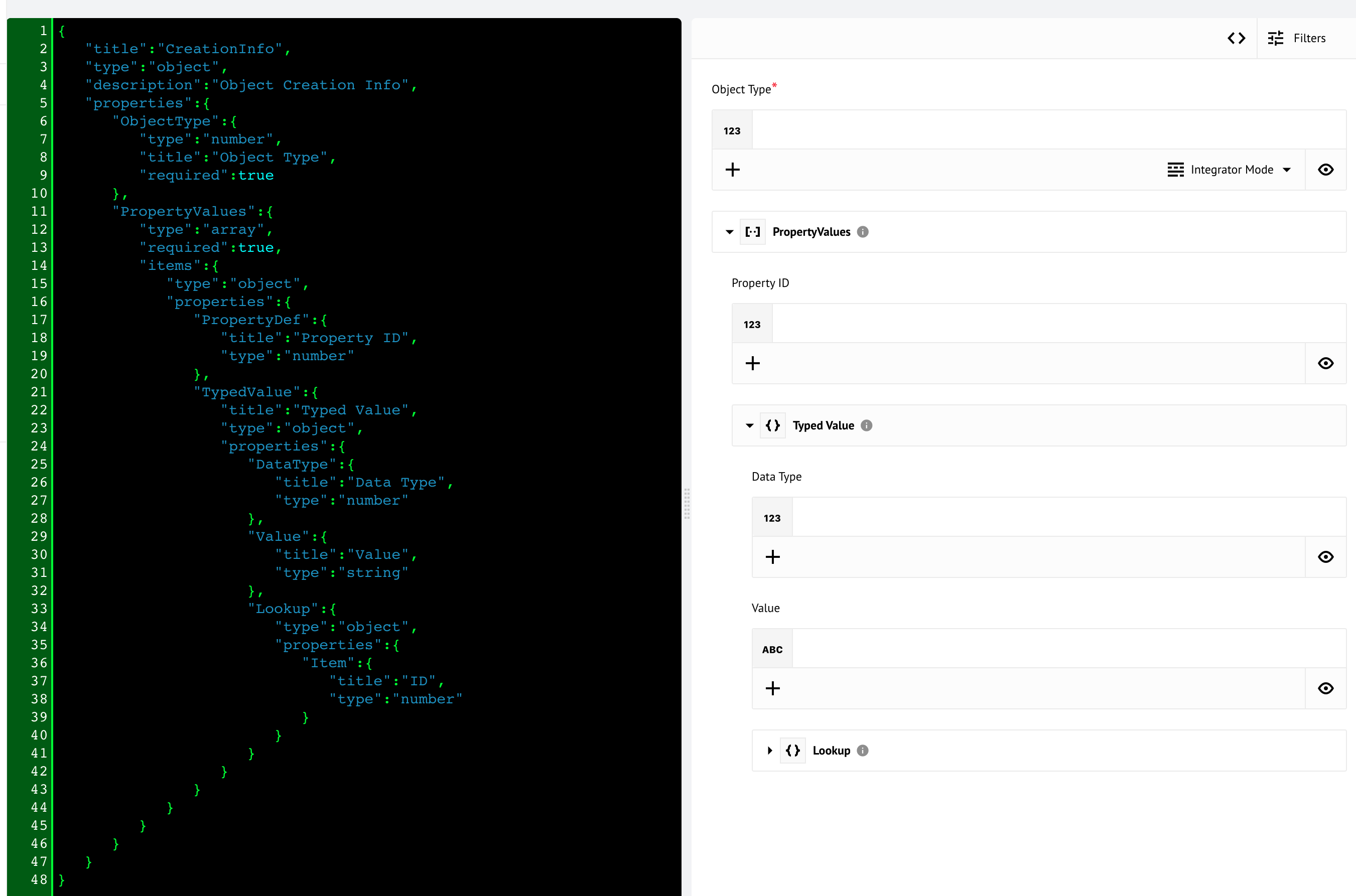
To access this tool navigate to the URL APP_ADDRESS/c/CONTRACT_ID/try-component-metadata
where the APP_ADDRESS is the address of the platform app https://app.elastic.io
and the CONTRACT_ID is your contract ID shown in your browser address bar between
/c/ and /w/ while visiting the platform UI. As of this moment there is no direct
navigation link from the left-hand-side menu.
For more information go read the article on this topic.
HELM3 (v21.37)
We are in middle of constantly improving various aspects of HELM3 deployments in collaborations with our partners. These are updates and improvements done in this round.
Secrets charts separation (v21.37)
In the platform release we separated the secrets chart creation from the platform charts following the best practices guidelines of the kubernetes secrets management.
You are free to choose your method to store secrets. You must define these secrets in the kubernetes before the platform version deployment.
Deployment after secrets separation (v21.37)
These instructions apply when you have previously deployed platform version and need to upgrade to the latest .
- Scale down the
stakater-reloaderto0instances. - Delete existing secrets in the
platformandtasksnamespaces (kubectl delete secrets --all -n platformandkubectl delete secrets --all -n tasks). - Deploy all required secrets for the platform.
- Deploy the version of the platform.
- Delete
wiperjob in kuberneteskubectl -n platform delete jobs -lapp=wiper. The system will restart it.
Note: You need to do steps 1 and 2 once. The
stakater-reloaderwill scale-up automatically during the platform installation. No need to scale it up manually.
Components (v21.37)
JDBC component 2.4.5 (v21.37)
- IMPROVED the component by opening only one connection pool per one execution and reusing it.
Product update - v21.39
Released: 2021-09-30
Features (v21.39)
Development section (v21.39)
With the platform release version we introduce a separate sub-section to the navigation menu to logically separate the component Development from the rest. A new Development section includes the link to Developer Teams as well as the try metadata tool (mentioned in the 21.37 release).

The development teams are no longer linked from the contract management screen. Contract Members, Workspaces and the Quota Usages are still accessible via the Contract Settings section.
Improvements and Updates (v21.39)
The release contains number of improvements under the hood which are not obvious for the users. Our team worked hard to:
- Improve the alerting of some edge cases when some micorservices would report false failed hatchecks.
- Extend the internal metrics collection from all microservices to Prometheus.
- Improve error handling for non-2xx responses from the Mandrill which is used to send platform emails. This improvement would allow troubleshoot cases of failed email sends.
OEM Related (v21.39)
News in this section are for our customers who use OEM version of the elastic.io platform.
Developer section (v21.39)
Newly added Development section can be hidden if desired via the following CSS parameters:
[data-key="developer-teams"] {
  display: none!important;
}

[data-key="metadata-test"] {
  display: none!important;
}

[data-key="development"] {
  display: none!important;
}
HELM3 (v21.39)
We are in middle of constantly improving various aspects of HELM3 deployments in collaborations with our partners. These are updates and improvements done in this round.
Certificate Manager (v21.39)
With platform version we introduce a possibility to manage the SSL
certificate using the certificate manager of your choice. The following changes were
made in the Handmaiden platform microservice:
- We introduce new optional environment variable called
CERT_MANAGER_ISSUER_NAME. - If the
CERT_MANAGER_ISSUER_NAMEis specified, then will use the issuers for the ingresses, created by handmaiden tenant-operator. You do not need to create secrets in this case. - We also introduce the
CERT_MANAGER_ISSUER_KINDvariable. Default value:issuer. Use this value for the issuer annotation. If theCERT_MANAGER_ISSUER_KINDis equalcluster-issuer, use cert-manager.io/cluster-issuer annotation in the created ingresses. - Default tenant certificate is optional (not created if not provided).
For the HELM3 declare the configurations and bind it to the handmaiden environment variables like:
    handmaiden:
      issuer:
#        name: letsencrypt-issuer
#        # Available values: issuer/cluster-issuer
#        kind: issuer
Fixed Bugs (v21.39)
- Fixed the platform API service response incorrect code (
5xx) while making an HTTPPOSTcall to the/v2/contracts/{CONTRACT_ID}/(un)suspend. Now the API responds with204if you try to un-suspend an active contract and with202if the contract is already suspended and you try to suspend it one more time.
Components (v21.39)
Snowflake Component 1.0.0 (v21.39)
- ADDED new actions:
Custom queryInsertLookupRowByPrimaryKeyDeleteRowByPrimaryKeySelect
Shopify component 1.4.2 (v21.39)
- ADDED a new action called
Make Rew Request - UPDATED the node.js sailor version to
2.6.26
Splitter Component 1.3.0 (v21.39)
- UPDATED the
Re-assemble messageaction. Implemented option to select processing behavior of incoming messages.