Product Updates in 2023 Q1
Product update - v23.02
Released: 2023-01-13
Fixed bugs (v23.02)
- FIXED bug, when the values in the dropdown menu for the component credentials did not pass to the OAuth popup window.
- FIXED bug, where
POST v2/recipe-deployments//syncreturns the HTML status code 500 when timeouts occur. - FIXED bug, which caused recipe
GETto return data sample ID instead of its contents. - To update the credential description, send the whole
credentialsarray on thePATCHcall. It will override the existingcredentialsarray instead of merging it with existing values. - To update the step name, send the whole
flow_templatesarray on thePATCHcall. It will override the existingflow_templatesarray instead of merging it with existing values. - Please visit API Docs for more information.
- FIXED bug, when retrieving a data sample would timeout on the user interface even though the logs would show a successful execution.
Components (v23.02)
Google Cloud Storage component 1.1.0 (v23.02)
- ADDED
WebhookTrigger
Stripe component 1.1.0 (v23.02)
- UPDATED internal library from
stringifytoqs.stringifyto properly encode JSON data intoapplication/x-www-form-urlencodedas required by the Stripe.
Plytix component 1.3.0 (v23.02)
- ADDED new option
Return full objectinGet New and Updated Objects PollingTrigger - FIXED missing metadata in
Get New and Updated Objects PollingTrigger
Delta-Detection component 2.2.0 (v23.02)
- ADDED
Delete Object/RecordAction - REMOVED sensitive data from logs
- UPDATED the
Sailorlibrary version to 2.7.1 - UPDATED the
maester-clientversion to 5.0.1
Zoom Webhook component 1.0.0 (v23.02)
- ADDED
WebhookTrigger
Kafka component 1.0.0 (v23.02)
- ADDED
ProduceAction - ADDED
ConsumeTrigger
Email component 1.2.4 (v23.02)
- FIXED a typo in logs
Product update - v23.04
Released: 2023-01-26
Improvements (v23.04)
Embedded Recipe Page: Recipe Credentials Edit (v23.04)
We previously introduced the ability to add new credentials for a deployed recipe via an embedded page in a 3rd-party site or app. Today we introduce the ability to create an embedded page for editing credentials for a single recipe deployment. For this purpose we have created a new API endpoint GET /v2/recipe-deployments/:recipe_deployment_id. This endpoint requires same permissions and scopes as in /v2/recipe/:recipe_id?include=recipe-deployments.
Please visit API Docs for more details on this API endpoint.
For more informaition on Embedded recipe deployment please read this article.
Create/Edit Recipe API-Call (v23.04)
We are introdusing POST /v2/flows/export-to-recipe API Call. With this call you can:
- export a set of flows to a recipe.
- update existing recipe with set of new flows.
This new, more powerful endpoint, replaces the old one - POST /v2/flows/${flowId}/export-to-recipe. Please visit API Docs for more details.
Flow Queues improvements (v23.04)
Before, the Flow Queues page displays the components inverted according to the flow graph (e.g if graph contain fork or content-based router) and don’t display the step name, only the number.
Now we render step name on Flow Queues page (like on Flow Designer) and render flow graph at Flow Queues, Runlog Execution, Thread pages in the same way as at Flow Designer page.
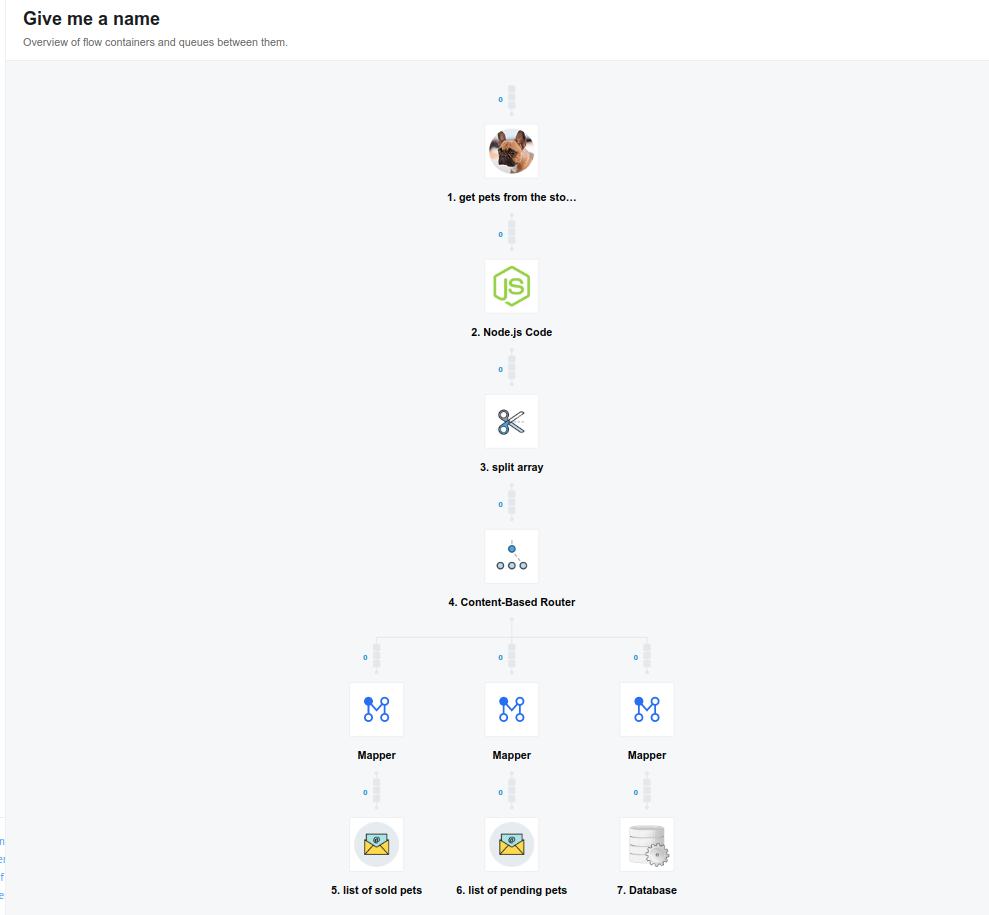
Maximum frequency of flow scheduling changed to 10 minutes (v23.04)
As part of our work to make the platform more robust and tolerant of high loads, we have decreased the maximum frequency of scheduling a flow to start. This default setting ensures that flows will be started more precisely. Even if the flow schedule is defined in the settings page as running every 3 minutes, these flows will now run only every 10 minutes.
Customers wishing to trigger flows more frequently must change the flow to run in Real-time mode.
OEM Related (v23.04)
OEM Fixed bugs (v23.04)
- FIXED bug, where the TCP connections were inefficiently making requests from our API to Elasticsearch during mass log retrieval. For this purpose we have created a singleton Elasticsearch client that will be used by
v2/logs
Fixed bugs (v23.04)
-
FIXED bug, where the flow-queues page would not load directly after a draft-version of a previously published flow was published.
-
FIXED when the Credentials and Recipe page would not load in cases where the user did not have permission to access auth secrets. Now, the UI shows a message with an error.
Components (v23.04)
Shopify Admin V2 component 2.0.0 (v23.04)
- ADDED
Make Raw RequestAction
AWS SQS component 1.1.1 (v23.04)
- SET Visibility Timeout for
Receive Messages Long Pollingtrigger to SQS server timeout by default
Pimcore component 1.0.0 (v23.04)
- ADDED
Raw RequestAction
Product update - v23.06
Released: 2023-02-09
Features (v23.06)
New Recipe create/edit UI features (v23.06)
As a continuation of the updates introduced in Release 23.04, we have added new features related to recipes:
Please Note: that all Recipe functionality is released as PREVIEW to all Users. In the coming 2 months we will restrict Recipe functions to Users with Tenant-level access. Users with Enterprise subscription access will be able to access Recipe functions as an upgrade to their subscriptions.
If you would like more details or an offer, please contact sales@elastic.io
-
ability to select multiple flows to export to recipe
-
update an existing Recipe
All the changes start from the Flows page. First you have to start with exporting a flow to a recipe:

Then you can select multiple flows to export and then click the corresponding button:

In the new recipe window you can configure your recipe. You can name your recipe (1) and give it a description (2) - this field supports Markdown. You can also give a description to credentials - this is especially important if you are embedding the credentials step into a 3rd party site! - (3) and set up visibility (4). After finishing configuration click on Save:

You can also update an existing recipe. In the Save as drop-down please select the option Update existing recipe Find a recipe you want to update in the drop-down list and select it:

Please Note: During the configuration process, you will need to specify credentials for all components in the recipe where they are required:

New Recipes Articles (v23.06)
In connection with the latest updates to the recipes feature, we have updated and supplemented our articles on the topic of recipes. You can:
- learn about the recipes themselves and how to create them, their deployment and access rights
- read guides on Embedded recipe and Embedded recipe deployment
- better understand how recipes work with the help of our Use cases
Improvements (v23.06)
Autostart flows on Recipe activation (v23.06)
We improved the behavior of v2/recipes/:recipe_id/activate endpoint.
You no longer need to start flows after activating a recipe - created flows are starting automatically.
Fixed bugs (v23.06)
-
FIXED bug, where fake container error
The container could not be located when the pod was deleted. The container used to be Runningappears in Runlog. -
FIXED bug with recipe activation URL. We set back the recipe URL to
{base_url}/recipes/{recipe_id}. -
FIXED bug when quota throw an error when copying multiple flows concurrently.
Components (v23.06)
Microsoft Dynamics CRM v2 component 1.2.0 (v23.06)
- ADDED
Upsert ObjectAction - UPDATED the
Sailorlibrary version to 2.7.1
Salesforce v2 component 2.5.1 (v23.06)
- FIXED issue with
431and414errors inGet Updated Objects Pollingtrigger - ADDED new configuration field
Selected FieldsinGet Updated Objects Pollingtrigger
Product update - v23.08
Released: 2023-02-27
Features (v23.08)
Configurable Recipe Use for Contracts (v23.08)
As a continuation of the updates introduced in Release 23.06, we have added new features in recipe management. This feature allows Tenant Admins to control which users are allowed to create/edit Recipes (by default, all users can use the recipes feature). You can set it up with a new permission tenants.contract.edit_feature_flags - allow to set the feature flags for Contract.
In this regard, POST and PATCH v2/contracts endpoins were changed - added an ability to set the feature flags for Contract.
Please Note: this permission belongs to tenant admins by default.
Here you can see an example of a request body:
{
  "data": {
    "type": "contract",
    "attributes": {
      "name": "Contract name",
      "available_roles": [
        {
          "scope": "contracts",
          "role": "admin"
        }
      ],
      "flow_stats_enabled_default": true,
      "support_user_id": "5b4f337bff4304610483ba67",
      "custom_data": {
        "description": "Contract description"
      },
      "feature_flags": {
        "disable_recipe_feature": true
      }
    }
  }
}
Please Note: “disable_recipe_feature” set to “false” be default.
Extend the UI view class RESTAPIView with the application/x-ndjson (v23.08)
We transformed “Content type” dropdown on the “Body” tab of the REST API v2 component to a text field with a dropdown of a hints:

- the hints appear when your cursor is over the field and list reacts when you enter characters into the text field.
- you can choose an item from the hints dropdown
- if no existing entries meet your needs, you can enter your custom content type and save it
- we validate Content-type header according to list of all the official MIME types.
Reducing the refresh time of auth-secrets (v23.08)
We now refresh auth-secret tokens closer to the token expiry. This change to 30 seconds before expiry (it used to be 60 seconds) is because various external APIs do not allow refreshes 1 minute before expiry (as example, ExactOnline) don’t allow to refresh secret very early.
Improvements (v23.08)
Change the text of the buttons “Delete” to “Unlink” (v23.08)
We continue to work towards the recipes feature. In this release we have changed the text in context menu and modals for managing recipe’s deployments in the next way:
- “Delete” to “Unlink”
- “Delete With Flows” to “Unlink and Delete Flows”
HELM3 (v23.08)
We constantly improve different aspects of HELM3 deployments in collaboration with our partners. This section lists updates and improvements included in this release.
New HElM enviroment variable (v23.08)
We are introducing a new HELM enviroment variable RECIPES_FEATURE_DISABLED - it controls whether users are allowed to create/edit Recipes. Set to “false” by default.
Fixed Bugs (v23.08)
-
FIXED bug, where by changing contract the large, serif text is visible at top let of screen if your internet connection is slow.
-
FIXED bug, where jQuery on the login page was missing
-
FIXED bug with caching of Plytix component page.
-
FIXED bug with Infobip custom JAVA component. The
sailor-jvm 4.0.0is published.Backward incompatible changes. Replaced
javax.jsonwithorg.glassfish:jakarta.json:1.1.6
Components (v23.08)
Code component 1.2.10 (v23.08)
- FIXED vulnerabilities in dependencies
Microsoft Dynamics CRM v2 component 1.2.1 (v23.08)
- FIXED input and output metadata for
Upsert ObjectAction
Shopify Admin V2 component 2.1.0 (v23.08)
- ADDED
Get New and Updated Objects PollingTrigger - ADDED
Execute mutationAction - ADDED
Lookup Object By IDAction - ADDED
Lookup Objects (plural)Action
Microsoft Azure AD Component 1.0.0 (v23.08)
- ADDED
Make Raw RequestAction
Product update - v23.10
Released: 2023-03-09
New Features (v23.10)
Integration flow “Scheduling” changes are now - autosaved (v23.10)
Changes to the cron scheduling of a flow are now saved automatically instead of requiring Users to hit ‘Save’.

Transform UI for “Implement” menu of Flow-designer to React (v23.10)
The Implement screen displays the flow definition. This screen is now updated to our new style and will be more responsive.

Improve “Generate Stub Sample” functionality (v23.10)
We enable option alwaysFakeOptionals and disable fillProperties in json-schema-faker library, which is used by the Generate Stub Sample button on UI
Fixed Bugs (v23.10)
- FIXED bug, where “container could not be located when the pod was terminated” errors in executions. Additional sporadic bugs related to ‘hanging’ or not starting flows are also addressed with this change.
Please note that clients utilising outdated components may still experience sporadic issues. These issues will be resolved by updating to the most recent versions of the connector.
Components (v23.10)
Shopify Admin V2 component 2.2.0 (v23.10)
- ADDED
Return Full Responsecheckbox forGet New and Updated Objects PollingTrigger andLookup Objects (plural)Action - FIXED Error
There can be only one argument named "after"inGet New and Updated Objects Pollingtrigger
AWS SQS component 1.1.2 (v23.10)
- ADDED
High load performanceinformation section
Product update - v23.12
Released: 2023-03-23
Features (v23.12)
Pub-sub support (v23.12)
Recipes can now contain the declarations.topics property with a list of pub-sub topic declarations. Users can define topic id in the same way as for credentials in the flow template. On activaton of a recipe which contains topic(s) - we create the required topic(s) in the corresponding workspace.
You can find more information about this new feature on the API documentation page
Transform UI for “Settings” page to React (v23.12)
We have migrated the Settings section of the Flow Designer page to React. In addition, the platform saves any setting changes once you click outside the focus area. Alternatively, you can still hit ‘Save’ at top right.

OEM Related (v23.12)
OEM Fixed bugs (v23.12)
- FIXED bug, that causes the redis cluster to crash
Special release procedure:
- Destroy old redis-cluster helm release.
- Deploy new
redis-clusterhelm chart. It has updated default config which fixes the problem.
Fixed Bugs (v23.12)
-
FIXED bug, where word searches with
CamelCaseandUppercasedid not work on the logs page. Search functionality on the logs page is now case insensitive - you can enter text in upper-case (A), lower-case (a) or mixed (AarDVarK). -
FIXED bug with irrelevant search results if the user starts searching immediately after the Flows page loads.
-
FIXED bug, where the queue reader sometimes misses changes in the state of thread queues.
Components (v23.12)
Vtex component 1.5.0 (v23.12)
- ADDED
Selective Get New And Updated Objects PollingTrigger - UPDATED the
Sailorlibrary version to 2.7.1
WooCommerce component 2.0.2 (v23.12)
- FIXED
key $schema must not start with '$'error that appeared after creating a recipe from a flow - UPDATED the
Sailorlibrary version to 2.7.1
Microsoft Azure AD component 1.1.0 (v23.12)
- ADDED
Linking or Unlinking objectsAction - ADDED
Lookup Objects (plural)Action - ADDED
Delete ObjectAction - ADDED
Lookup Object (at most one)Action - ADDED
Upsert ObjectAction - ADDED
Get New and Updated Objects PollingTrigger
Jira Cloud component 1.0.0 (v23.12)
- ADDED
Make Raw RequestAction
Zoho CRM component 1.3.7 (v23.12)
- FIXED bug where search criteria does not work properly in the
Lookup Objects Pluralaction