Product Updates in 2022 Q2
Product update - v22.14
Released: 2022-04-11
Improvements and Updates (v22.14)
Step designer: Sample data part (v22.14)
We have improved the sample data retrieval to provide a more unified user experience during flow design. The look and feel is now more in line with our new approach.
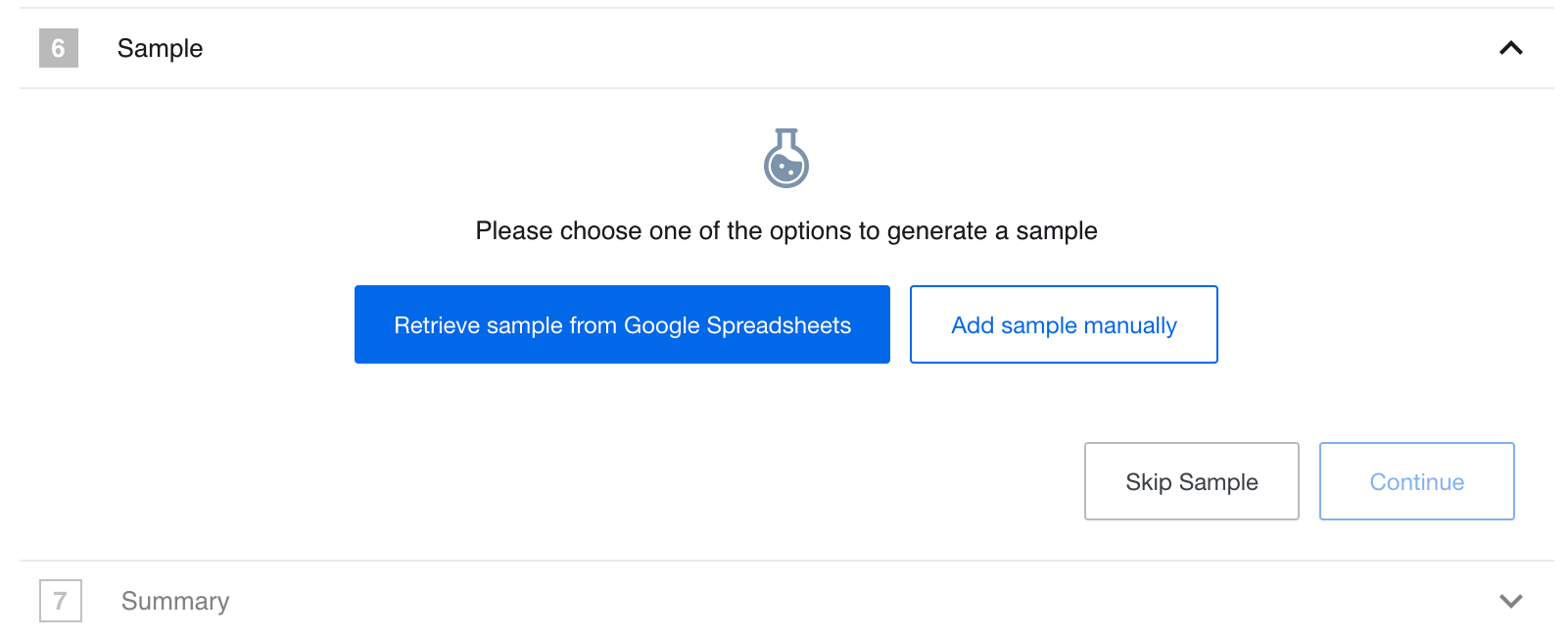
The above images show the new Sample data retrieval view. This release
adds new functionality, allowing users to skip sample generation by clicking on
the Skip Sample button. When this function is used the platform will add an
empty JSON {} instead of the Sample data.
When you retrieve the Sample the platform UI will show it only in JSON format. In we removed the Integrator view of Data Sample.
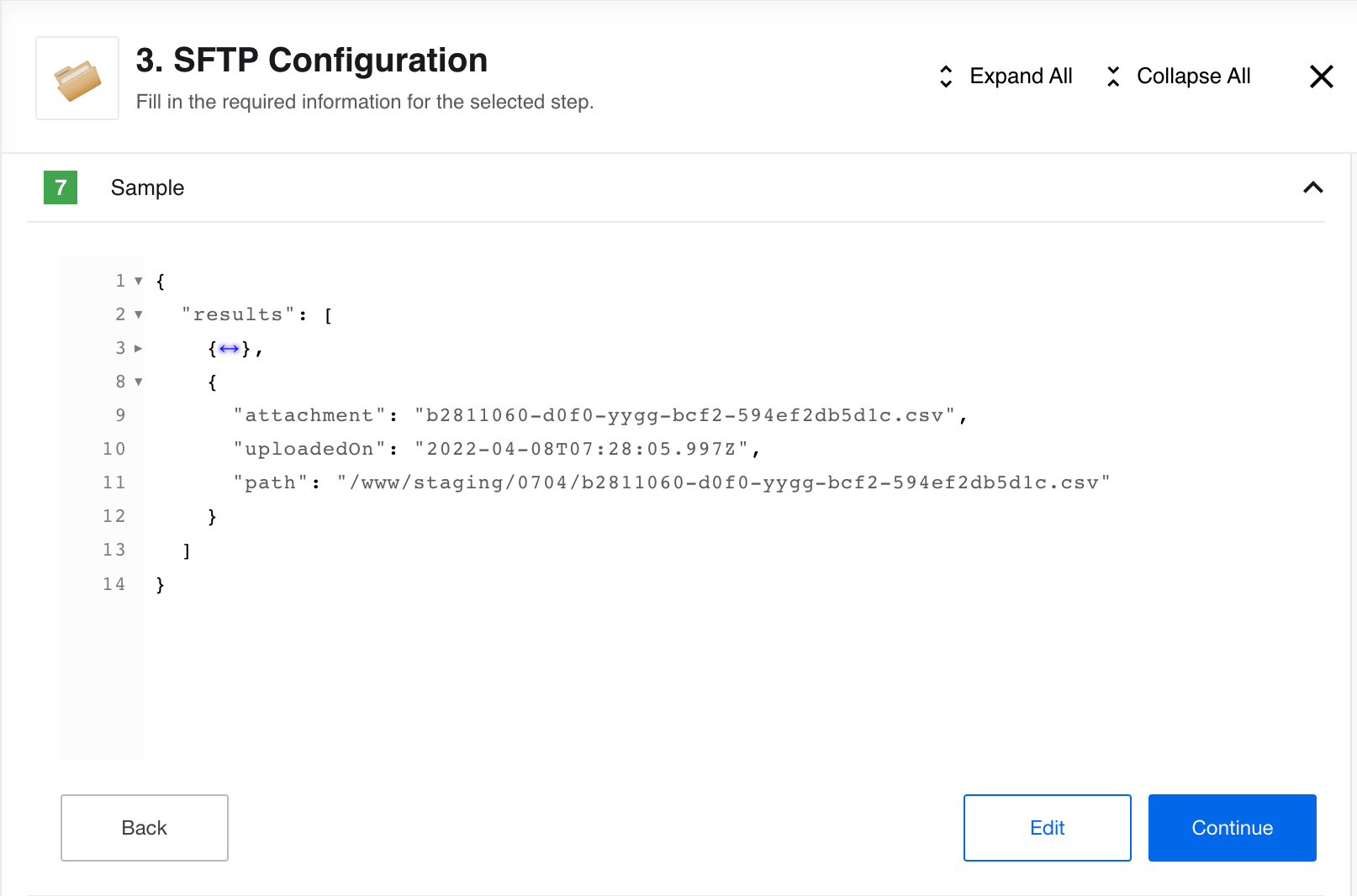
Here you can view the Sample, collapse different sections of the JSON data structure and edit it.
Quota usage page improvements (v22.14)
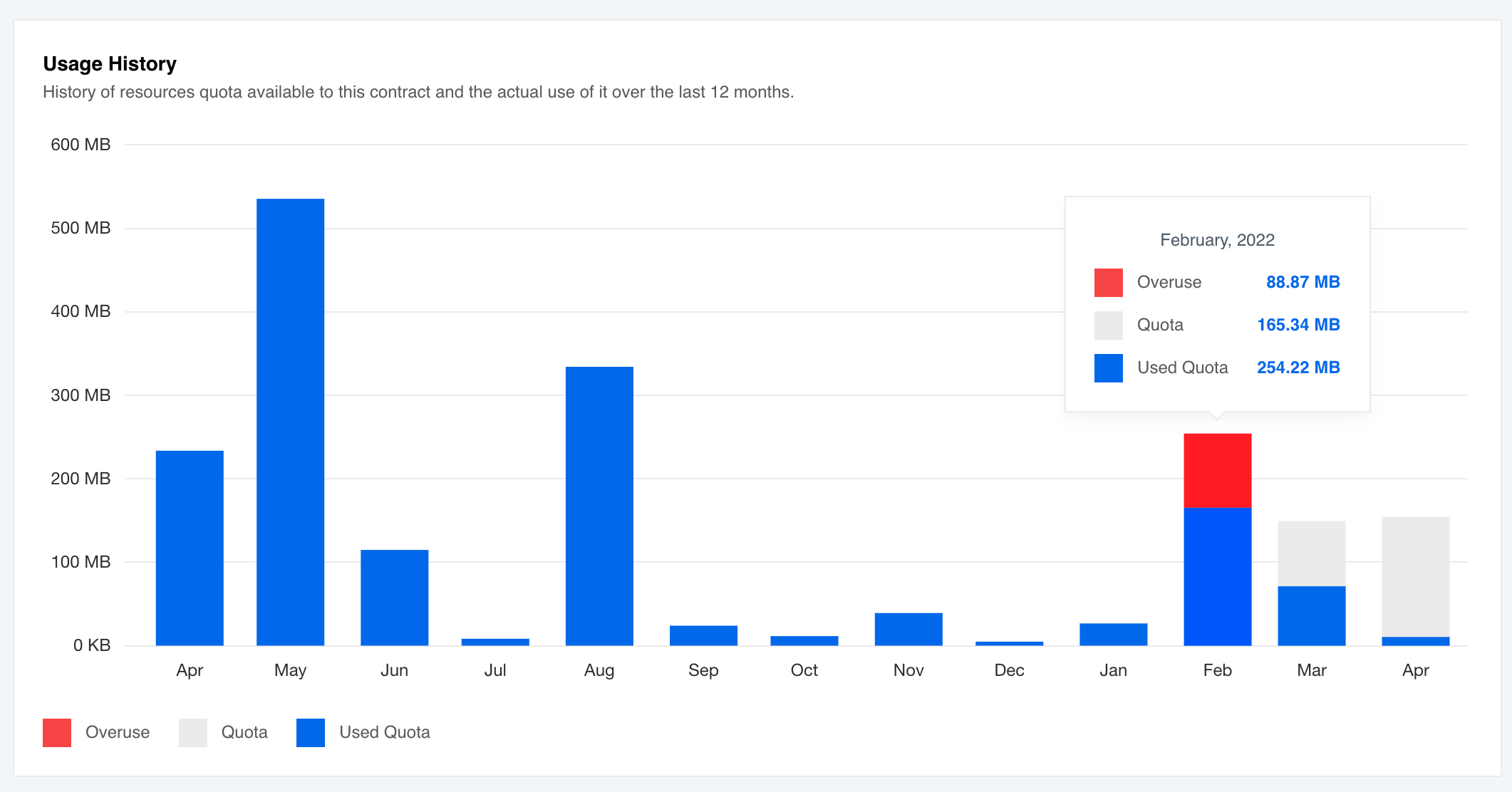
To show the RAM quota overuse we improved the quota Usage History histogram. If you go over the set RAM quota value the overused part will show in red.
SSH Keys and SSH 8.8 (v22.14)
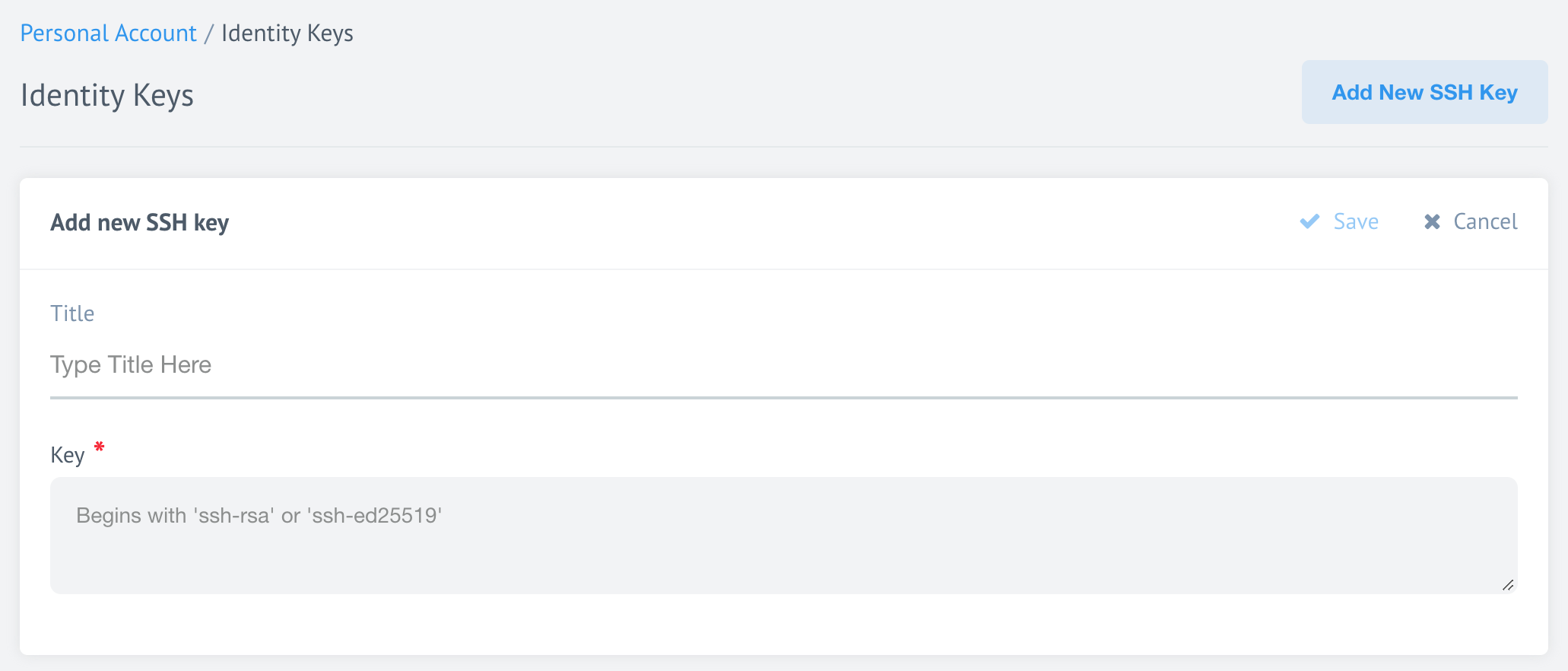
To support the newest SSH versions we deprecated the old ssh-dss signature and
we added ssh-ed25519 instead. Now when you upload your SSH key to our platform
you will see the information about the supported types of signatures.
Please Note the old ssh-rsa keys are still supported. If you want to use
them you have two options:
- Use an OpenSSH
8.8+client and generate your SSH Key using the-oPubkeyAcceptedKeyTypes=+ssh-rsaparameter. It will generate anRSA+SHA-2type SSH key which provides a high level of security and works with the OpenSSH8.8+clients. - Use an OpenSSH
<=8.7client to generate your SSH Key.
Flow deletion times (v22.14)
The platform includes new capability to hard-delete the flows after an expiration time set by the platform management. Every time you try to delete the flow a warning message will show with the following text:
Are you sure you want to delete “FLOW NAME” flow permanently? Deleting this flow is an irreversible process, we cannot undo a deletion if you complete the process by accident. Please note that the credentials linked with the flow will not be deleted.
HELM3 (v22.14)
We constantly improve different aspects of HELM3 deployments in collaboration with our partners. This section lists updates and improvements done in this round.
Changes to cadvisor and fluentd demons (v22.14)
To enable better coexistence of platform microservices within the multi-service
Kubernetes clusters, we modified the logic used to run cadvisor and fluentd services.
The platform will run these services when the node has uniquely defined selectors.
To achieve this we introduced a new HELM3 configuration for the node labels for the Kubernetes pod allocation.
global:
  nodeSelectors:
    platform: "platform"
    longRunningTask: "longrunning"
    ordinaryTask: "ordinary"
For these changes to take affect we deprecate the following HELM3 configurations:
KUBERNETES_ORDINARY_LABEL_VALUEKUBERNETES_LONG_RUNNING_LABEL_VALUE
These variables ware removed from the secrets HELM3 chart and are no longer used
by the admiral service starting from release. Please use
Values.global.nodeSelectors platform HELM3 chart configuration instead.
- The
cadvisorservice will run on the nodes withlongRunningTaskandordinaryTasklabels. - The
fluentdservice will run on the nodes withplatform,longRunningTaskandordinaryTasklabels.
Richer Ingress Management (v22.14)
To extend the Ingress setup capability we made changes in the Handmaiden microservice
to provide 2 new ways to provide annotations to the Ingress records. With this new
capability you can set unique Ingress values per each tenant in your cluster.
Set HELM3 configuration (v22.14)
You can set the Ingress values directly in your HELM3 chart like:
global:
  services:
    handmaiden:
      annotations:
        kubernetes.io/ingress.class: 'nginx'
        testAnnotation: 'testValue'
If you set the above configuration the platform passes it to the new environment
variable INGRESS_OPERATOR_ANNOTATIONS used by the Handmaiden service. This adds
Ingress annotations to all tenants in your multi-tenant cluster.
Setting via API call (v22.14)
You can set unique Ingress annotations for each tenant using the new configuration while creating the tenant via an API call. A typical call body could look like:
{
  "data": {
    "type": "tenant",
    "attributes": {
      "ingress_config" : {
        "annotations": {
          "annotationName": "value"
        }
      }
    }
  }
}
Annotation Priorities (v22.14)
Our platform will serves these annotations based on priority of annotation the configurations (from low to high):
- Default Ingress annotations,
- Annotations provided in the INGRESS_OPERATOR_ANNOTATIONS environment variable,
- Annotations, provided for the tenant using API call,
- Static, hard-coded annotations.
Flow deletion job (v22.14)
Introducing a new cron job called clear-deleted-flows which permanently deletes
flows from the MongoDB with the DELETED status. Every user trying to delete a
flow will see a warning message informing that this is a
permanent and irreversible action.
HELM3 optional variables (v22.14)
We introduce new environment variables which you can use to control the
clear-deleted-flows job:
WIPER_CLEAR_DELETED_FLOWS_AGE_SECONDS- Time in seconds the job must wait before deleting the flow permanently after it is marked asDELETEDin MongoDB. We set the default value to86400seconds (1 day).WIPER_CLEAR_DELETED_FLOWS_LIMIT- Maximum number of flows theclear-deleted-flowsjob will permanently delete each time it runs.
Release process (v22.14)
This release process applies if you already have a cluster running previous versions of the platform code. The release will start an automatic migration.
- Backup the MongoDB data base before the deployment to have an opportunity to reverse the process.
- Set
WIPER_CLEAR_DELETED_FLOWS_LIMITenvironment variable to an applicable number for your case to perform this operation faster of you have large number of flows in your DB.
After the migration the
marathonevents,requestbinsandtaskstartlogsdeprecated collection will be removed.
Iron Bank table creation on all Clickhouse instances (v22.14)
New Environment Variables:
IRON_BANK_CLICKHOUSE_NODES(required) - array of objects with host (required), port, user and password valuesIRON_BANK_CLICKHOUSE_DATABASE(optional) - ClickHouse database name (default iron_bank)
IRON_BANK_CLICKHOUSE_NODES:
   - host: "10.0.0.1"
     port: "8123"
     user: "default"
     password: "123"
   - host: "10.0.0.2"
     port: "8123"
     user: "user"
     password: "1234"
IRON_BANK_CLICKHOUSE_DATABASE: "iron_bank"
New Iron Bank provision logic
- If all nodes in
IRON_BANK_CLICKHOUSE_NODESare not available, an error is thrown and iron bank shuts down - If one of the nodes is not available, a warning is logged and provision to all other available nodes is executed
- The main connection (to which all querying is executed) is set to the first available node from
IRON_BANK_CLICKHOUSE_NODES
Removed Environment Variables:
IRON_BANK_CLICKHOUSE_URI
Fixed bugs (v22.14)
- Addressed issue when the platform token refresher service would return
500status code in case when the/refresh/[id]Oauth server would return an error. Now the service reports4xxindicating the third party problem. - Fixed the bug connected with the Profile Page usage example returning
401in case of API-Key regeneration.
Components (v22.14)
Hubspot Component 1.5.1 (v22.14)
- FIXED the bug in
Get New and Updated Objects Pollingpreventing it from extracting more than 10K records. - UPDATED sailor library to
2.6.27version. - ADDED added the component pusher job to
Circle.ciconfiguration.
Salesforce Component 2.2.2 (v22.14)
- ADDED reconnect logic on errors.
- UPDATED sailor library to
2.6.27version. - ADDED added the component pusher job to
Circle.ciconfiguration.
Vtex component 1.3.0 (v22.14)
- ADDED a new
Lookup Object (at Most One)action
Paypal component 1.1.0 and 1.2.0 (v22.14)
- ADDED a new
Get New and Updated Objects Pollingtrigger, - ADDED a new
Lookup Object (at Most One)action, - ADDED a new
Make a Paymentaction.
SOAP component 1.2.9 (v22.14)
- IMPROVED Metadata generation,
- ADDED a possibility to handle WSDL files where the “message” doesn’t contain an element,
- UPDATED the Java Sailor libraries to
3.3.9version.
SFTP component 1.4.6 (v22.14)
- IMPROVED large files handling. Now downloading file sizes bigger 10MB would not truncate the file.
JDBC component 2.5.2 (v22.14)
- UPDATED the Java Sailor libraries to
3.3.9version.
Petstore component Java 1.0.4 (v22.14)
- UPDATED the Java Sailor libraries to
3.3.9version.
Product update - v22.16
Released: 2022-04-21
Improvements and Updates (v22.16)
Not enough quota to start task (v22.16)
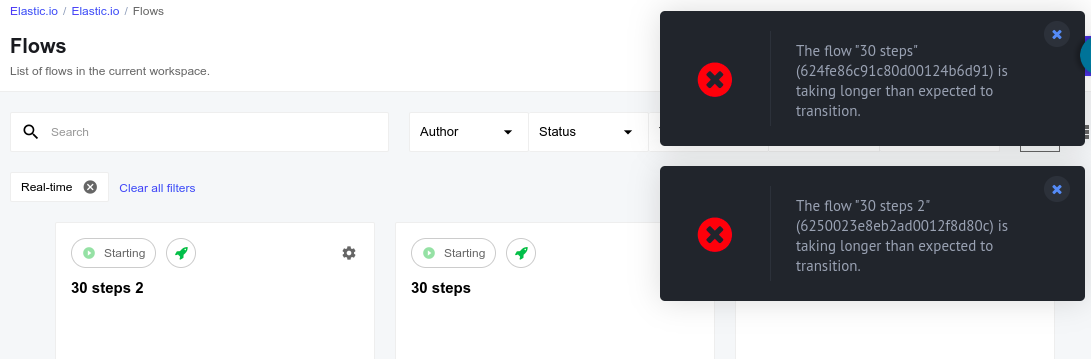
If you are one of our many power users you might have noticed from time to time a pop-up warning with a message Not enough quota to start task. These messages were not related to your RAM quota limit. Instead these messages are triggered by real-time flows with more than 25 steps. Because the platform initiates each step sequentially, these errors are triggered when all flow steps cannot be initiated within the allowed time.
We have resolved this issue by ensuring that all steps (Kubernetes pods) are initiated in parallel, thus significantly shortening the time required to start the flow. We also changed the warning message to The flow FLOW NAME (FLOW ID) is taking longer than expected to transition.
OEM Related (v22.16)
News in this section are for our customers who use OEM version of the elastic.io platform.
Enforce 2FA use (v22.16)
Tenant administration can now enforce the 2FA during the login. We introduce a
tenant configuration flag called forced_totp to switch this feature on.
- To enable
forced_totpyou must enable theenabled_totpas well. - If you remove the
enabled_totpfeature flag, system will removeforced_totpas well.
You can set these parameters either during the tenant creation or you can update the parameters of an existing tenant via an API call. An example of such an API call is shown below.
{
  "data": {
    "type": "tenant",
    "attributes":{
      "feature_flags": {
        "enabled_totp" : true,
        "forced_totp" : true
      }
    }
  }
}
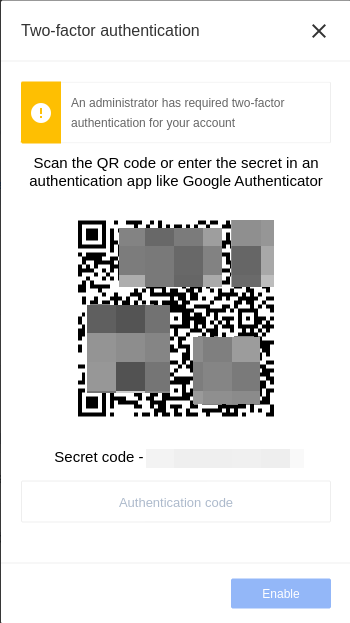
From version, the platform checks status of the forced_totp
parameter during your navigation of every page in the UI. If tenant administration
enforced the 2FA and you have not enabled the 2FA for your account then you will
be redirected to your profile page and presented a pop-up form to enable the 2FA.
Fixed bugs (v22.16)
- Changed the platform behaviour when webhook would give an error when an integration flow would have adding a step after the request-reply component in the WebHook -> Request-reply flows.
Components (v22.16)
Hubspot component 1.5.2 (v22.16)
- FIXED bug connecting with the uploading attachments
Salesforce component 2.2.3 (v22.16)
- UPDATED dependencies and addressed the packaged vulnerabilities
Sftp component 1.4.7 (v22.16)
- FIXED uploading the attachments
Zendesk component 1.0.1 (v22.16)
- UPDATED Sailor version to
2.6.27 - UPDATED dependencies and addressed the packaged vulnerabilities
- ADDED the component pusher job to
Circle.ciconfiguration. - UPDATED
component-commons-libraryversion to2.0.2 - FIXED the attachments processing
Email component 1.0.14 (v22.16)
- UPDATED Sailor version to
2.6.27 - UPDATED dependencies and addressed the packaged vulnerabilities
- ADDED the component pusher job to
Circle.ciconfiguration.
CSV component 3.1.2 (v22.16)
- UPDATED the
component-commons-libraryto read and upload attachments through theMaesterservice - UPDATED Sailor version to
2.6.27 - UPDATED dependencies and addressed the packaged vulnerabilities
Request-reply component 1.2.3 (v22.16)
- UPDATED Sailor version to
2.6.27 - UPDATED dependencies and addressed the packaged vulnerabilities
- ADDED the component pusher job to
Circle.ciconfiguration.
Product update - v22.18.1
Released: 2022-05-05
HELM3 (v22.18.1)
We constantly improve different aspects of HELM3 deployments in collaboration with our partners. This section lists updates and improvements done in this round.
Configure login attempts (v22.18.1)
You can now configure the number of failed login attempts allowed before users are locked out of the system.
We added a new variable MAX_LOGIN_ATTEMPTS to the HELM3 secrets chart. You may set this variable according to your own requirements. The default value is set to five (5). Here is how we calculate this number:
- In case you don’t have 2-factor Authentication (2FA) enabled, this is the number of failed login attempts.
- In case you have 2FA enabled, this is combined number of failed 2FA code and login attempts. This means if your user has 2FA enabled and succeeded with login but failed with 2FA more than the value of
MAX_LOGIN_ATTEMPTSthen your user will be locked out of the system. To unlock such users the tenant administration must first disable 2FA for this user and instruct users to navigate/forgotaddress of the tenant to reset their password. This will reset the counter and user can login again.
OEM Related (v22.18.1)
Information in this section is intended for our customers who use OEM version of the elastic.io platform.
Removing docker registry builds on component deletion (v22.18.1)
The platform builds a component docker image every time you push a new version of your component. When you remove the component or a particular version of it from the platform, an associated docker build will remain until you would remove it at later stage directly from the docker registry.
With this update we improved the situation in the following way:
- When you remove a version of your component, the platform removes the associated docker build.
- When you remove your component entirely, the platform removes all builds of your component.
- We created a special tool (
remove-deleted-repos-from-docker) to help cleanup the remnant builds. Contact us to get a copy of this tool. - As an OEM customer, you must configure your own docker registry to enable delete images option.
- As an OEM customer, please be aware that the deletion from docker registry does not free the memory automatically. To free the memory you would need to run the garbage collector job.
Components (v22.18.1)
CSV Component 3.1.3 (v22.18.1)
- FIXED
Emit Batchbehavior
Woocommerce Component 2.0.1 (v22.18.1)
- ADDED
Raw Requestaction - ADDED
Upsert Objectaction - ADDED
Webhooktrigger - REMOVED
Create ObjectandUpdate Objectactions removed in favor the newUpsert Objectaction. - ADDED metadata information to all actions.
Paypal component 1.3.0 (v22.18.1)
- ADDED
Webhooktrigger - ADDED
Create Objectaction - ADDED
Update Objectaction - IMPROVED the input metadata in
Make a Paymentaction
Vtex component 1.4.0 (v22.18.1)
- ADDED
Place Orderaction
MailChimp component 1.0.3 (v22.18.1)
- ADDED an ability to set
Ansprachefield forAdd new Subscriberaction
Updates to multiple components (v22.18.1)
As a part of our on-going improvements of integration components, we
- UPDATED Sailor version to
2.6.27 - UPDATED dependencies and addressed the packaged vulnerabilities
- ADDED the component pusher job to
Circle.ciconfiguration.
Here is the list of components for release.
- Code component
1.2.8 - JSONata transfer component
1.0.11 - Router component
1.0.0 - Simple-trigger component
1.1.6 - Splitter component
1.4.1 - WebHook component
1.2.11 - Mapper
1.0.0 - Filter component
1.1.3 - REST-API component
1.2.19and2.0.12. Both deprecated and V2 were updated. - Woocommerce Component
2.0.1 - MailChimp component
1.0.3
Product update - v22.20
Released: 2022-05-19
Improvements and Updates (v22.20)
Re-authentication for sensitive actions (v22.20)
While working on the platform interface it is possible that users can accidentally change or delete important or sensitive information.
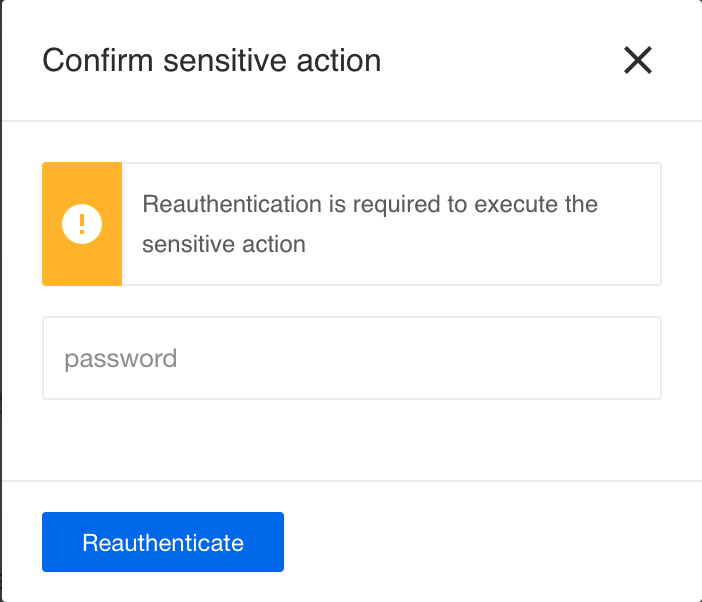
For such cases we introduce re-authentication for sensitive actions. After for the following actions you will be asked to enter your password to authenticate:
- Reading, copying and regenerating your API Keys.
- Modifying your user details.
- Disabling 2-Factor Authentication (2FA).
- Inviting members to contracts.
- Inviting and removing members from workspaces.
Please Note: You will be asked to re-authenticate once every 6 hours.
Email verification during registration (v22.20)
To prevent erroneous and bot registrations we introduce email verification step to our trial registration process. When you register first time with our platform, an email will be sent to your given email address. Click on the link in your received email to finish your registration. There are certain rules and restrictions to this process as well:
- If you register using Single-Sign-on (SSO) Provider (OIDC/SAML) then the platform will not ask to verify your email address since you have verified it with your provider.
- You must wait for 30 minutes before you can use the same email address to register.
- The invitation to confirm your email is valid only for 1 day.
Please Note: If you are invited to the platform directly, no email verification will be required.
HELM3 (v22.20)
We constantly improve different aspects of HELM3 deployments in collaboration with our partners. This section lists updates and improvements included in this release.
Separate MongoDB for Maester (v22.20)
When your integration flow needs to transfer big objects or attachments, one of the platform microservices called Maester temporarily stores them in MongoDB while passing only the object IDs through the integration flow steps.
Starting from , you can use a dedicated database for storing Maester
objects and the run-time attachments. To configure, add MAESTER_MONGO_URI
environment variable to HELM3 secrets charts and set it to target this new database.
Note: You will need to migrate the grids to new MongoDB as well to ensure the Maester object availability after implementation.
Organisations who do not need a separate MongoDB instance to store their Maester
objects should set the MAESTER_MONGO_URI variable to the same value as the
MONGO_URI variable. This will save objects in your main database.
Setting authentication token lifetime (v22.20)
To configure the re-authentication for sensitive actions:
- Add the
SENSITIVE_ACTION_AUTH_LIFETIMEenvironment variable to HELM3 secrets chart and set it to specify how long user authentications are valid. The system expect the value of this parameter in milliseconds. The default is set to 21600000 (6 hours). - Enable the
tenant.featureFlags.sensitiveActionsReauthfeature flag (set it totrue).
OEM Related (v22.20)
Information in this section is intended for our customers who use OEM version of the elastic.io platform.
White-labeled credential management (v22.20)
Developing integrations requires a certain level of access to business systems. In cases where the integrators are not responsible for these systems it is critical that only secure access is allowed and that system admins can control credentials used To solve the dilemma we introduce White-labeled credential management feature.
How does the White-labeled credential management work? (v22.20)
As an integrator you provide a unique URL to the credential holder to enter their access credentials without registering or logging-in to the system. The access holder is presented an interface to enter their credentials, verify them and save.
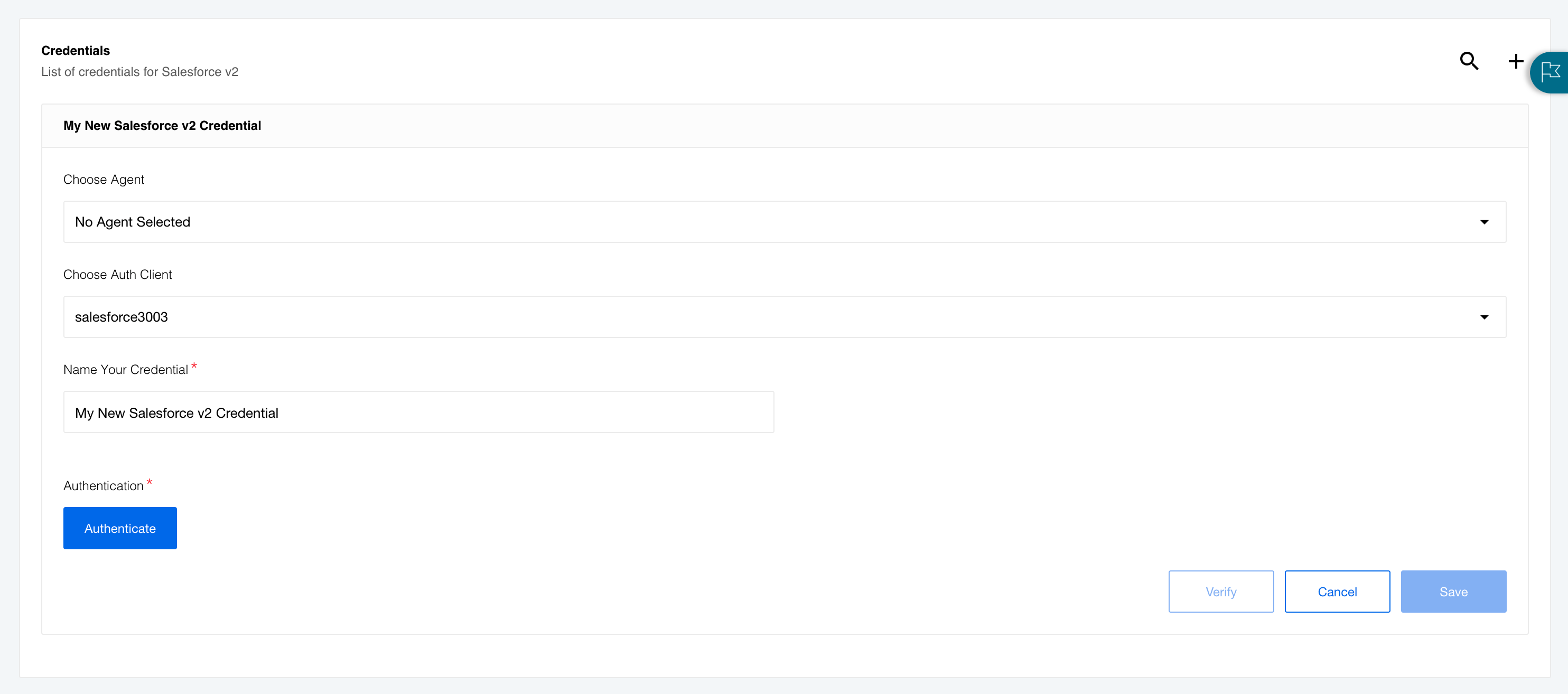
In addition they can modify the existing credentials as well.
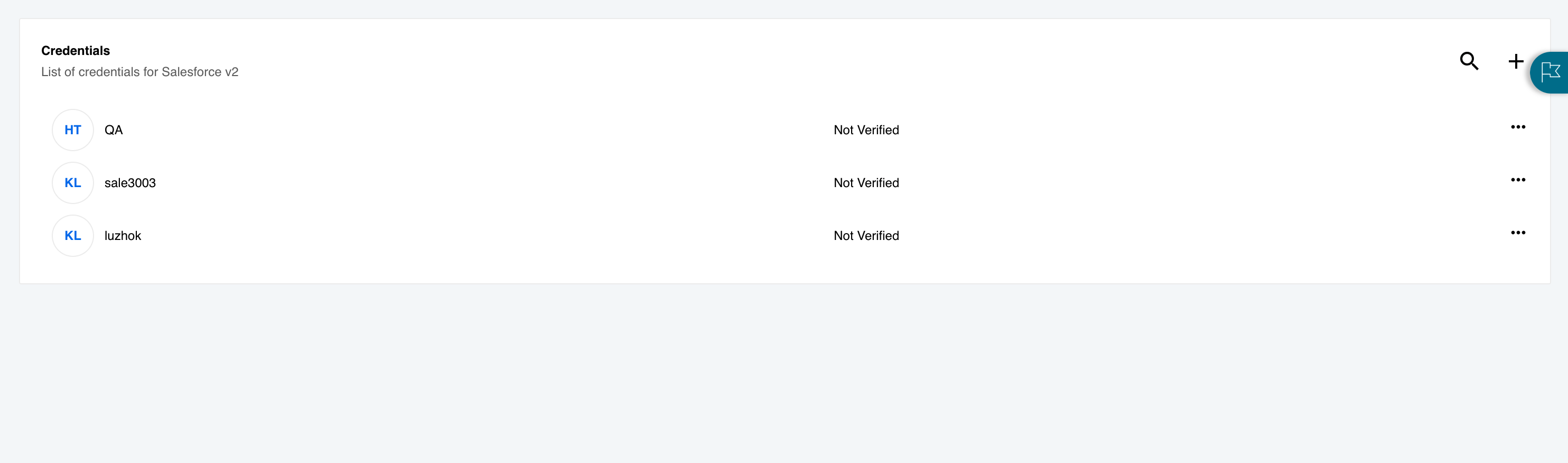
For both cases they are presented with a simple screen to work with only the specified credentials.
How to generate unique URL? (v22.20)
There are certain preconditions before you can enable this feature:
- The end customer is already in the DB. This means you have to create a user for your credential holder, then add him/her to the contract and workspace where the integration is to be developed. All these actions you can do with API calls using administrative access.
- The newly created user must have only access to the credentials entity.
- Your tenant has SSO provider (OIDC/SAML) with
autoCreateUsersset tofalse.
Once the above conditions are met you can take the following steps to generate the URL to request credentials from their owner:
The initial URL has a form /embedded-credentials/repoId where the repoId
would be the ID of component for which you need to set the credential. Then you
would need to add the following query parameters to this URL:
workspaceId(required) - this is the ID of the workspace where integration is set.ssoProviderType(optional) - values can beSAMLProviderorOIDCProvider.ssoProviderId(optional) - this is the ID of your SSO provider.
Let us construct the URL:
TENANT_URL/embedded-credentials/[repoId]?workspaceId=[workspaceId]&ssoProviderType=[ssoProviderType]&ssoProviderId=[ssoProviderId]
If you do not specify ssoProviderType and ssoProviderId then they will be
automatically taken from the tenant.loginRedirectSsoProvider property but only if this is defined.
Setup Email verification (v22.20)
To set the email verification process
in your tenant the following must be done using an API call to update your tenant records using tenantAdmin privileges:
- Enable the registration page - set the
attributes.hide_registerparameter tofalse. - Use
signin_v_2type - add theattributes.signin_v_2attribute containing the URL of the provider logo using theattributes.signin_v_2.logo_urltenant parameter. - Enable
email_verificationfeature flag (NEW) - setattributes.feature_flags.email_verificationtotrue.
Fixed bugs (v22.20)
- Fixed the error
Cannot add property token, object is not extensibleappears in the platform user interface when trying to evaluate JSONata expressions with"$count()".
Components (v22.20)
PayPal Component 1.3.0 (v22.20)
- ADDED
Receive Instant Payment Notificationtrigger - ADDED
Receive Payment Data Transfertrigger - ADDED
Webhooktrigger - ADDED
Create Objectaction - ADDED
Update Objectaction - IMPROVED input metadata in the
Make a Paymentaction
Microsoft One Drive Component 1.0.5 (v22.20)
- UPDATED the
component-commons-libraryto read and upload attachments through theMaester - UPDATED Sailor version to
2.6.27 - UPDATED dependencies and addressed the packaged vulnerabilities
Shopify Admin Component 1.6.0 (v22.20)
- ADDED validation
HMACsignature for theWebhook subscriptiontrigger
Petstore Component Java 1.0.6 (v22.20)
- IMPROVED the security by adding an automated vulnerability check run in CI/CD
JDBC Component 2.5.4 (v22.20)
- IMPROVED the security by adding an automated vulnerability check run in CI/CD
Vtex Component 1.4.1 (v22.20)
- ADDED
Place Orderaction - UPDATED dependencies and addressed the packaged vulnerabilities
- ADDED the component pusher job to
Circle.ciconfiguration.
CSV Component v3 3.1.4 (v22.20)
- FIXED memory leak on
Emit Batchbehavior for theRead CSV attachmentaction
Updates to multiple components (v22.20)
As a part of our on-going improvements of integration components, we
- UPDATED Sailor version to
2.6.27 - UPDATED dependencies and addressed the packaged vulnerabilities
- ADDED the component pusher job to
Circle.ciconfiguration.
Here is the list of components for release.
- Marketo component
2.2.4 - AWS S3 Component
1.4.3 - HJSON Component
1.0.1 - Zoho CRM Component
1.3.2 - Git Protocol Component
1.1.3 - Google Spreadsheets
2.0.2 - Salesforce Component v1
1.3.9 - Salesforce Component v2
2.2.2and2.2.3 - Simple Trigger Component
1.1.6 - Delta Detection Component
2.0.3 - Utility Component
1.4.1 - Magento2 Component
1.6.6 - GraphQL Component
1.1.2 - Pub-Sub Component
1.0.8 - MongoDB Component
1.5.9 - CSV Component Old
2.2.1 - Dictionary Component
1.1.6a.k.a Lookup Table Component - ZIP Component
1.1.5 - XML Component
1.3.5 - Meracdo Pago Component
1.0.1
Product update - v22.22
Released: 2022-06-02
Announcements (v22.22)
ISO 27001 certification (v22.22)
We are ISO 27001 certified! Check our dedicated page for more details and to download the copy of our certificate.
Temporary Duplication of Execution Numbers (v22.22)
As part of ongoing improvements we have refined our system architecture around executions to decrease latency when loading the executions page. As part of these changes there is a temporary duplication of the number of executions recorded in your executions page. No data is lost, there is no influence on quota consumption, and these duplications will disappear as we end the transition phase in approximately 30 days. If you have any questions please contact our support directly.
Attachment/object processing and storing (v22.22)
We are changing policies for our retention services. As platform traffic grows the resource burden of retaining files becomes significant.
- The attachment and object (a.k.a.
lightweight objects) retention period is reduced to 3 days (72 hours) - The maximum attachment/object size is capped at 100 MB.
Features (v22.22)
Flow designer header (v22.22)
To provide more vertical space during the flow design process we changed the flow designer header behaviour. Now when the left-hand-side menu is closed the action buttons and statuses merge into the same line with flow title and description.

When your flow title or description is larger than the available space the visible text is cropped. By hovering over these fields you can reveal the full text.

Improvements and Updates (v22.22)
Copy code blocks from published flows (v22.22)
Reusing mappings or code snippets from published flows can accelerate flow development. You can now select and copy such text from your published flows without first making a draft of the flow. This feature includes:
- Any mapping (including JSONata transform views)
- The selected data sample
- Any code from the code component
- Data from retrieved sample
Example shows copied code from the Node.js code component configuration view:

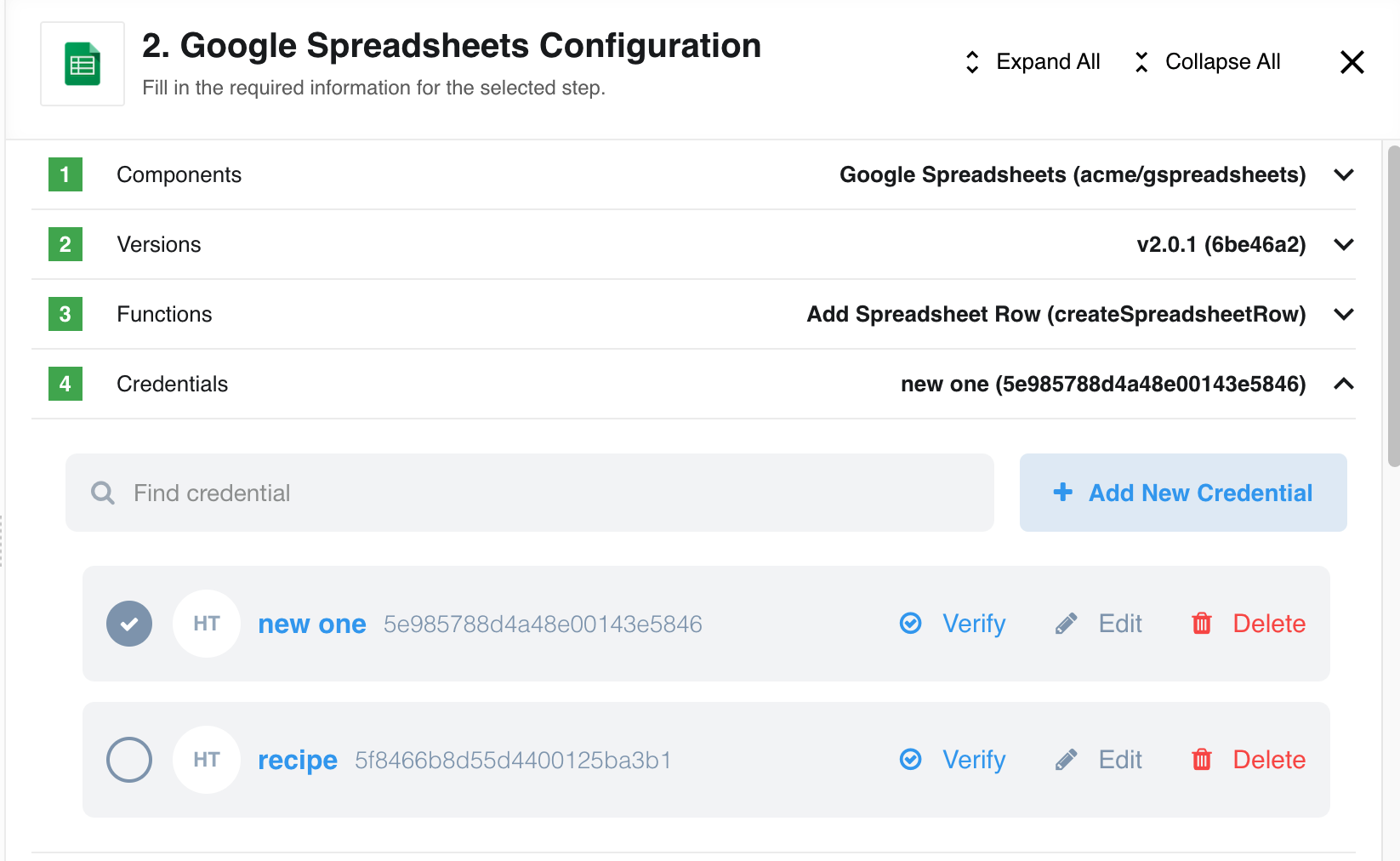
Credential ID permanently shown (v22.22)
Now you can see the IDs of any credentials while browsing through the list of credentials in the Integrate > Credentials > Component Name view:

Or while configuring a step in your integration flow:
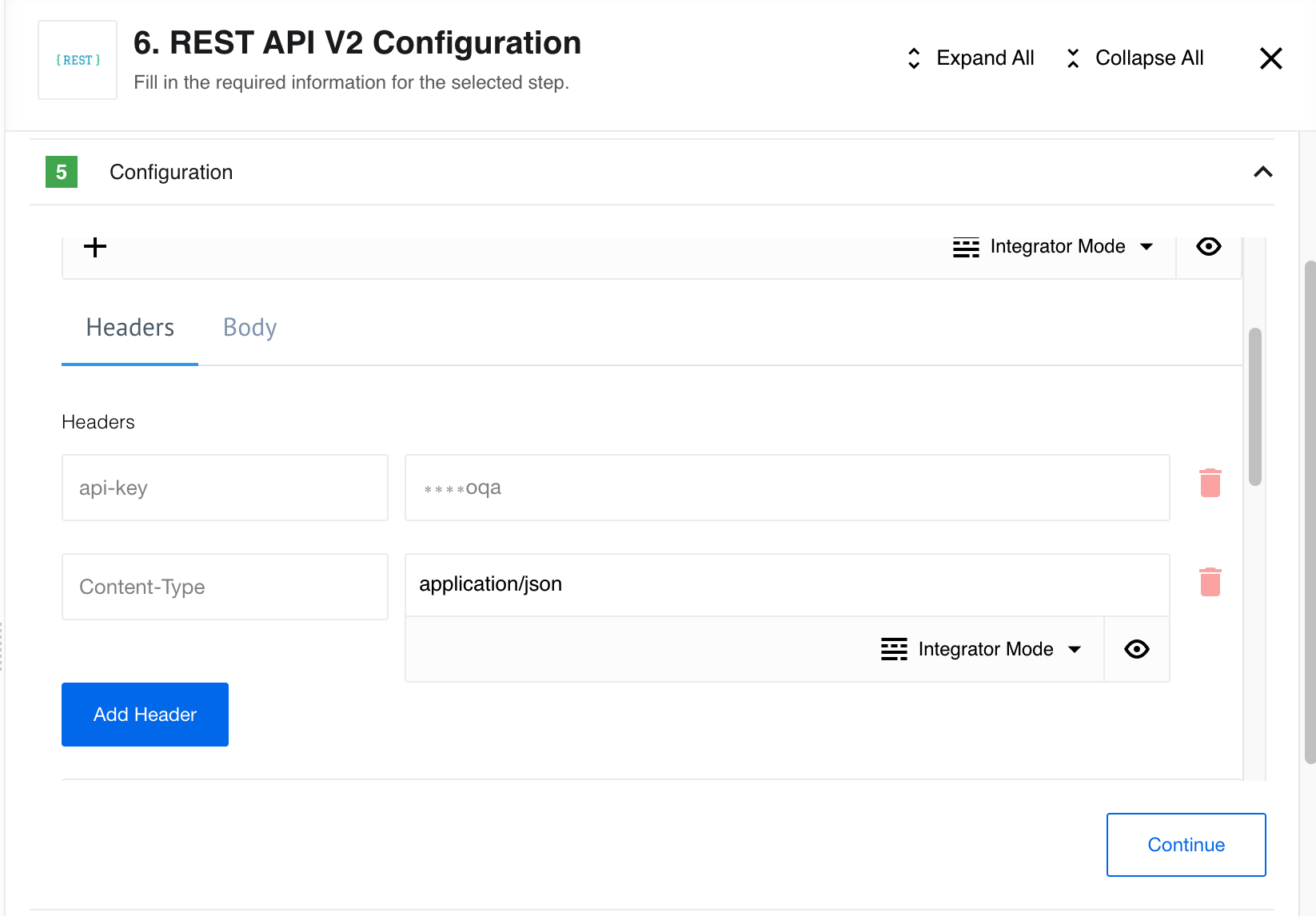
REST-API component header configuration (v22.22)
We now obfuscate authentication header values for the REST-API-V2 component. You
will notice this in the Configuration view when basic or api-key authentication is used.
Re-authentication for sensitive actions (continuation) (v22.22)
This is part 2 of our initiative to prevent accidental or malicious changes to sensitive data and follows on from release 22.20.
This time we extend the list of actions for which you will be asked to enter your password to authenticate:
- Change user roles in Contracts and Workspaces.
- Add or remove SSH Keys.
- Remove member from Contract.
Again, please note: You will be asked to re-authenticate once every 6 hours.
HELM3 (v22.22)
We constantly improve different aspects of HELM3 deployments in collaboration with our partners. This section lists updates and improvements included in this release.
Enforcing Maester object size (v22.22)
We introduce a new variable (MAESTER_MAX_SIZE_PER_OBJECT in bytes) you can use to control
the maximum object size accepted by the Maester service. The default maximum value
is set 1GB. The recommended range is from 100MB to 1GB.
OEM Related (v22.22)
Information in this section is intended for our customers who use OEM version of the elastic.io platform.
Email domain blacklist (v22.22)
If your tenant has an an open registration page then you can block registration
from any domain by adding it into the domain blacklist. For this to work in your
tenant, make an API call
to update your tenant records using tenantAdmin privileges:
- Enable the registration page - set the
attributes.hide_registerparameter tofalse. - Add records to the blacklist - create the
attributes.email_domains_blacklistrecord to contain comma separated domain names in an array object like["example.com", "foo.bar"].
Email verification with regular signup page (v22.22)
During the 20.20 platform release we introduced email verification process which worked only when the signin_v_2 were used.
Now you can use the email verification process even if you are using a regular
signup page in your tenant. To enable this feature in your tenant the following
steps must be done using an API call
to update your tenant records using tenantAdmin privileges:
- Enable the registration page - set the
attributes.hide_registerparameter tofalse. - Enable
email_verificationfeature flag - setattributes.feature_flags.email_verificationtotrue.
Fixed bugs (v22.22)
- Fixed the user interface bug connected with slow loading of the executions page for workspaces containing executions belonging to a deleted user’s flows. Now you will see
[Deleted User]instead. - Fixed the bug when
"Cannot perform 'get' on a proxy that has been revoked"error was shown after evaluation of the JSONata mapping expression. - Fixed the Dashboard bug connected with the overlapping axis lines and values.
- Fixed the bug when Flow Page would not load in case the aggregated flow versions document would exceed 16MB limit in MongoDB.
Components (v22.22)
REST API V2 component (v22.22)
- IMPROVED the use of platform secrets
HJson component 1.0.2 (v22.22)
- FIXED the attachments URL
Delta-detection Component 2.1.0 (v22.22)
- ADDED
Write Entire Bucket Contentsaction - ADDED
Read Entire Bucket Contentsaction
utility component 1.4.2 (v22.22)
- ADDED
Network Diagnosticsaction
Ipaas Core component 1.4.0 (v22.22)
- UPDATED
Lookup Flow Hydrates Component Version Info- making this view dynamic - UPDATED
Upsert Flow Handles Matching on Semantic Versions- making this view dynamic - UPDATED
Lookup Flow Hydrates Pub-Sub Topic Info- making this view dynamic
Zoho CRM component 1.3.4 (v22.22)
- FIXED the attachment processing
- FIXED set the node engine to
16.x(addresses error with Verify Credentials) - ADDED environment variable
MAX_FILE_SIZEto control attachment size limit - UPDATED component dependencies
Magento2 component 1.6.7 (v22.22)
- ADDED support for Magento2 versions
2.4.4 - FIXED the integration tests
Ukraine-alert component 1.0.0 (v22.22)
- NEW component to receive raid alerts notifications in Ukraine
- ADDED new
Get Ukraine Alerts Pollingtrigger - ADDED new
Webhooktrigger
Google spreadsheet component 2.0.3 (v22.22)
- IMPROVED configuration of the timing of calls is now available in the Credentials step
- ADDED configuration of retry attempts to the Credentials step
- ADDED retry logic that helps prevent
Quota exceedederrors
Docuware component 1.1.1 (v22.22)
- FIXED bug with data shown in “Search dialog to use” field
- FIXED attachments Url
JDBC component 2.5.5 (v22.22)
- UPDATED connection parameter
connectionTimeZonenow defaults toSERVERfor MySQL connections
Paypal component 1.3.1 (v22.22)
- ADDED duplicate check of incoming message for Receive IPN message trigger
SFTP component 1.4.8 (v22.22)
- FIXED memory leak for
Download Files/File by nameactions andRead Filestrigger - UPDATED component dependencies
Salesforce component 2.2.4 (v22.22)
- ADDED timeout mechanism which allows to retry never-ending requests
Product update - v22.24
Released: 2022-06-21
Improvements and Updates (v22.24)
Change of Footer position (v22.24)
To extend vertical space of the flow designer screen we moved the Footer to the bottom of side-menu. You can now see the platform version, Privacy Policy and ToS links by opening the menu.

Re-authentication for sensitive actions (final part) (v22.24)
This is the 3rd and final part of our initiative to prevent accidental or malicious changes to sensitive data and follows on from releases 22.20 and 22.22.
In this final part we extend re-authentication for sensitive actions to support cases when a user logs in using OIDC/SAML. The user will be redirected to OIDC/SAML provider for authentication.
Again, please note: You will be asked to re-authenticate once every 6 hours.
This feature will work on all modern web browsers versions from:
- Chrome
66+ - Firefox
63+
Component development and custom Dockerfile (v22.24)
To improve component deployment and build process we modernised the appbuilder
and apprunner docker images to address potential vulnerabilities in the Node.js
packages. All platform services, as well as the Node.js based integration components
are built with these images.
The modernisation brought some important changes which might affect you when you deploy the new version of your component code.
- You can use a custom
Dockerfileto define the build process in theNode.jscomponents. It must be in the root directory of your component code. - If you have previously used a custom
Dockerfileyou might have noticed that it was not used in the build process. Now the build process will check for the existence of it and use it. Which means if you have not updated yourDockerfilerecently, chances are your component build might fail or the newly built component might not function as expected. Check yourDockerfilebefore deploying or remove it from the component code if custom build parameters are not necessary. - We now support
Node.jsversion 18. - IMPORTANT: custom
Dockerfileis not yet supported for Java components.
Fixed bugs (v22.24)
- Fixed the bug in the object and attachment handling service. Now the service will retry streams on failure and will handle errors properly.
- Fixed the user interface bug when the required field symbol (
*) would not show after the metadata reload in case the mandatory fields were controlled by a checkbox.
Components (v22.24)
Salesforce Component v2 2.2.4 and 2.3.0 (v22.24)
- ADDED new
Type Of Search-External IDstoUpsert Objectaction - ADDED caching for metadata in the
Upsert Objectaction (metadata needs to find fields that contain attachment) - ADDED timeout for
Upsert Objectaction
REST API Component v2 2.0.13 (v22.24)
- IMPROVED secrets only load once per container lifetime (per token expiration time in case of OAUTH2)
Vtex Component 1.4.2 (v22.24)
- ADDED
Last interactionoption toTime stamp field to poll oninGet New And Updated Objects Pollingtrigger - IMPROVED
Get New And Updated Objects Pollingtrigger to use scroll instead of search to collect all records
HJSON Component 1.0.2 (v22.24)
- FIXED url in attachment
Delta Detection Component 2.1.0 (v22.24)
- ADDED
Read Entire Bucket Contentsaction - ADDED
Write Entire Bucket Contentsaction
Utility Component 1.5.0 (v22.24)
- ADDED
Network Diagnosticsaction
IPass Core Component 1.4.0 (v22.24)
- IMPROVED flow with
pubSubTopicNameat actionsLookup Object By Unique CriteriaandLookup Objects (plural) - ADDED logic to handle matching Pub-Sub topics at actions
Upsert Object By Unique Criteria - IMPROVED flow with
componentSemanticVersionat actionsLookup Object By Unique CriteriaandLookup Objects (plural) - ADDED logic to handle matching on Semantic Versions at actions
Upsert Object By Unique Criteria
Ukraine Alerts Component 1.0.0 and 1.0.1 (v22.24)
- ADDED retries to every API call
- ADDED
Get Ukraine Alerts PollingTrigger - ADDED
WebhookTrigger
Zoho CRM Component 1.3.3 and 1.3.4 (v22.24)
- ADDED
versionfield to the component.json file - FIXED attachment processing
- IMPROVED set node engine to 16.x (fix error with “Verify Credentials”)
- ADDED ENV
MAX_FILE_SIZEto control attachment size limit - IMPROVED upgrade
component-commons-libraryto v2.1.0
Magento2 Component 1.6.7 (v22.24)
- ADDED support for Magento2 versions 2.4.4
- FIXED integration tests
Shopify Component 1.6.1 and 1.6.2 (v22.24)
- ADDED information about required permissions for the credential verification
- IMPROVED more info in logs if got errors
ID Linking Component 1.1.0 (v22.24)
- ADDED
Write Entire Bucket ContentsAction - ADDED
Read Entire Bucket ContentsAction - FIXED label names for
Upsert Objectinput metadata
SFTP Component 1.4.9 (v22.24)
- ADDED file filter to the
Poll Filestrigger
Xero Component 1.0.0 (v22.24)
- ADDED
Make Raw Requestaction
Email Component 1.2.0 (v22.24)
- ADDED support for attachments from metadata. The metadata now is shown in the body.
- FIXED how the component handles incoming Arrays. Now it stringifies the JSON bodies by default preserving the strings, numbers, and booleans.
- NEW main library for sending emails (old one is now deprecated).
- IMPROVED the code by migration to
TypeScript.
Product update - v22.26
Released: 2022-06-30
Improvements and Updates (v22.26)
Node.js Sailor version 2.6.28 (v22.26)
A new version of the Node.JS Sailor library 2.6.28 is released. For Users who
develop their own components using our SDKs this update provides improved handling
of any errors generated by the Maester service during upload of lightweight messages.
Edit Snapshot button always present (v22.26)
With this release it is now possible to to set and edit snapshots
while the flow is in Draft status - flows no longer need to have the status
Published or have been executed.

OEM Related (v22.26)
Information in this section is intended for our customers who use OEM version of the elastic.io platform.
Email domain blacklist (continuation) (v22.26)
This is further improvement of email domain blacklist feature from 22.22
release. Now you can use a wildcard character (*) with a domain name to exclude
all variants, for example gmail.*, yahoo.*, etc.
Fixed bugs (v22.26)
- Fixed the issue which enabled data sample editing in read-only mode of the flow designer. To edit data samples you must press edit first to make changes.